IAM Roles & Audit For MLops
🎯 Mục tiêu Task 2
Thiết lập phân quyền truy cập (IAM) cho toàn bộ dịch vụ AWS trong pipeline và bật CloudTrail để giám sát, ghi lại mọi hoạt động trên tài khoản AWS.
→ Đảm bảo bảo mật, kiểm soát truy cập, và minh chứng hoạt động nhóm.
📥 Input
-
AWS Account với quyền admin
-
Convention đặt tên dự án:
mlops-retail-prediction-dev -
Vùng mục tiêu:
ap-southeast-1 -
CloudTrail đa vùng được bật
-
Input từ Task 1: Task 1 (Introduction) — project conventions, naming, and high-level objectives
✅ Output
- Các dịch vụ AWS có quyền Least Privilege phù hợp vai trò
- Toàn bộ thao tác đều được CloudTrail ghi lại
- Đáp ứng tiêu chí rubric: bảo mật, phân quyền, quản lý dự án trên cloud
💰 Chi phí ước tính ≈ 0.05 USD/tháng (CloudTrail + lưu trữ S3 cho logs)
📌 Các bước chính
- CloudTrail Setup - Thiết lập audit logging đa vùng
- S3 CloudTrail Bucket - Lưu trữ log tập trung
- EKS Cluster Service Role - Role cho control plane
- EKS Node Group Role - Role cho worker node
- SageMaker Execution Role - Role cho training & deploy
- IRSA Foundation - Chuẩn bị quyền ở mức Pod
✅ Deliverables
- CloudTrail multi-region trail với logging vào S3
- EKS Cluster Service Role (Console)
- EKS Node Group Role với quyền ECR/S3/CloudWatch
- SageMaker Execution Role với quyền S3 cần thiết
- Nền tảng an toàn cho thiết lập IRSA
📊 Acceptance Criteria
- CloudTrail ghi lại tất cả API calls và hoạt động người dùng
- EKS cluster có thể tạo với các service role phù hợp
- SageMaker training jobs có quyền đọc/ghi S3
- Node groups có thể pull image từ ECR
- Tất cả IAM role tuân thủ principle of least privilege
- Audit trail sẵn sàng cho compliance và monitoring
1. CloudTrail Setup - Nền tảng Audit
1.1. Tạo S3 Bucket cho CloudTrail
Đi tới S3 Console: AWS Console → S3 → “Create bucket”
Cấu hình Bucket:
Bucket name: mlops-cloudtrail-logs-us-east-1-842676018087
Region: us-east-1 (phải cùng region với CloudTrail trail)
Block all public access: ✅ Enabled
Versioning: ✅ Enabled
Default encryption: ✅ AWS KMS
KMS key: alias/mlops-retail-prediction-dev-cloudtrail-key
Cấu hình Lifecycle Policy:
Bước 1. S3 Console → chọn bucket mlops-cloudtrail-logs-ap-southeast-1 → Management → Create lifecycle rule.
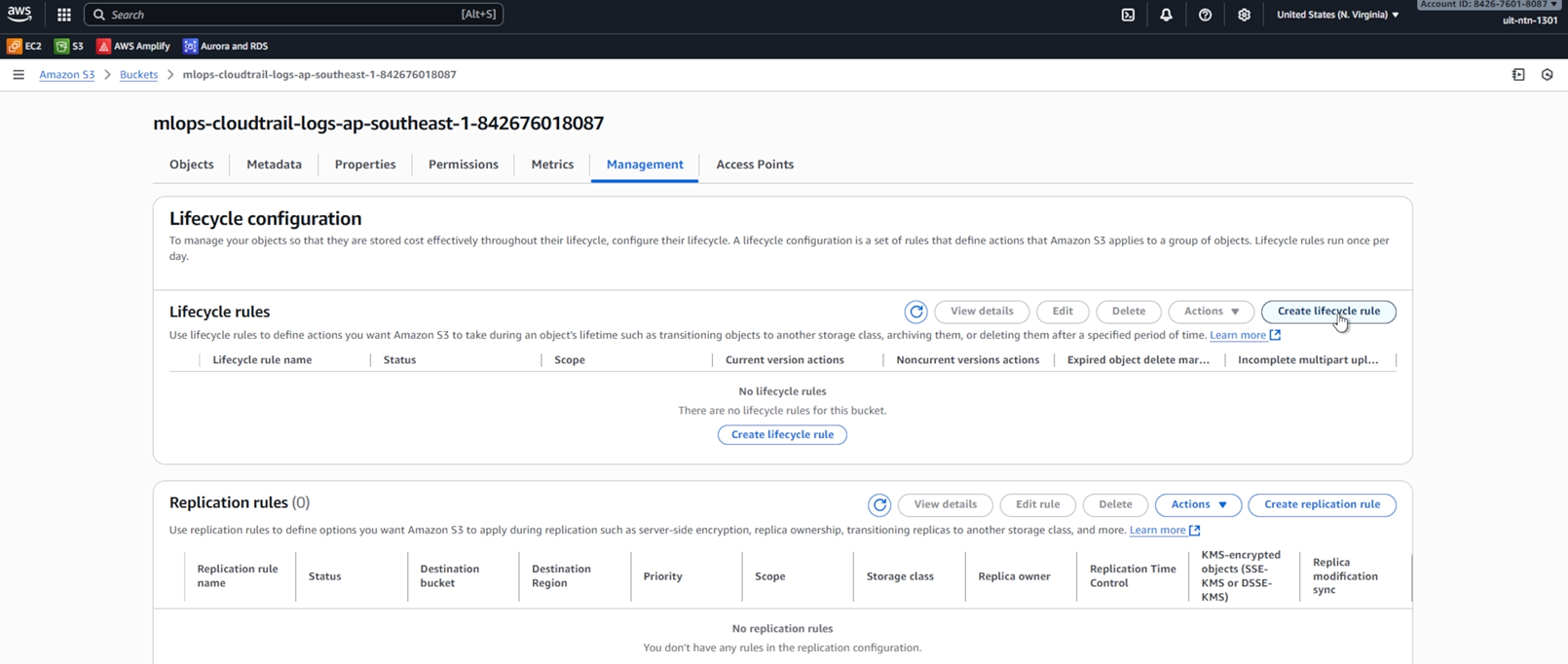
Bước 2. Đặt tên (ví dụ CloudTrailLogLifecycle), Apply to all objects hoặc dùng Prefix mlops-logs/.
Chi tiết các trường cấu hình:
-
Object tags:
- ❌ Không cần thêm tags vì chúng ta đã dùng prefix để lọc
-
Object size:
- ❌ Không cần specify minimum object size
- ❌ Không cần specify maximum object size
- CloudTrail logs thường có kích thước nhỏ và đồng đều
-
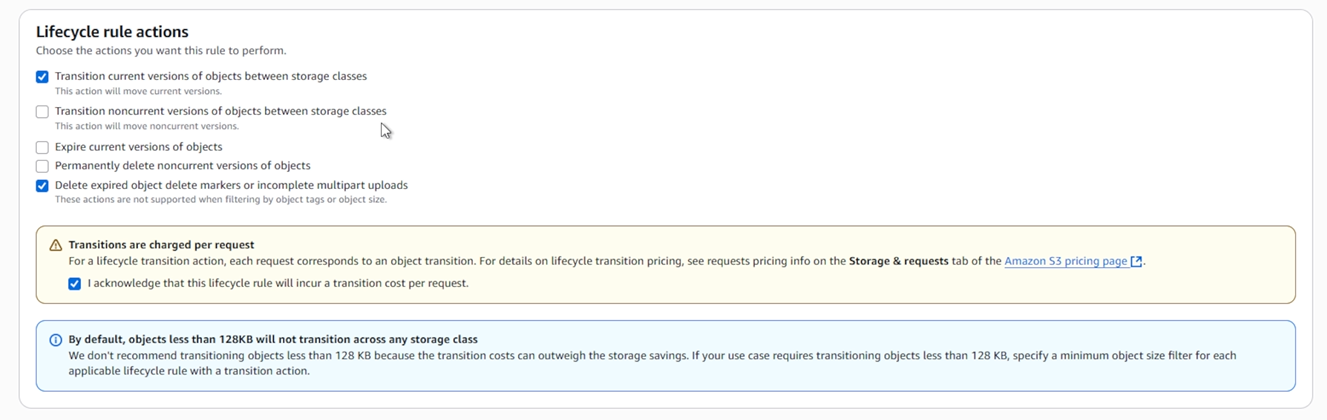
Lifecycle rule actions:
- ✅ Transition current versions of objects between storage classes
- Chọn để tự động chuyển logs sang storage class rẻ hơn
- ❌ Transition noncurrent versions of objects between storage classes
- Không cần vì CloudTrail logs không có nhiều versions
- ❌ Expire current versions of objects
- Không expire vì cần giữ logs cho audit
- ❌ Permanently delete noncurrent versions of objects
- Không xóa vì cần giữ lịch sử logs
- ✅ Delete expired object delete markers or incomplete multipart uploads
- Chọn để dọn dẹp các markers và uploads lỗi
- ✅ Transition current versions of objects between storage classes
Bước 3. Chọn actions (Current versions):
- After 30 days → STANDARD_IA
- After 90 days → GLACIER / GLACIER_IR (tùy chọn)
- After 365 days → DEEP_ARCHIVE

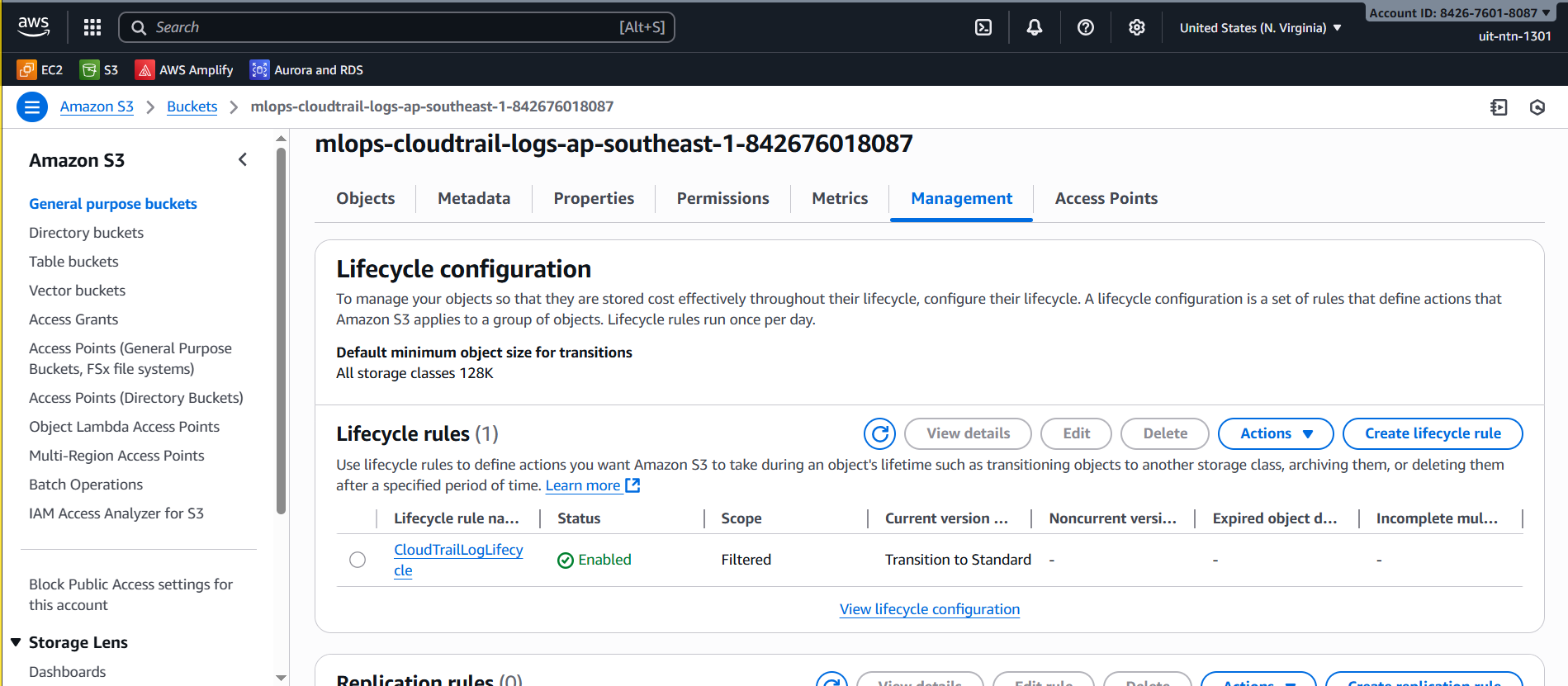
Bước 4. Kiểm tra rule đã Active trong tab Management.
1.2 Cấu hình Trail
⚠️ Lưu ý về Region:
- CloudTrail là multi-region service nhưng trail phải được tạo ở một region cụ thể (home region)
- S3 bucket và KMS key phải được tạo ở cùng region với CloudTrail trail
- Trong trường hợp này, chúng ta sẽ tạo tất cả resource ở region
us-east-1
1.3. Khuyến nghị: Đồng bộ region giữa S3 và SageMaker Project
Ngắn gọn: Nếu dữ liệu chính của pipeline (prefix gold/ và artifacts/) nằm trong us-east-1, hãy tạo SageMaker Domain / Project ở us-east-1 để tránh lỗi cross-region (S3 301), phức tạp với KMS keys, và các endpoint khác.
Nếu tổ chức yêu cầu SageMaker phải ở ap-southeast-1, bạn cần sao chép hoặc replicate dữ liệu sang bucket ở ap-southeast-1 trước khi tạo Project. Ví dụ lệnh sync (PowerShell / CloudShell):
aws s3 mb s3://mlops-retail-prediction-dev-842676018087-apse1 --region ap-southeast-1
aws s3 sync s3://mlops-retail-prediction-dev-842676018087/gold/ s3://mlops-retail-prediction-dev-842676018087-apse1/gold/ --acl bucket-owner-full-control
aws s3 sync s3://mlops-retail-prediction-dev-842676018087/artifacts/ s3://mlops-retail-prediction-dev-842676018087-apse1/artifacts/ --acl bucket-owner-full-control
Kèm theo:
- Tạo KMS key ở region đích nếu dùng SSE-KMS.
- Cập nhật IAM policies để cho phép SageMaker role truy cập bucket mới.
Gợi ý: Cho lab và debug nhanh, phương án ít rủi ro là tạo Project/Domain ở nơi bucket hiện có (ở lab này là us-east-1).
1.2.1 Tạo KMS Key cho CloudTrail
- Tạo KMS Key (ở region
us-east-1):
- AWS Console → KMS → us-east-1 → Customer managed keys → Create key
-
Cấu hình Key:
Key type: ✅ Symmetric (mã hóa và giải mã dữ liệu) Key usage: ✅ Encrypt and decrypt -
Thêm labels:
Alias: alias/mlops-retail-prediction-dev-cloudtrail-key Description (optional): KMS key for CloudTrail logs encryption Tags (optional): - Key: Project - Value: MLOps-Retail-Prediction -
Cấu hình quyền quản trị:
Key administrators: Chọn IAM users/roles được phép quản lý key Key deletion: Có cho phép xóa key hay không -
Cấu hình quyền sử dụng:
Key users: - Thêm service principal: cloudtrail.amazonaws.com -
Chỉnh sửa key policy:
{
  "Version": "2012-10-17",
  "Id": "Key policy created by CloudTrail",
  "Statement": [
    {
      "Sid": "Enable IAM User Permissions",
      "Effect": "Allow",
      "Principal": {
        "AWS": [
          "arn:aws:iam::842676018087:root"
        ]
      },
      "Action": "kms:*",
      "Resource": "*"
    },
    {
      "Sid": "Allow CloudTrail to encrypt logs",
      "Effect": "Allow",
      "Principal": {
        "Service": "cloudtrail.amazonaws.com"
      },
      "Action": "kms:GenerateDataKey*",
      "Resource": "*",
      "Condition": {
        "StringLike": {
          "kms:EncryptionContext:aws:cloudtrail:arn": [
            "arn:aws:cloudtrail:*:842676018087:trail/*"
          ]
        },
        "StringEquals": {
          "aws:SourceArn": "arn:aws:cloudtrail:us-east-1:842676018087:trail/mlops-retail-prediction-audit-trail"
        }
      }
    },
    {
      "Sid": "Allow CloudTrail to describe key",
      "Effect": "Allow",
      "Principal": {
        "Service": "cloudtrail.amazonaws.com"
      },
      "Action": "kms:DescribeKey",
      "Resource": "*"
    }
  ]
}
Các điểm quan trọng trong KMS policy: Enable IAM User Permissions: Cho phép root account quản lý key Allow CloudTrail to encrypt logs:
- Cho phép generateDataKey với điều kiện EncryptionContext và SourceArn
- EncryptionContext giới hạn cho CloudTrail trails trong account
- SourceArn chỉ định chính xác trail được phép sử dụng Allow CloudTrail to describe key: Cho phép CloudTrail xem thông tin key
- Key Policy mặc định cho CloudTrail:
{
  "Version": "2012-10-17",
  "Id": "Key policy created by CloudTrail",
  "Statement": [
    {
      "Sid": "Enable IAM User Permissions",
      "Effect": "Allow",
      "Principal": {
        "AWS": "arn:aws:iam::842676018087:root"
      },
      "Action": "kms:*",
      "Resource": "*"
    },
    {
      "Sid": "Allow CloudTrail to encrypt logs",
      "Effect": "Allow",
      "Principal": {
        "Service": "cloudtrail.amazonaws.com"
      },
      "Action": "kms:GenerateDataKey*",
      "Resource": "*",
      "Condition": {
        "StringEquals": {
          "aws:SourceArn": "arn:aws:cloudtrail:us-east-1:842676018087:trail/mlops-retail-prediction-audit-trail"
        },
        "StringLike": {
          "kms:EncryptionContext:aws:cloudtrail:arn": "arn:aws:cloudtrail:*:842676018087:trail/*"
        }
      }
    },
    {
      "Sid": "Allow CloudTrail to describe key",
      "Effect": "Allow",
      "Principal": {
        "Service": "cloudtrail.amazonaws.com"
      },
      "Action": "kms:DescribeKey",
      "Resource": "*"
    },
    {
      "Sid": "Allow principals in the account to decrypt log files",
      "Effect": "Allow",
      "Principal": {
        "AWS": "*"
      },
      "Action": [
        "kms:Decrypt",
        "kms:ReEncryptFrom"
      ],
      "Resource": "*",
      "Condition": {
        "StringEquals": {
          "kms:CallerAccount": "842676018087"
        },
        "StringLike": {
          "kms:EncryptionContext:aws:cloudtrail:arn": "arn:aws:cloudtrail:*:842676018087:trail/*"
        }
      }
    },
    {
      "Sid": "Enable cross account log decryption",
      "Effect": "Allow",
      "Principal": {
        "AWS": "*"
      },
      "Action": [
        "kms:Decrypt",
        "kms:ReEncryptFrom"
      ],
      "Resource": "*",
      "Condition": {
        "StringEquals": {
          "kms:CallerAccount": "842676018087"
        },
        "StringLike": {
          "kms:EncryptionContext:aws:cloudtrail:arn": "arn:aws:cloudtrail:*:842676018087:trail/*"
        }
      }
    }
  ]
}
Key Policy bao gồm:
- Cho phép root account quản lý key
- Cho phép CloudTrail mã hóa logs với điều kiện trail ARN khớp
- Cho phép CloudTrail xem thông tin key
- Cho phép các principal trong account giải mã logs
- Hỗ trợ giải mã logs cross-account nếu cần
KMS key phải được tạo ở cùng Region với S3 bucket và có đúng policy cho phép CloudTrail sử dụng.
1.2.2 Cấu hình S3 Bucket Policy
-
Vào S3 bucket permissions:
S3 Console → mlops-cloudtrail-logs-ap-southeast-1 → Permissions → Bucket policy -
Policy mặc định cho S3 bucket:
{
  "Version": "2012-10-17",
  "Statement": [
    {
      "Sid": "AWSCloudTrailAclCheck",
      "Effect": "Allow",
      "Principal": {
        "Service": "cloudtrail.amazonaws.com"
      },
      "Action": "s3:GetBucketAcl",
      "Resource": "arn:aws:s3:::mlops-cloudtrail-logs-ap-southeast-1-842676018087",
      "Condition": {
        "StringEquals": {
          "aws:SourceArn": "arn:aws:cloudtrail:us-east-1:842676018087:trail/mlops-retail-prediction-audit-trail"
        }
      }
    },
    {
      "Sid": "AWSCloudTrailWrite",
      "Effect": "Allow",
      "Principal": {
        "Service": "cloudtrail.amazonaws.com"
      },
      "Action": "s3:PutObject",
      "Resource": "arn:aws:s3:::mlops-cloudtrail-logs-ap-southeast-1-842676018087/mlops-logs/AWSLogs/842676018087/*",
      "Condition": {
        "StringEquals": {
          "aws:SourceArn": "arn:aws:cloudtrail:us-east-1:842676018087:trail/mlops-retail-prediction-audit-trail",
          "s3:x-amz-acl": "bucket-owner-full-control"
        }
      }
    }
  ]
}
S3 Bucket Policy bao gồm:
- AWSCloudTrailAclCheck: Cho phép CloudTrail kiểm tra ACL của bucket
- AWSCloudTrailWrite: Cho phép CloudTrail ghi logs vào bucket
- Conditions:
- aws:SourceArn: Đảm bảo chỉ trail cụ thể có thể truy cập
- s3:x-amz-acl: Đảm bảo bucket owner có full control với objects
Policy này cho phép CloudTrail kiểm tra ACL của bucket và ghi logs vào bucket.
1.2.3 Tạo CloudTrail
Bước 1: Tạo Trail mới
AWS Console → us-east-1 → CloudTrail → Create trail
Bước 2: Cấu hình Trail cơ bản (ở region us-east-1)
| Mục | Giá trị |
|---|---|
| Trail name | mlops-retail-prediction-audit-trail |
| Apply trail to all regions | ✅ Yes |
| Management events | ✅ Read/Write |
| Data events | ✅ S3 bucket data events |
| Insights events | ✅ Enabled (phát hiện hành vi bất thường) |
Bước 3: Cấu hình Storage
| Mục | Giá trị |
|---|---|
| S3 bucket | mlops-cloudtrail-logs-ap-southeast-1 |
| Log file prefix | mlops-logs/ |
| Log file SSE-KMS encryption | ✅ Enabled |
| AWS KMS alias | alias/mlops-retail-prediction-dev-cloudtrail-key (chọn key đã tạo) |
Bước 4: Tích hợp CloudWatch Logs (tùy chọn)
| Mục | Giá trị |
|---|---|
| CloudWatch Logs | ✅ Enabled |
| Log group | mlops-cloudtrail-log-group |
| IAM Role | CloudTrail_CloudWatchLogs_Role (auto-created) |
Role CloudTrail_CloudWatchLogs sẽ được tự động tạo với các quyền cần thiết: logs:PutLogEvents, logs:CreateLogStream, logs:DescribeLogStreams
Bước 5: Review và Create trail
Thứ tự quan trọng để tránh lỗi:
- ✅ Tạo KMS key với policy phù hợp
- ✅ Cấu hình S3 bucket policy
- ✅ Tạo CloudTrail với KMS và S3 đã setup
- ✅ Kiểm tra logs được ghi thành công
2. Thiết lập IAM Roles - Quyền cho dịch vụ
2.1. EKS Cluster Service Role
- AWS Console → IAM → Roles → “Create role”
- Trusted Entity Type:
AWS service Service: EKS - Cluster - Gán Policy:
Policy: AmazonEKSClusterPolicy - Chi tiết Role:
Role name: mlops-retail-prediction-dev-eks-cluster-role
Description: EKS cluster service role for retail prediction MLOps platform
2.2. EKS Node Group Role
- Tương tự
- Trusted Entity Type:
AWS service Service: EC2 - Gán Policies:
✅ AmazonEKSWorkerNodePolicy ✅ AmazonEKS_CNI_Policy ✅ AmazonEC2ContainerRegistryReadOnly ✅ CloudWatchAgentServerPolicy - Chi tiết Role:
Role name: mlops-retail-prediction-dev-eks-nodegroup-role
Description: EKS node group role with ECR, S3, and CloudWatch access for retail prediction
2.3. SageMaker Execution Role
-
Trusted Entity Type:
AWS service Service: SageMaker -
Gán Policies:
✅ AmazonSageMakerFullAccess ✅ AmazonS3FullAccess (cho lưu trữ dữ liệu và model) ✅ CloudWatchLogsFullAccess (cho training job logs) -
Thêm Inline Policy cho EC2 (BẮT BUỘC cho Projects):
Policy Name:
SageMakerEC2Access{ "Version": "2012-10-17", "Statement": [ { "Effect": "Allow", "Action": [ "ec2:DescribeVpcs", "ec2:DescribeSubnets", "ec2:DescribeSecurityGroups", "ec2:DescribeNetworkInterfaces", "ec2:DescribeAvailabilityZones", "ec2:DescribeRouteTables" ], "Resource": "*" } ] }Cách thêm:
- IAM Console → Roles →
mlops-retail-prediction-dev-sagemaker-execution - Permissions tab → Add permissions → Create inline policy
- JSON tab → paste policy trên
- Policy name:
SageMakerEC2Access
- IAM Console → Roles →
-
Chi tiết Role:
Role name: mlops-retail-prediction-dev-sagemaker-execution Description: SageMaker execution role for retail prediction training jobs and model deployment
2.4. BẮT BUỘC: Thêm EC2 Permissions
Vì SageMaker Projects là bắt buộc, cần thêm EC2 permissions ngay:
- IAM Console → Roles →
mlops-retail-prediction-dev-sagemaker-execution - Permissions tab → Add permissions → Create inline policy
- JSON tab → paste policy sau:
{
  "Version": "2012-10-17",
  "Statement": [
    {
      "Effect": "Allow",
      "Action": [
        "ec2:DescribeVpcs",
        "ec2:DescribeSubnets",
        "ec2:DescribeSecurityGroups",
        "ec2:DescribeNetworkInterfaces",
        "ec2:DescribeAvailabilityZones",
        "ec2:DescribeRouteTables"
      ],
      "Resource": "*"
    }
  ]
}
- Review → Policy name:
SageMakerEC2Access - Create policy
✅ Xác minh: Role phải có 4 policies:
AmazonSageMakerFullAccess(AWS managed)AmazonS3FullAccess(AWS managed)CloudWatchLogsFullAccess(AWS managed)SageMakerEC2Access(inline policy vừa tạo)
SageMaker Unified Studio (2024+) yêu cầu:
- ✅ Projects là bắt buộc - không thể bỏ qua
- ✅ EC2 permissions là BẮT BUỘC - phải thêm inline policy
- ✅ Project profile cần được setup trước
Nếu thiếu EC2 permissions:
- ❌ “Create project” sẽ fail
- ❌ “Insufficient permissions to describe VPCs”
- ❌ Không thể truy cập Studio notebooks
✅ GIẢI PHÁP:
- Bắt buộc thêm inline policy EC2 ở trên
- Tạo Project với “ML and generative AI model development”
- Studio sẽ hoạt động bình thường
3. Xác thực & Kiểm tra an ninh
3.1. Xác minh CloudTrail
Kiểm tra trạng thái CloudTrail: AWS Console → CloudTrail → Trails
✅ mlops-retail-prediction-audit-trail: Active
✅ Multi-region trail: Enabled
✅ Management events: Read/Write
✅ Data events: S3 configured
✅ CloudWatch Logs: Integrated
Xác minh S3 Logging: AWS Console → S3 → mlops-cloudtrail-logs-ap-southeast-1
✅ Log files được tạo: /mlops-logs/AWSLogs/[account-id]/CloudTrail/
✅ Encryption: SSE-S3 enabled
✅ Lifecycle policy: Applied
✅ Access logging: Configured
3.2. Tổng hợp IAM Roles
Đi tới IAM → Roles và kiểm tra:
✅ mlops-retail-prediction-dev-eks-cluster-role
✅ mlops-retail-prediction-dev-eks-nodegroup-role
✅ mlops-retail-prediction-dev-sagemaker-execution
✅ CloudTrail_CloudWatchLogs_Role (auto-created)
Kiểm tra Trust Relationships:
- Vào từng role → tab Trust relationships
- Xác minh các trusted entities đúng:
eks.amazonaws.com(EKS cluster role)ec2.amazonaws.com(EKS node group role)sagemaker.amazonaws.com(SageMaker execution role)cloudtrail.amazonaws.com(CloudTrail logging role)
3.3. Kiểm tra bảo mật
Kiểm tra CloudTrail Logging:
- Thực hiện một API call thử nghiệm (ví dụ list S3 buckets)
- Kiểm tra CloudTrail logs trong 5-10 phút
- Xác nhận event xuất hiện trong CloudWatch Logs
Kiểm tra quyền IAM:
# Test SageMaker role có thể assume và truy cập S3
aws sts assume-role --role-arn arn:aws:iam::ACCOUNT:role/mlops-retail-prediction-dev-sagemaker-execution --role-session-name test
Kiểm tra SageMaker role đầy đủ:
# Test S3 access
aws s3 ls s3://mlops-retail-prediction-dev-ACCOUNT/ --profile sagemaker-test

# Test SageMaker training job permissions
aws sagemaker list-training-jobs --region us-east-1 --profile sagemaker-test

# Test EC2 permissions (nếu đã thêm)
aws ec2 describe-vpcs --region us-east-1 --profile sagemaker-test
# Test EKS roles sẵn sàng cho việc tạo cluster
aws eks describe-cluster --name test-cluster --region ap-southeast-1
4. Tối ưu chi phí & Tuân thủ
4.1. Quản lý chi phí CloudTrail — Bảng so sánh
| Hạng mục | Đơn giá | Ghi chú / Assumptions | Ví dụ ước tính |
|---|---|---|---|
| S3 — Standard | $0.023 / GB‑month | Hot logs (ngày 0–30) | 1 GB → $0.023 |
| S3 — Standard‑IA | $0.0125 / GB‑month | Sau 30 ngày (truy cập ít) | 1 GB → $0.0125 |
| S3 — Glacier | $0.004 / GB‑month | Lưu trữ dài hạn (90–365 ngày) | 1 GB → $0.004 |
| S3 — Deep Archive | $0.00099 / GB‑month | Retention >365 ngày | 1 GB → $0.00099 |
| CloudTrail — Management events | Miễn phí (bản sao đầu tiên) | Management API calls | — |
| CloudTrail — Data events | $0.10 / 100,000 events | S3 object-level, Lambda, v.v. | 100k events → $0.10 |
| CloudTrail — Insights | $0.35 / 100,000 events | Tùy chọn phát hiện bất thường | 100k events → $0.35 |
Tình huống mẫu (ước tính hàng tháng)
- Minimal (ví dụ project nhỏ): 0.5 GB lưu trữ (chủ yếu Standard‑IA) + 10k data events
→ S3 ≈ 0.5 * $0.0125 = $0.0063 ; Data events ≈ (10k/100k)*$0.10 = $0.01
→ Tổng ≈ $0.016 → khớp khoảng “≈ $0.01–$0.02” - Typical (logs tăng, vài chục GB, vài chục nghìn events): 5 GB pha trộn các lớp + 50k data events
→ S3 (mix) ≈ $0.02–$0.04 ; Data events ≈ $0.05 ; Insights (tuỳ dùng) có thể thêm $0.00–$0.35
→ Tổng ~ $0.02–$0.05 (thường thấy cho dự án nhỏ)
Ghi chú ngắn:
- Lifecycle chuyển objects sang IA/Glacier/Deep Archive là chìa khoá giảm chi phí dài hạn.
- Data events và Insights tăng theo số events — tối ưu sampling / chỉ log cần thiết để tiết kiệm.
- Kiểm tra thực tế bằng billing/Cost Explorer để hiệu chỉnh các giả định trên.
5. Clean Up Resources (Hướng dẫn xoá tài nguyên)
Cảnh báo: Các lệnh bên dưới sẽ xóa tài nguyên thực tế. Kiểm tra tên tài nguyên (bucket, role, trail, key) trước khi chạy.
5.1 Xóa CloudTrail
PowerShell (AWS CLI):
# Xóa trail (nếu tên chính xác)
aws cloudtrail delete-trail --name mlops-retail-prediction-audit-trail

# Nếu muốn tắt ghi sang CloudWatch Logs trước
aws cloudtrail update-trail --name mlops-retail-prediction-audit-trail --cloud-watch-logs-log-group-arn "" --cloud-watch-logs-role-arn ""
5.2 Xóa S3 CloudTrail Bucket và nội dung
Lưu ý: Bucket có thể nằm ở us-east-1 theo cấu hình trên. Kiểm tra aws s3 ls/console trước khi xóa.
# Xóa tất cả objects (recursive)
aws s3 rm s3://mlops-cloudtrail-logs-ap-southeast-1 --recursive

# Xóa bucket
aws s3api delete-bucket --bucket mlops-cloudtrail-logs-ap-southeast-1 --region us-east-1
5.3 Hủy KMS Key (schedule delete)
KMS keys không thể bị xóa ngay lập tức nếu đang được sử dụng. Ta nên lên lịch xóa an toàn (ví dụ 7 ngày):
# Tìm KeyId từ alias
$keyId = aws kms list-aliases --query "Aliases[?AliasName=='alias/mlops-retail-prediction-dev-cloudtrail-key'].TargetKeyId" --output text

# Lên lịch xóa key (pending days: 7 - 30)
aws kms schedule-key-deletion --key-id $keyId --pending-window-in-days 7
5.4 Gỡ IAM Roles & Policies (EKS / SageMaker / CloudTrail)
Quy trình an toàn: 1) Detach managed policies 2) Xóa inline policies 3) Xóa role.
# Ví dụ: xóa SageMaker execution role
$roleName = 'mlops-retail-prediction-dev-sagemaker-execution'

# 1) Liệt kê và detach managed policies
aws iam list-attached-role-policies --role-name $roleName --query 'AttachedPolicies[].PolicyArn' --output text | ForEach-Object { aws iam detach-role-policy --role-name $roleName --policy-arn $_ }

# 2) Xóa inline policies
aws iam list-role-policies --role-name $roleName --query 'PolicyNames' --output text | ForEach-Object { aws iam delete-role-policy --role-name $roleName --policy-name $_ }

# 3) Xóa role
aws iam delete-role --role-name $roleName

# Lặp lại cho các role khác (EKS cluster/nodegroup, CloudTrail_CloudWatchLogs_Role, GitHub/CI roles, v.v.)
5.5 Gỡ Container Insights / CloudWatch integration
# Xóa CloudWatch log group (nếu có)
aws logs delete-log-group --log-group-name "/aws/containerinsights/mlops-retail-cluster/application" || Write-Host 'Log group not found'

# Xóa CloudWatch log group cho CloudTrail integration
aws logs delete-log-group --log-group-name "mlops-cloudtrail-log-group" || Write-Host 'Log group not found'

# Disable Container Insights addon from EKS (nếu áp dụng)
aws eks delete-addon --cluster-name mlops-retail-cluster --addon-name amazon-cloudwatch-observability
5.6 Xóa ECR images (nếu muốn dọn sạch images dev/staging)
# Xóa images theo tag
aws ecr batch-delete-image --repository-name mlops/retail-api --image-ids imageTag=dev,imageTag=staging || Write-Host 'No matching images or already deleted'

# Xóa untagged images (thận trọng)
aws ecr describe-images --repository-name mlops/retail-api --filter tagStatus=UNTAGGED --query 'imageDetails[].imageDigest' --output text | ForEach-Object { aws ecr batch-delete-image --repository-name mlops/retail-api --image-ids imageDigest=$_ }
5.7 Dừng / Xóa SageMaker training jobs, endpoints, model packages
# Stop in-progress training jobs with name pattern
aws sagemaker list-training-jobs --name-contains "retail-" --status-equals InProgress --query 'TrainingJobSummaries[].TrainingJobName' --output text | ForEach-Object { aws sagemaker stop-training-job --training-job-name $_ }

# Delete failed endpoints
aws sagemaker list-endpoints --name-contains "retail-" --query 'Endpoints[?EndpointStatus==`Failed`].EndpointName' --output text | ForEach-Object { aws sagemaker delete-endpoint --endpoint-name $_ }

# Delete pending model packages in model group (thận trọng: giữ các approved)
aws sagemaker list-model-packages --model-package-group-name "retail-forecast-models" --model-approval-status PendingManualApproval --query 'ModelPackageSummaryList[].ModelPackageArn' --output text | ForEach-Object { aws sagemaker delete-model-package --model-package-name $_ }
5.8 Kiểm tra và xác nhận (Verification)
# Kiểm tra trail đã bị xóa
aws cloudtrail describe-trails --query 'trailList[?Name==`mlops-retail-prediction-audit-trail`]' || Write-Host 'Trail removed or not found'

# Kiểm tra bucket
aws s3 ls s3://mlops-cloudtrail-logs-ap-southeast-1 2>$null || Write-Host 'Bucket removed or empty'

# Kiểm tra IAM role
aws iam get-role --role-name mlops-retail-prediction-dev-sagemaker-execution 2>$null || Write-Host 'Role removed'

# Kiểm tra KMS key scheduled deletion
aws kms list-keys --query 'Keys[?KeyId==`'$keyId'`]' || Write-Host 'Check key deletion schedule manually in KMS console'
Nếu bạn muốn, tôi có thể:
- thêm phiên bản PowerShell script tự động hóa toàn bộ bước cleanup (cần confirm tên tài nguyên) hoặc
- thay thế các lệnh
ForEach-Objectbằng các script an toàn hơn để preview danh sách tài nguyên trước khi xóa.
Video thực hiện
👉 Kết quả Task 2
✅ CloudTrail Multi-Region - Bản ghi kiểm toán toàn diện cho tất cả hoạt động AWS
✅ Lưu trữ Audit S3 - Lưu giữ log tối ưu chi phí với lifecycle policies
✅ Role Bảo mật EKS - Quyền cho cluster và node group đã sẵn sàng
✅ Role Thực thi SageMaker - Training jobs + Projects ready (EC2 permissions BẮT BUỘC)
✅ Nền tảng Bảo mật - Kiến trúc least-privilege chuẩn doanh nghiệp
✅ Sẵn sàng Tuân thủ - Audit trail phù hợp với yêu cầu pháp lý
💰 Chi phí hàng tháng: ~0.05 USD (CloudTrail + lưu trữ S3)
🔍 Phủ sóng kiểm toán: 100% các API call và hoạt động người dùng
🛡️ Tư thế bảo mật: Quyền truy cập theo nguyên tắc least-privilege, sẵn sàng cho production
🚀 Bước tiếp theo:
- Task 3: Thiết lập S3 data lake với tích hợp bảo mật
- Task 4: VPC networking với security groups
- Task 5: Triển khai EKS cluster với IAM roles đã cấu hình
- Task 6: Thiết lập IRSA cho quyền ở mức Pod
🔐 Lưu ý bảo mật:
- CloudTrail logs chứa thông tin nhạy cảm - đảm bảo bảo mật bucket S3
- SageMaker role cần EC2 permissions (Projects bắt buộc từ 2024)
- Phải thêm inline policy EC2 để tạo được Projects
- Tên role sẽ được sử dụng chính xác trong các task tiếp theo
- IRSA yêu cầu OIDC provider cho EKS (Task 5)
- Giám sát chi phí CloudTrail bằng AWS Cost Explorer
- Rà soát logs định kỳ để phát hiện hoạt động bất thường