Production Networking
🎯 Mục tiêu Task 5
Thiết lập Production VPC cho EKS deployment và public API demo (riêng biệt với SageMaker training VPC):
- Production EKS Infrastructure - EKS Cluster và Pods trong private subnets
- Public API Access - ALB trong public subnets cho demo endpoint
/predict - High-Performance Internal Networking - VPC Endpoints cho S3/ECR access < 50ms latency
- Cost Optimization - Bỏ NAT Gateway, chỉ bật ALB khi demo
⚠️ VPC Separation Strategy:
- Task 4: SageMaker training dùng VPC mặc định (Quick setup) - đơn giản, tiết kiệm
- Task 5: EKS production dùng VPC riêng - bảo mật, kiểm soát tốt hơn
- Không conflict: 2 VPC độc lập, có thể kết nối qua VPC Peering nếu cần
🎯 Production VPC Architecture:
- ✅ Private Subnets: EKS Pods (secure, no direct Internet)
- ✅ Public Subnets: ALB only (public API demo access)
- ✅ Internal Communication: EKS ↔ S3 qua VPC Endpoints
- ✅ Demo Ready: Public API endpoint qua ALB với SSL/health checks
📥 Input
- AWS Account với VPC permissions
- CIDR planning:
10.0.0.0/16(production EKS VPC) - Demo requirements: Public API access qua ALB
- Task 4 completed: SageMaker training chạy trong VPC mặc định
- Input từ Task 4: Task 4 (SageMaker training) — training VPC choices and requirements
- Input từ Task 2: Task 2 (IAM Roles & Audit) — roles and policies required for VPC, EKS and ECR access
Cost Analysis: Demo-Ready Setup
| Component | Cost | Purpose | Demo Impact |
|---|---|---|---|
| VPC/Subnets | FREE | Core networking | Always on |
| Internet Gateway | FREE | ALB public access | Always on |
| ALB | $0.0225/hour | Public API endpoint | Only when demo |
| S3 VPC Endpoint | FREE | Model/data access | Always on |
| ECR VPC Endpoint | $7.2/month | Container images | Always on |
| CloudWatch VPC Endpoint | $7.2/month | Monitoring | Always on |
Monthly Cost: ~$14.4 + ALB usage = $14.4 base + $0.02/hour demo
Tiết kiệm: ~$7.2/month so với full MLOps VPC (không cần SageMaker VPC endpoint)
Demo Cost: Chỉ ~$16/month nếu demo 24/7, hoặc ~$1.6 nếu demo 3 hours/day
1. Hybrid VPC Infrastructure Setup
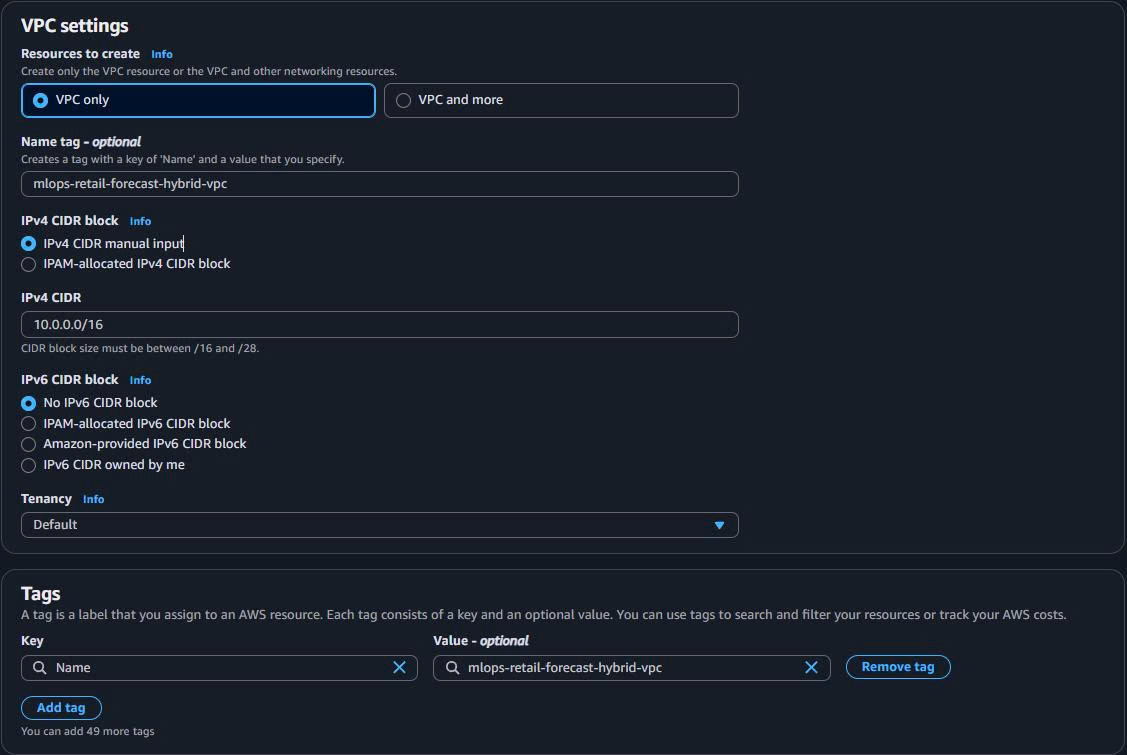
1.1. Tạo VPC qua Console
- Truy cập VPC Dashboard:
- AWS Console → VPC service → “Create VPC”

- VPC Configuration:
VPC Name: mlops-retail-forecast-hybrid-vpc
IPv4 CIDR: 10.0.0.0/16
IPv6 CIDR: No IPv6 CIDR block
Tenancy: Default
Enable DNS hostnames: ✅ (Required for VPC Endpoints)
Enable DNS resolution: ✅ (Required for VPC Endpoints)
1.2. Tạo Subnets
-
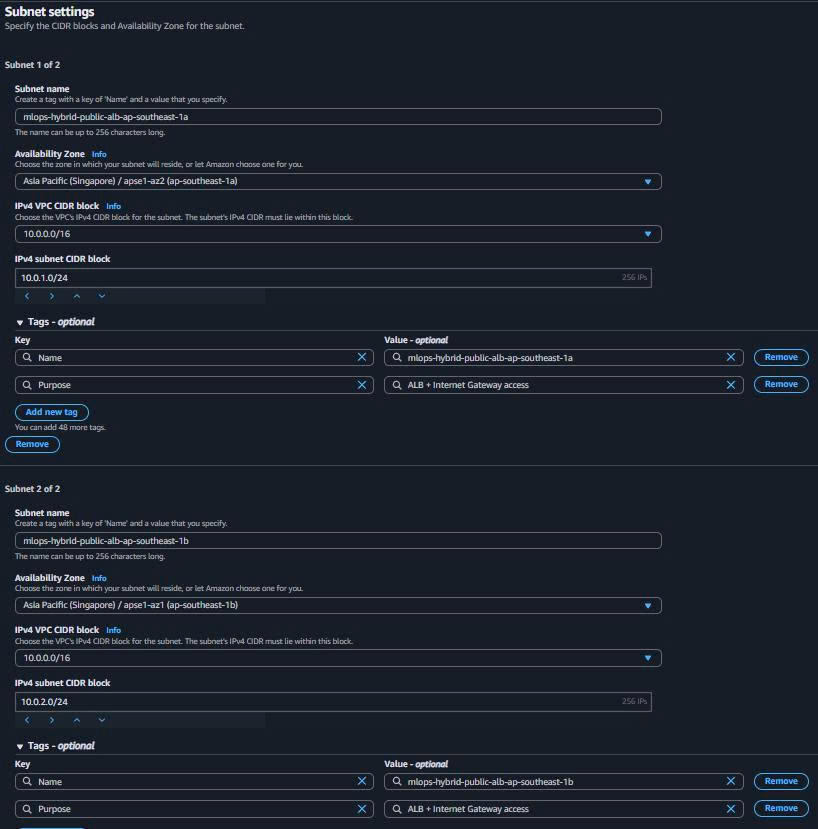
Public Subnets (ALB Only):
- Navigate to “Subnets” → “Create subnet”
Public Subnet 1 (ap-southeast-1a):
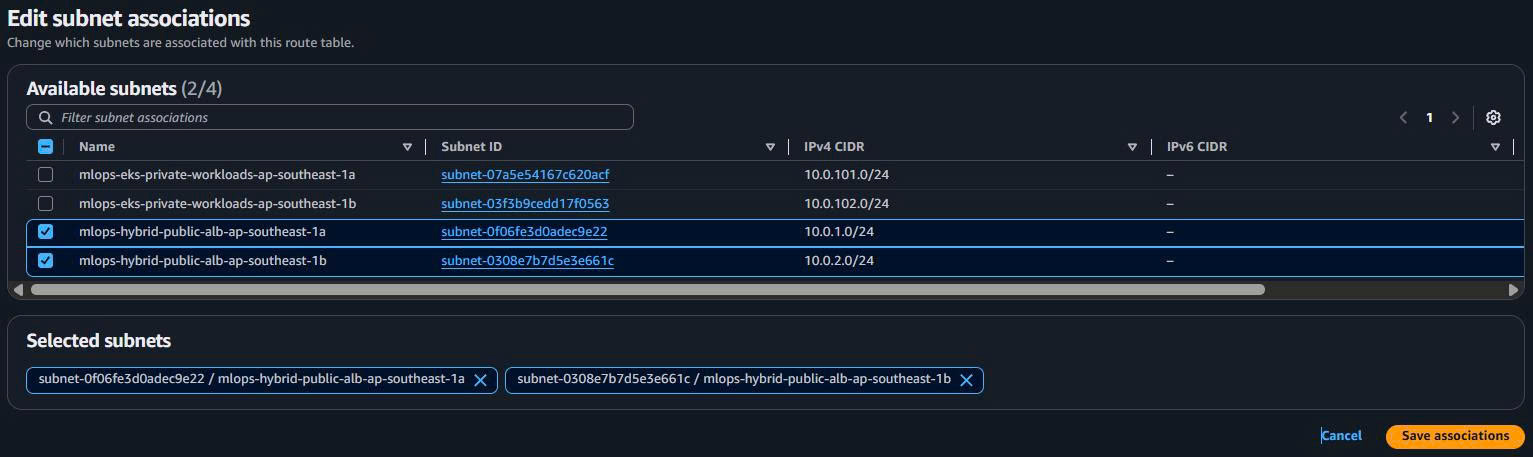
   Name: mlops-hybrid-public-alb-ap-southeast-1a
   Availability Zone: ap-southeast-1a
   IPv4 CIDR: 10.0.1.0/24
   Purpose: ALB + Internet Gateway access
Public Subnet 2 (ap-southeast-1b):
   Name: mlops-hybrid-public-alb-ap-southeast-1b
   Availability Zone: ap-southeast-1b
   IPv4 CIDR: 10.0.2.0/24
   Purpose: ALB + Internet Gateway access
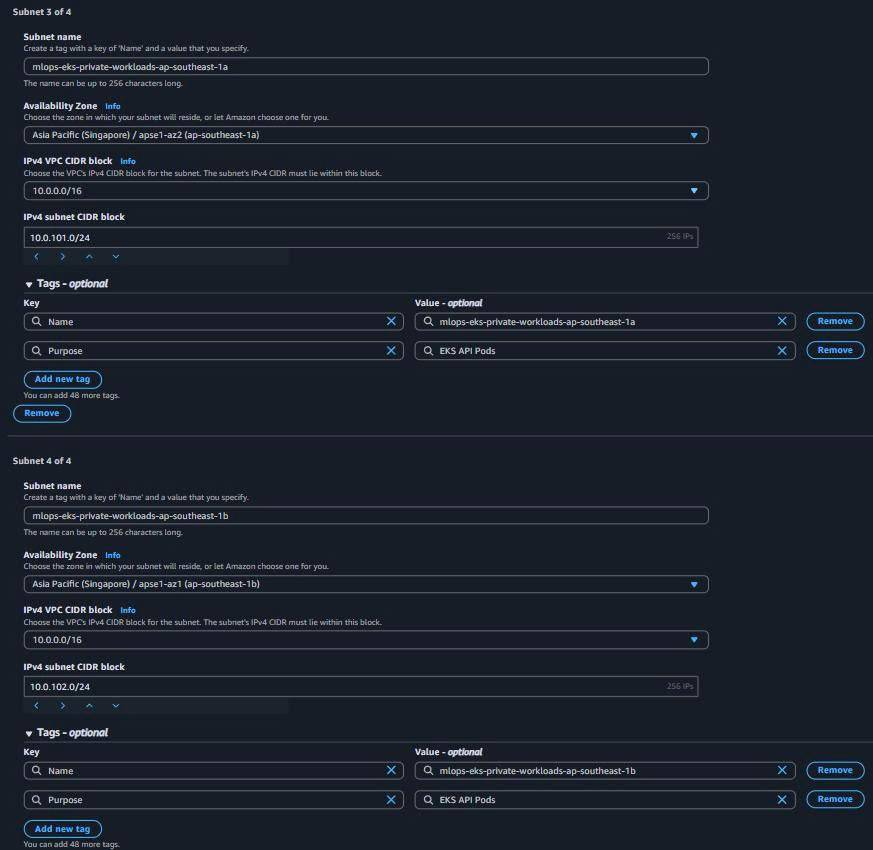
- Private Subnets (EKS Production):
Private Subnet 1 (ap-southeast-1a):
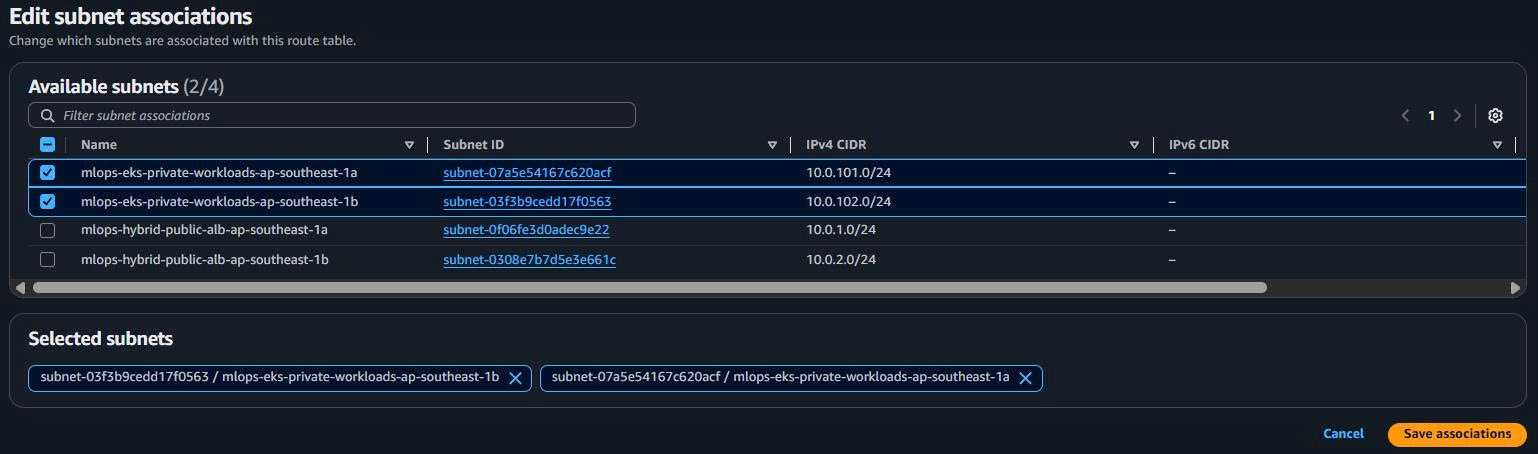
   Name: mlops-eks-private-workloads-ap-southeast-1a
   Availability Zone: ap-southeast-1a
   IPv4 CIDR: 10.0.101.0/24
   Purpose: EKS API Pods
Private Subnet 2 (ap-southeast-1b):
   Name: mlops-eks-private-workloads-ap-southeast-1b
   Availability Zone: ap-southeast-1b
   IPv4 CIDR: 10.0.102.0/24
   Purpose: EKS API Pods
1.3. Internet Gateway Setup
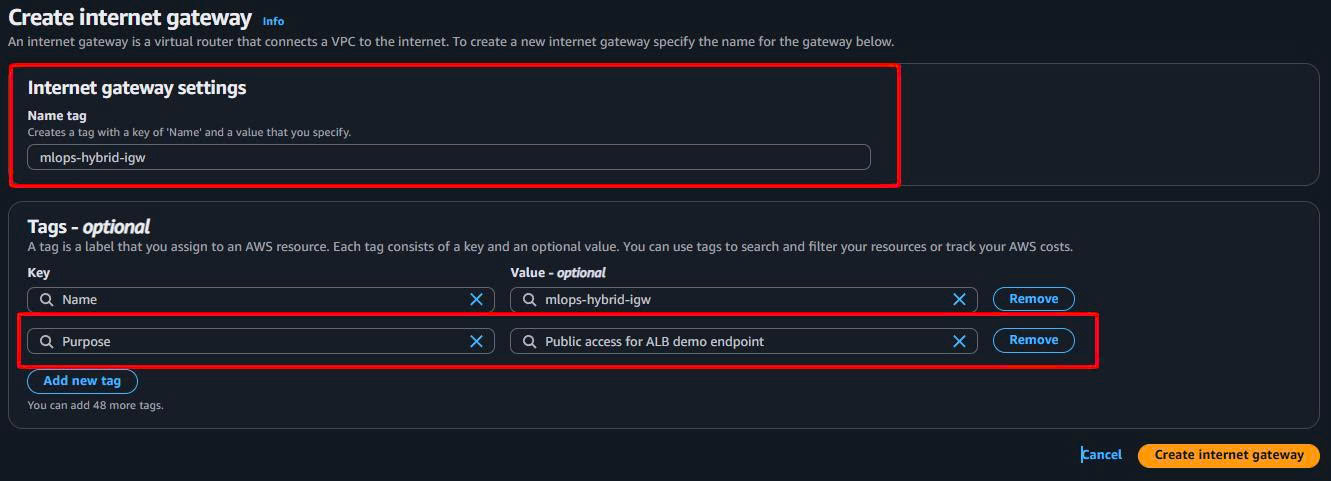
- Tạo Internet Gateway:
- “Internet Gateways” → “Create internet gateway”
Name: mlops-hybrid-igw
Purpose: Public access for ALB demo endpoint
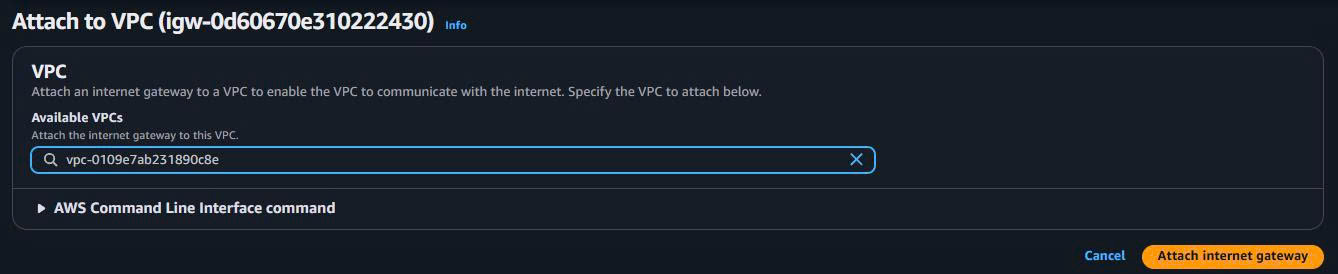
- Attach to VPC:
- Select Internet Gateway → “Actions” → “Attach to VPC”
- Select: mlops-retail-forecast-hybrid-vpc
1.4. Route Tables Configuration
1.4.1. Public Route Table (ALB Traffic)
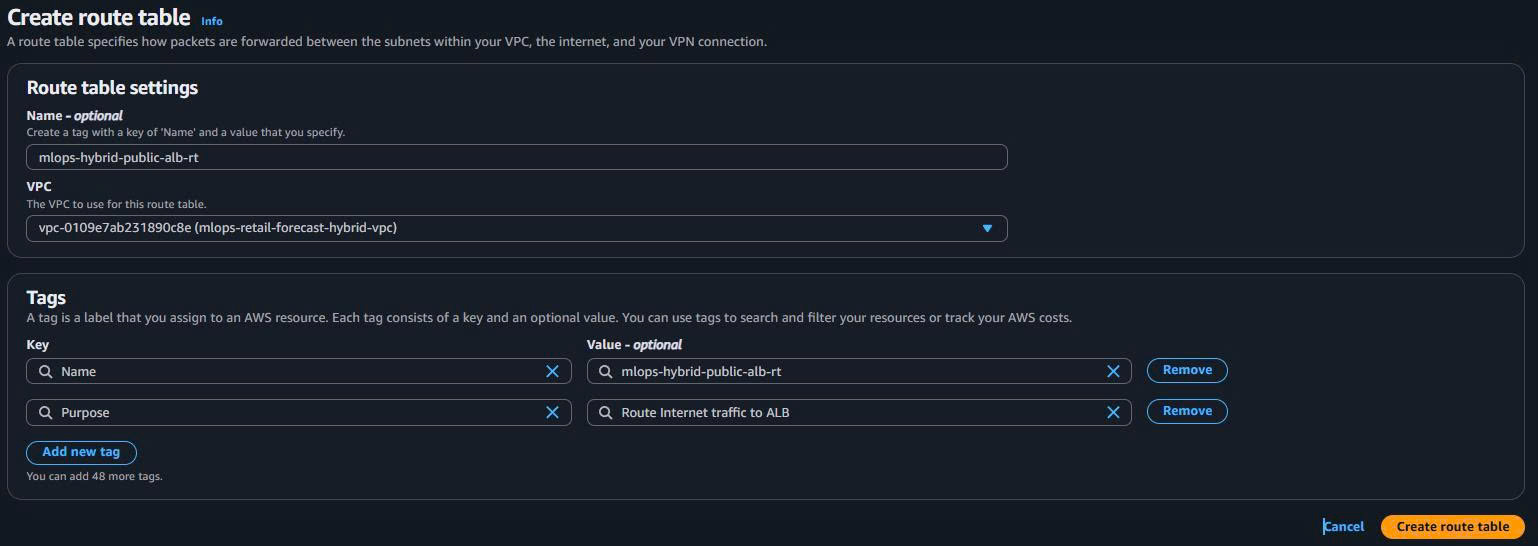
- Create Public Route Table:
Name: mlops-hybrid-public-alb-rt
VPC: mlops-retail-forecast-hybrid-vpc
Purpose: Route Internet traffic to ALB
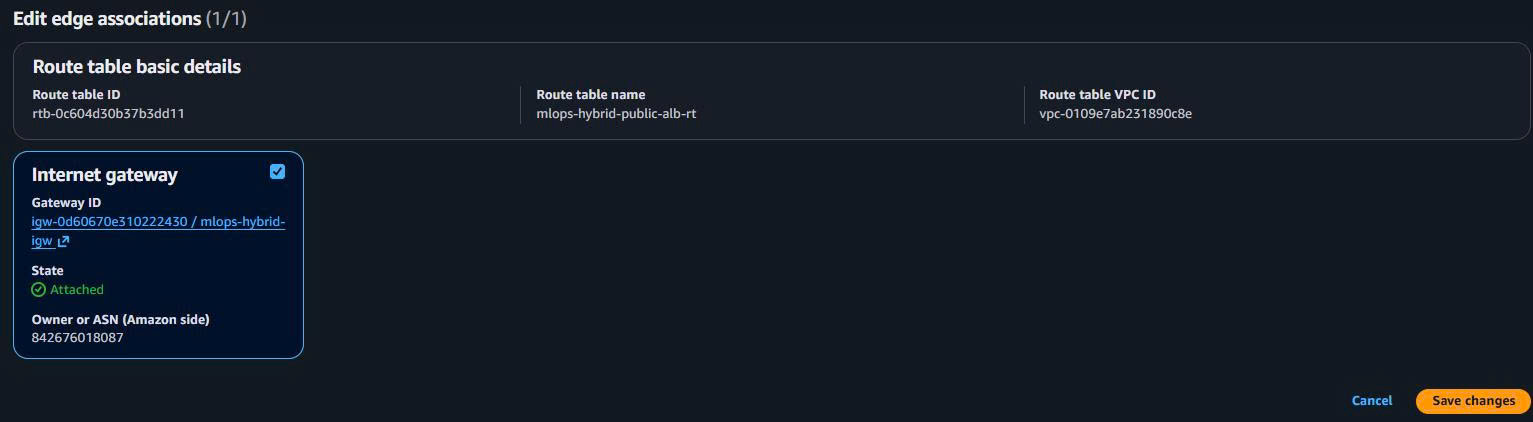
- Add Internet Gateway Route:
- Add route:
0.0.0.0/0→ Internet Gateway (mlops-hybrid-igw)
- Add route:
- Associate Public Subnets:
- Associate both ALB public subnets
1.4.2. Private Route Table (Secure Workloads)
-
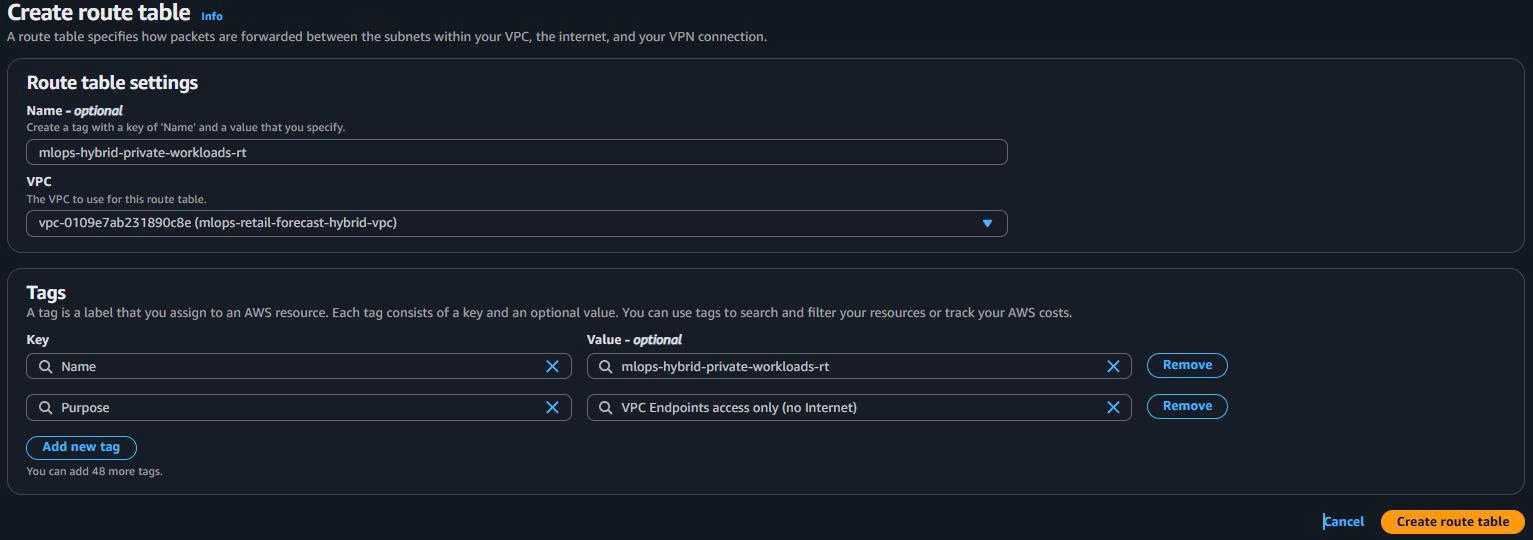
Create Private Route Table:
Name: mlops-hybrid-private-workloads-rt VPC: mlops-retail-forecast-hybrid-vpc Purpose: VPC Endpoints access only (no Internet) -
Keep Default Local Routes:
- Only local VPC route: 10.0.0.0/16 → local
- NO Internet Gateway route (security)
- VPC Endpoints will provide AWS services access
-
Associate Private Subnets:
- Associate both workload private subnets
1.5. Security Groups Setup (Layered Security)
1.5.1. ALB Security Group (Public Internet Access)
-
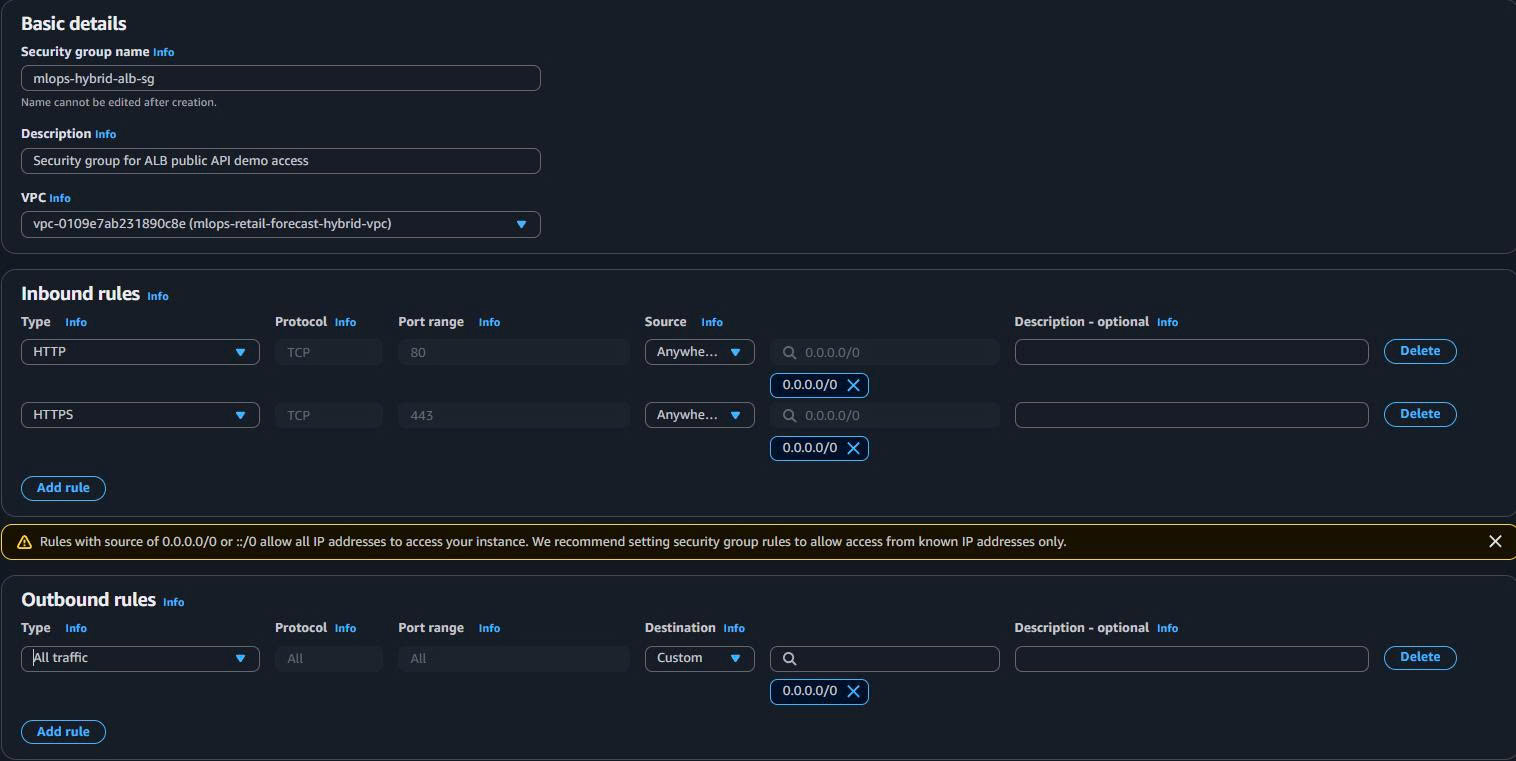
Basic Details:
Security group name: mlops-hybrid-alb-sg Description: Security group for ALB public API demo access VPC: mlops-retail-forecast-hybrid-vpc -
Inbound Rules (Public Demo Access):
- Rule 1: HTTP (80) from 0.0.0.0/0 (redirect to HTTPS)
- Rule 2: HTTPS (443) from 0.0.0.0/0 (secure API demo)
-
Outbound Rules:
- Rule: All traffic to EKS Security Group (ALB → EKS communication)
1.5.2. EKS Worker Nodes Security Group (Private Workloads)
-
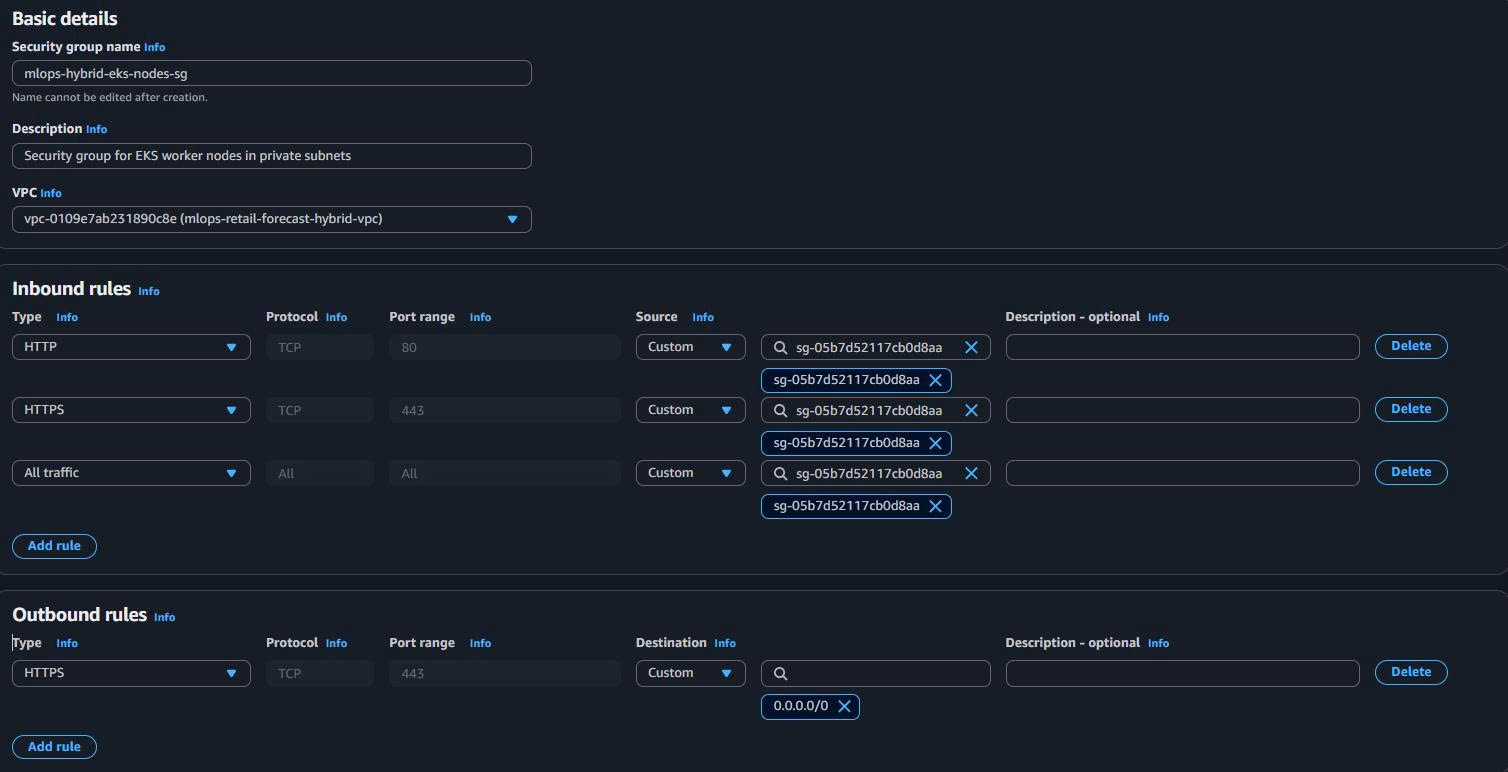
Basic Details:
Security group name: mlops-hybrid-eks-nodes-sg Description: Security group for EKS worker nodes in private subnets VPC: mlops-retail-forecast-hybrid-vpc -
Inbound Rules (Controlled Access):
- Rule 1: HTTP (80) from ALB Security Group (API traffic)
- Rule 2: HTTPS (443) from ALB Security Group (secure API traffic)
- Rule 3: All Traffic from self (inter-node communication)
- Rule 4: All Traffic from EKS Control Plane SG (cluster management)
-
Outbound Rules:
- Rule 1: HTTPS (443) to VPC Endpoints SG (AWS services access)
- Rule 2: All Traffic to self (inter-node communication)
1.5.3. EKS Control Plane Security Group
-
Basic Details:
Security group name: mlops-hybrid-eks-control-plane-sg Description: Security group for EKS control plane VPC: mlops-retail-forecast-hybrid-vpc -
Inbound Rules:
- Rule: HTTPS (443) from EKS Nodes SG (cluster API access)
-
Outbound Rules:
- Rule: All Traffic to EKS Nodes SG (cluster management)

1.5.4. VPC Endpoints Security Group (AWS Services Access)
-
Basic Details:
Security group name: mlops-hybrid-vpc-endpoints-sg Description: Security group for VPC endpoints (S3, ECR, SageMaker) VPC: mlops-retail-forecast-hybrid-vpc -
Inbound Rules (Internal Access Only):
- Rule 1: HTTPS (443) from EKS Nodes SG (EKS → AWS services)
- Rule 2: HTTPS (443) from SageMaker SG (SageMaker → S3/ECR)
- Rule 3: HTTPS (443) from VPC CIDR (10.0.0.0/16) - fallback

🎯 Security Groups Complete!
4 Security Groups Created:
- ALB SG: Public Internet access (80/443)
- EKS Nodes SG: Private workloads
- EKS Control Plane SG: Cluster management
- VPC Endpoints SG: AWS services access
Note: SageMaker sẽ dùng default SG trong VPC mặc định (Task 4)
1.6. Enable Auto-assign Public IP for ALB Subnets
Important for ALB functionality:
-
Navigate to Public Subnets:
- VPC Dashboard → Subnets
-
Enable Auto-assign Public IP:
- Select each public subnet
- Actions → “Modify auto-assign IP settings”
- ✅ Enable auto-assign public IPv4 address
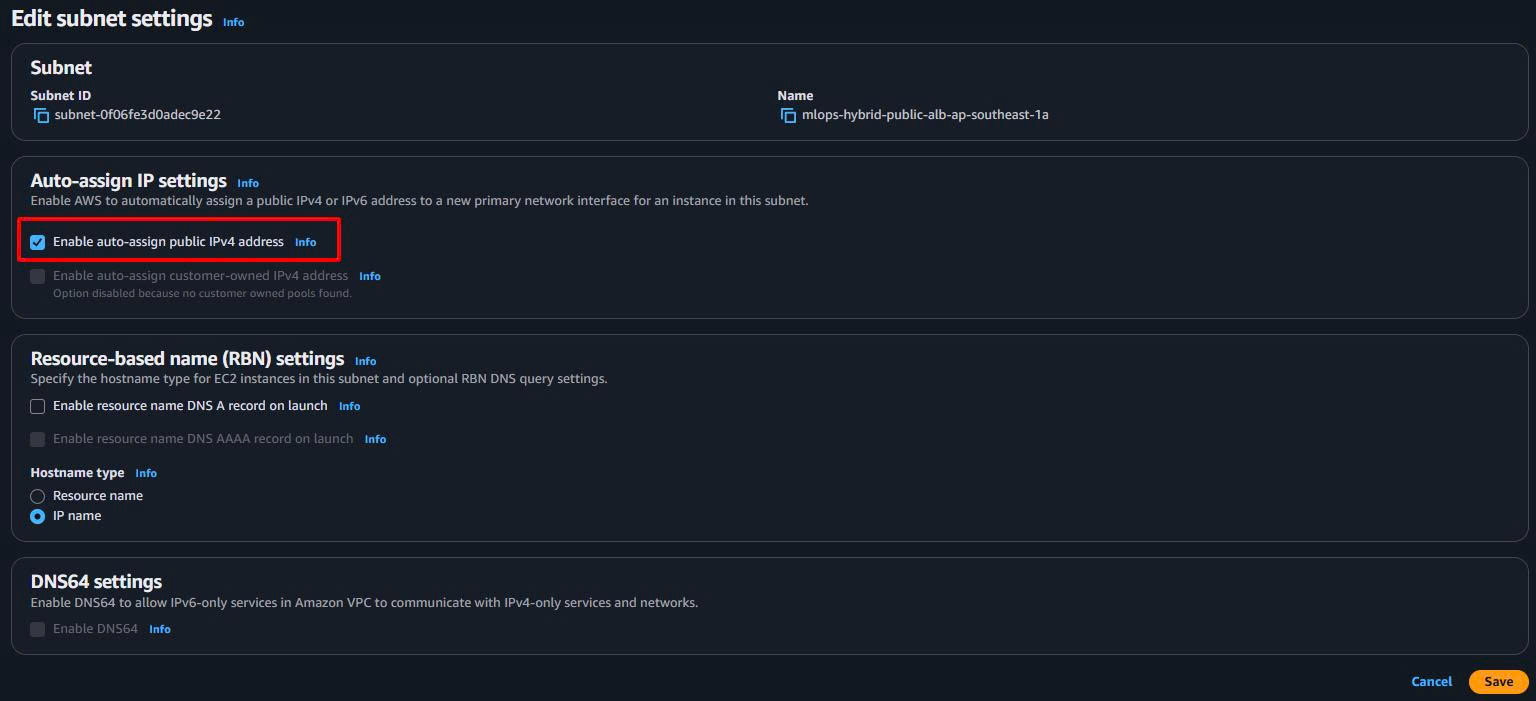
⚠️ Critical for ALB: Public subnets must have auto-assign public IP enabled, otherwise ALB creation will fail.
1.7. Console Setup Complete

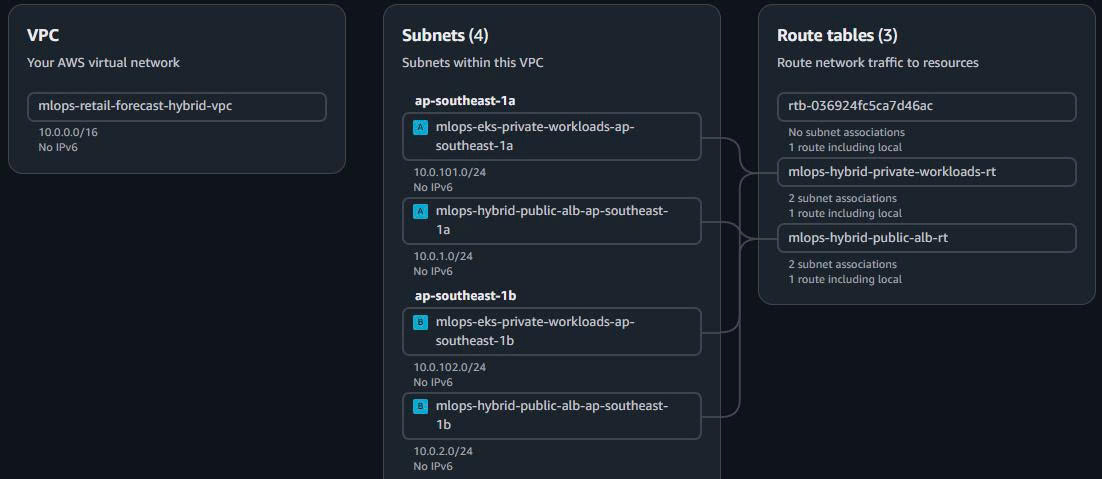
🎯 Hybrid VPC Console Setup Complete!
Security Architecture:
- Layer 1: Internet → ALB (80/443 from 0.0.0.0/0)
- Layer 2: ALB → EKS Nodes (controlled access)
- Layer 3: EKS → VPC Endpoints (AWS services only)
- Layer 4: Private subnets completely isolated from Internet
Demo Ready: ALB can accept public traffic and route to private EKS API pods
2. VPC Endpoints for High-Performance Internal Networking
Bước này BẮT BUỘC phải làm để đảm bảo EKS ↔ S3 ↔ SageMaker latency < 50ms:
2.1. S3 Gateway Endpoint (FREE - Model/Data Access)
- Create S3 Gateway Endpoint:
- VPC Dashboard → “Endpoints” → “Create endpoint”
Endpoint name: mlops-hybrid-s3-gateway-endpoint
Service: com.amazonaws.ap-southeast-1.s3
Type: Gateway
VPC: mlops-retail-forecast-hybrid-vpc
Route Tables: mlops-hybrid-private-workloads-rt
Policy: Full Access (demo purposes)
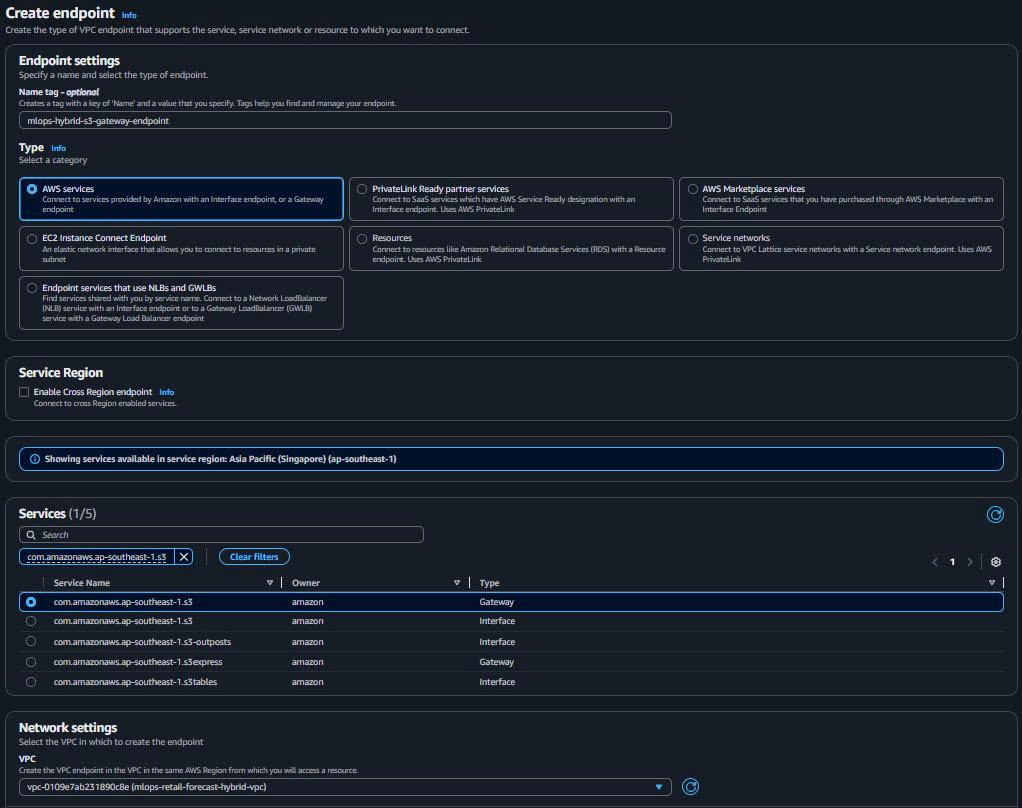
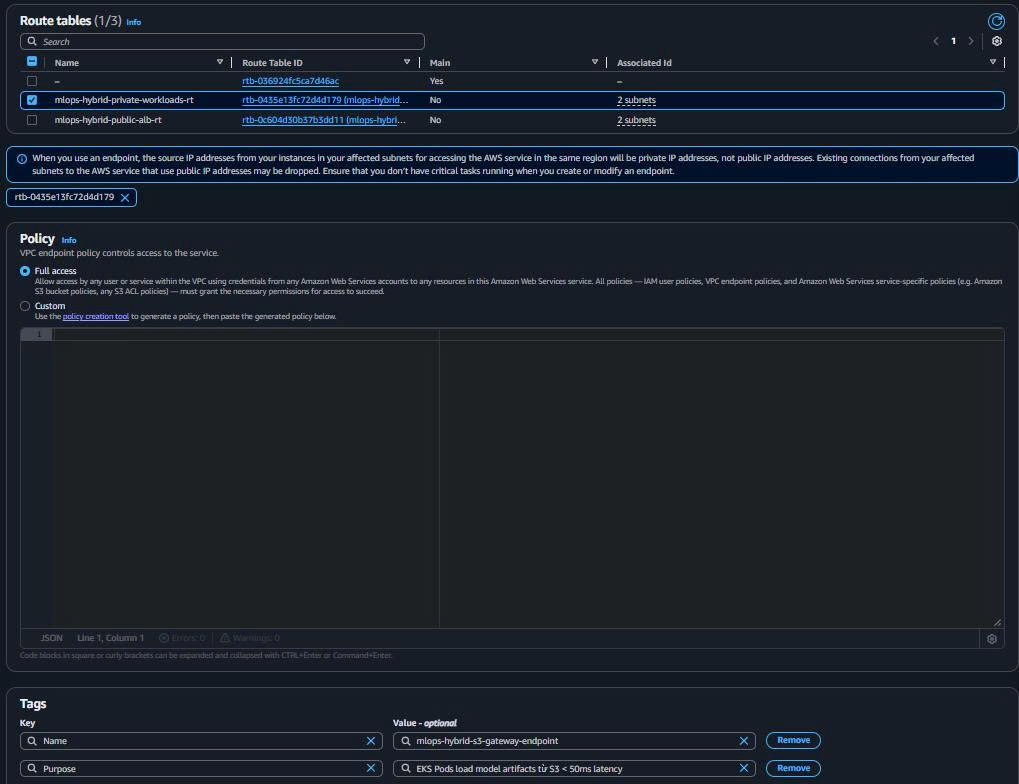
Purpose: EKS Pods load model artifacts từ S3 < 50ms latency
2.2. ECR API Interface Endpoint (Container Images)
- Create ECR API Endpoint:
Endpoint name: mlops-hybrid-ecr-api-endpoint
Service: com.amazonaws.ap-southeast-1.ecr.api
Type: Interface
VPC: mlops-retail-forecast-hybrid-vpc
Subnets: Both private workload subnets
Security Groups: mlops-hybrid-vpc-endpoints-sg
Private DNS: ✅ Enabled
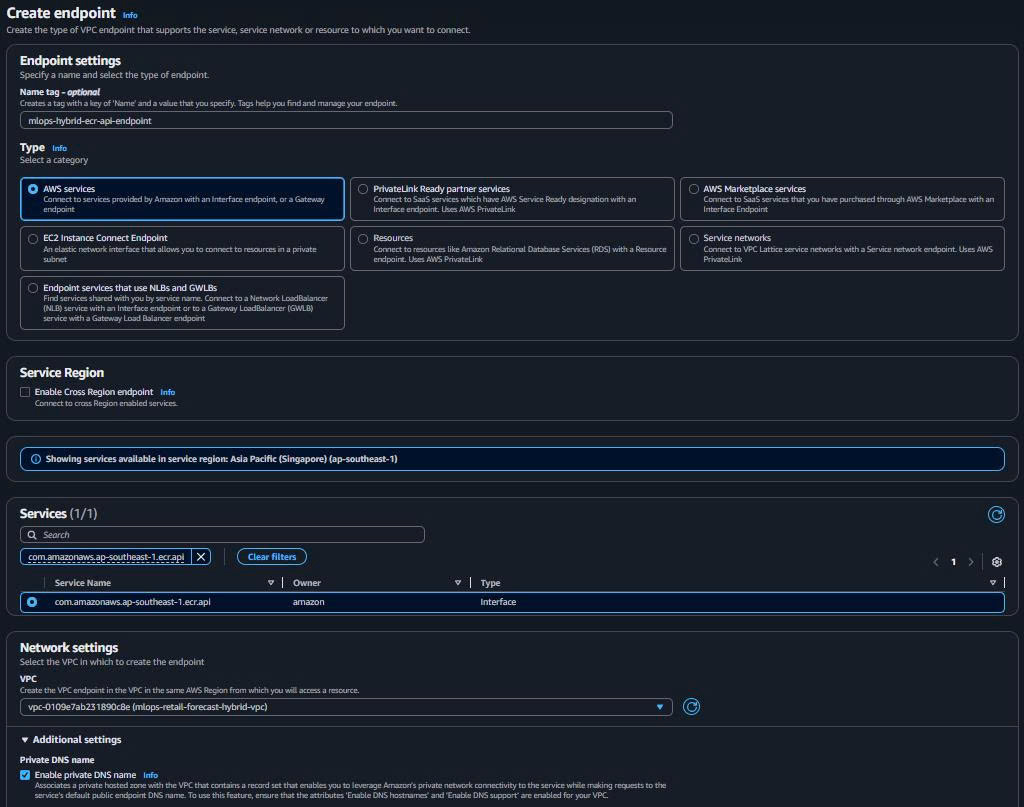
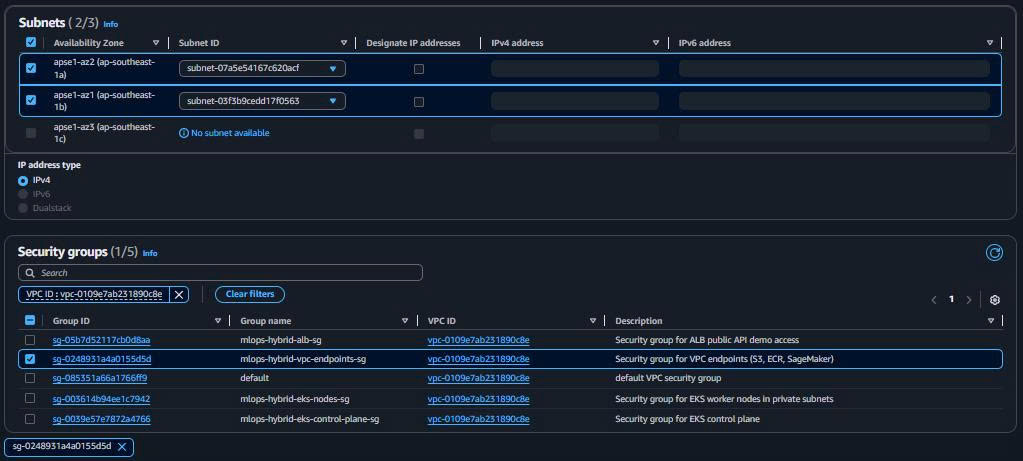
Purpose: EKS pull container images từ ECR repository
2.3. ECR DKR Interface Endpoint (Docker Registry)
- Create ECR DKR Endpoint:
Endpoint name: mlops-hybrid-ecr-dkr-endpoint
Service: com.amazonaws.ap-southeast-1.ecr.dkr
Type: Interface
VPC: mlops-retail-forecast-hybrid-vpc
Subnets: Both private workload subnets
Security Groups: mlops-hybrid-vpc-endpoints-sg
Private DNS: ✅ Enabled
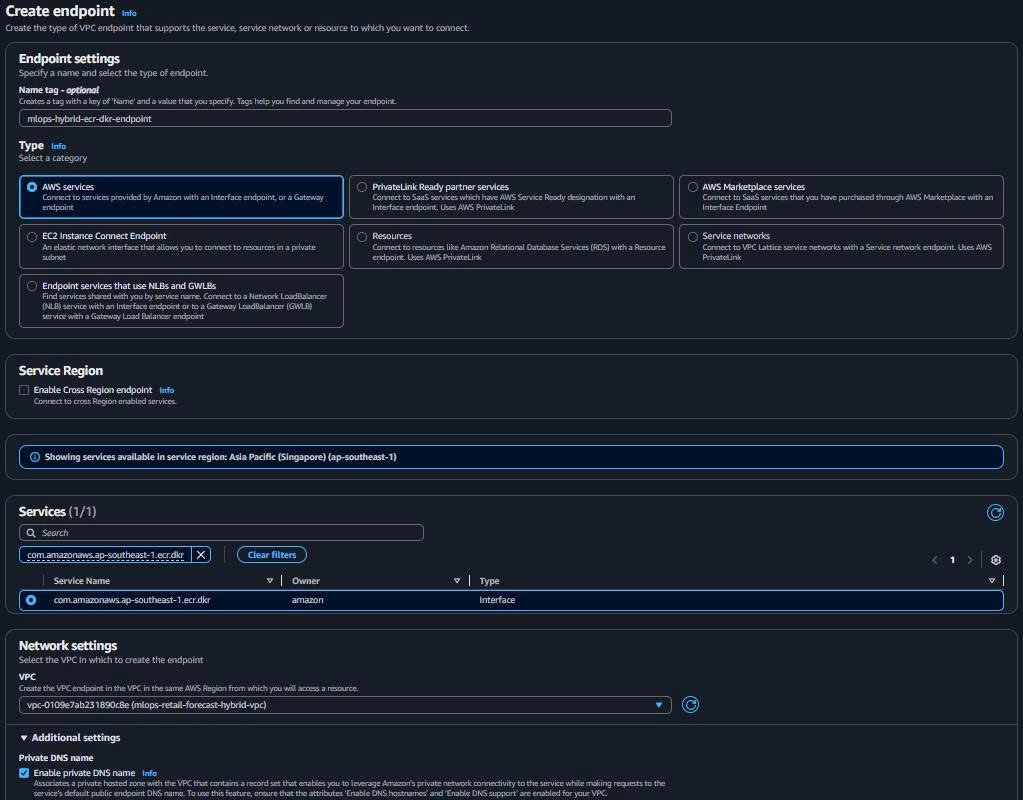
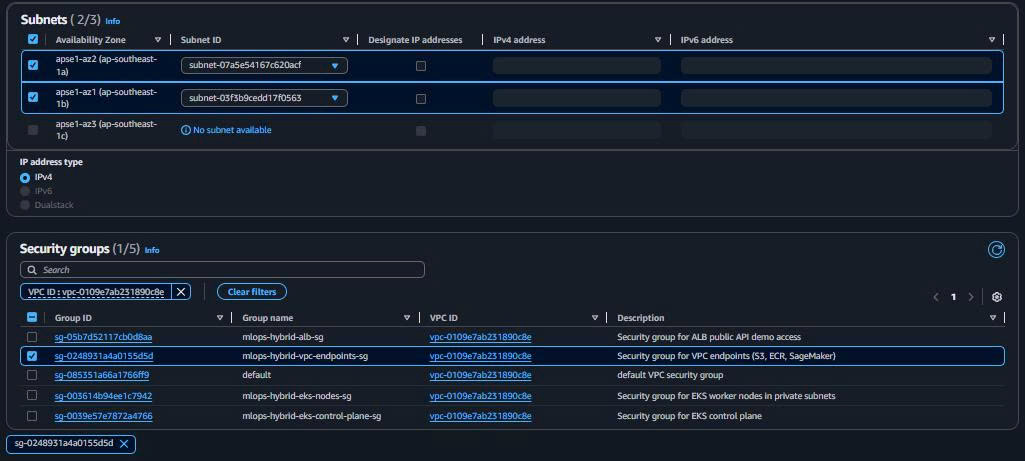
Purpose: Docker layer downloads cho EKS container runtime
2.4. CloudWatch Logs Interface Endpoint
- Create CloudWatch Logs Endpoint:
Endpoint name: mlops-hybrid-logs-endpoint
Service: com.amazonaws.ap-southeast-1.logs
Type: Interface
VPC: mlops-retail-forecast-hybrid-vpc
Subnets: Both private workload subnets
Security Groups: mlops-hybrid-vpc-endpoints-sg
Private DNS: ✅ Enabled
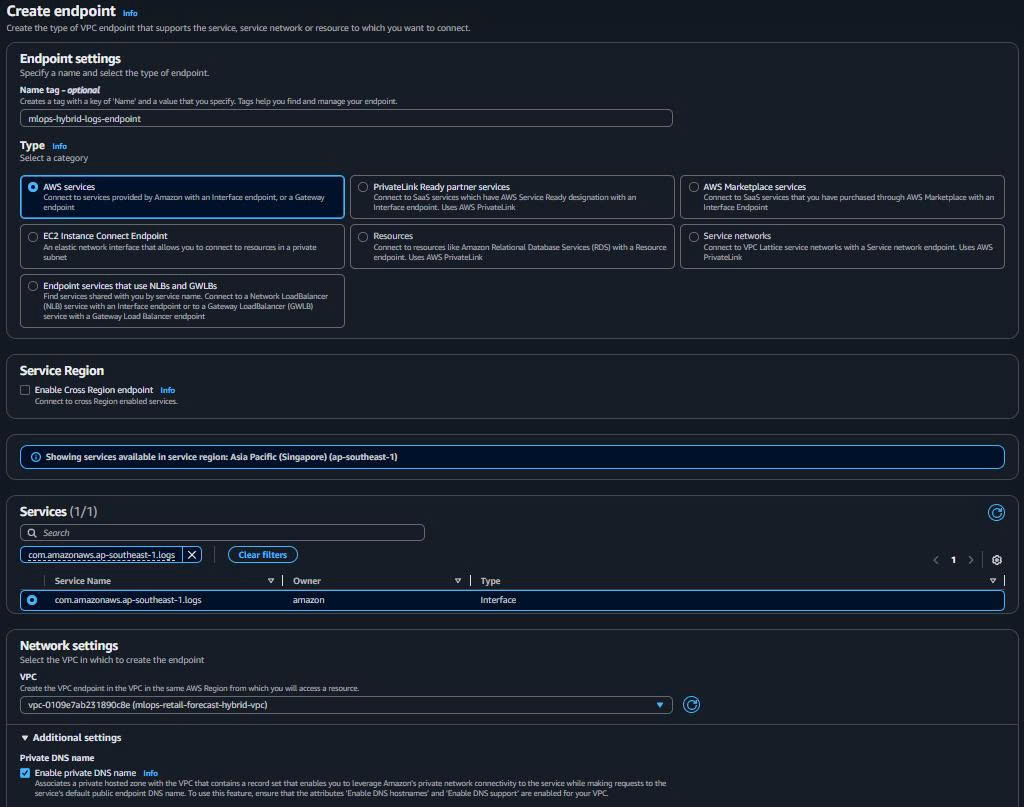
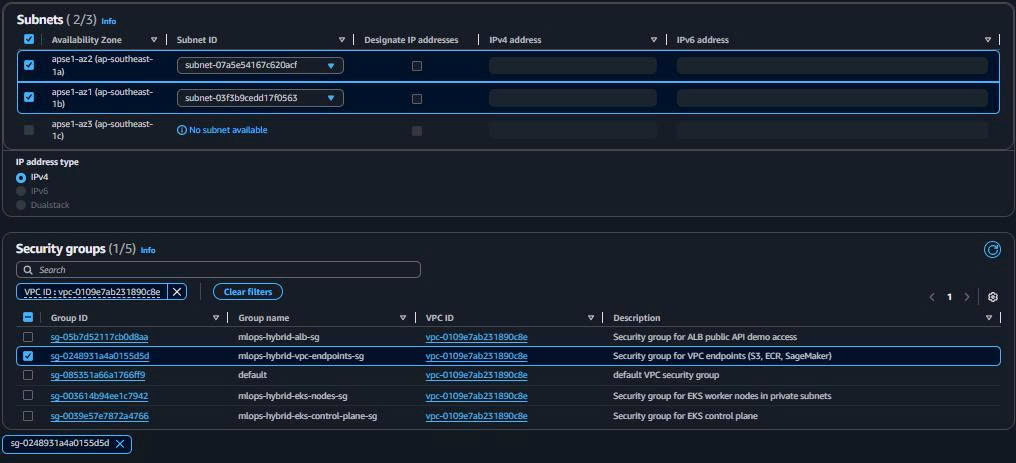
Purpose: Monitoring and logging cho EKS/SageMaker workloads
2.5. VPC Endpoints Verification

Expected Results:
- S3 Gateway: Route added to private route table automatically
- 3x Interface Endpoints: ENI created in each private subnet
- Private DNS: All endpoints resolvable via internal DNS
🎯 VPC Endpoints Complete!
High-Performance Internal Network:
- EKS ↔ S3: < 50ms (Gateway Endpoint)
- EKS ↔ ECR: < 50ms (Interface Endpoints)
- EKS ↔ CloudWatch: < 50ms (Logs Endpoint)
- No Internet dependency for AWS services
Cost Optimized: ~$7.2/month tiết kiệm (không cần SageMaker VPC Endpoint)
3. Application Load Balancer Setup (Public API Demo)
3.1. Create Application Load Balancer
-
Navigate to Load Balancers:
- EC2 Dashboard → Load Balancers → “Create load balancer”
-
ALB Configuration:
Name: mlops-hybrid-api-demo-alb
Scheme: Internet-facing
IP address type: IPv4
VPC: mlops-retail-forecast-hybrid-vpc
Mappings: Both public ALB subnets
Security groups: mlops-hybrid-alb-sg
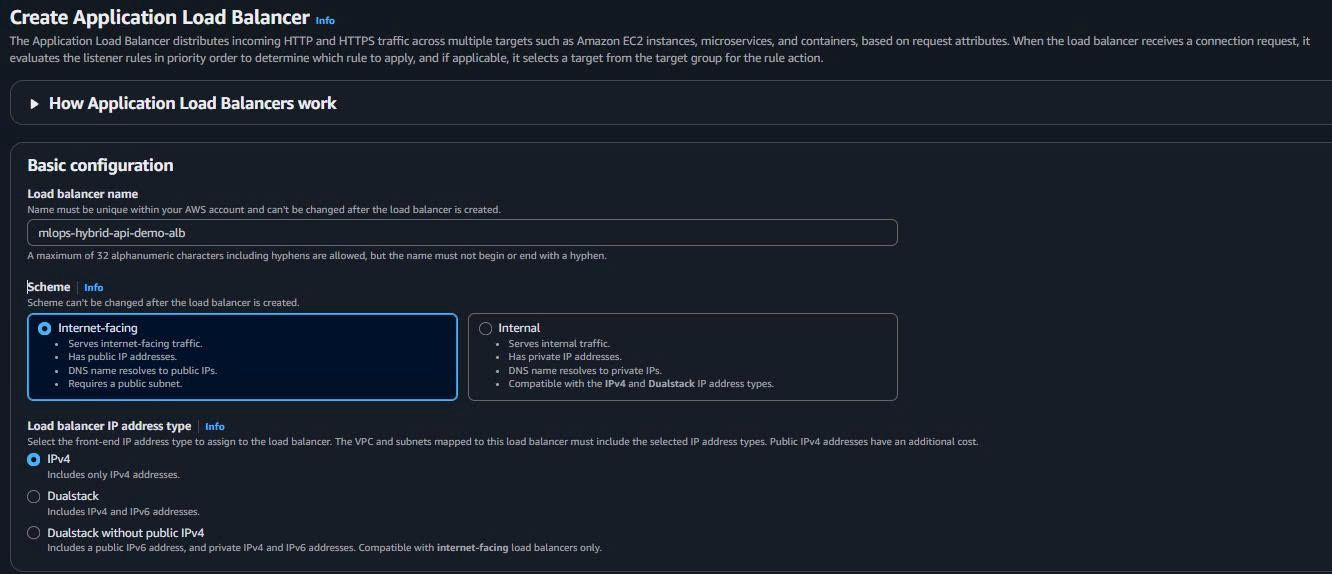
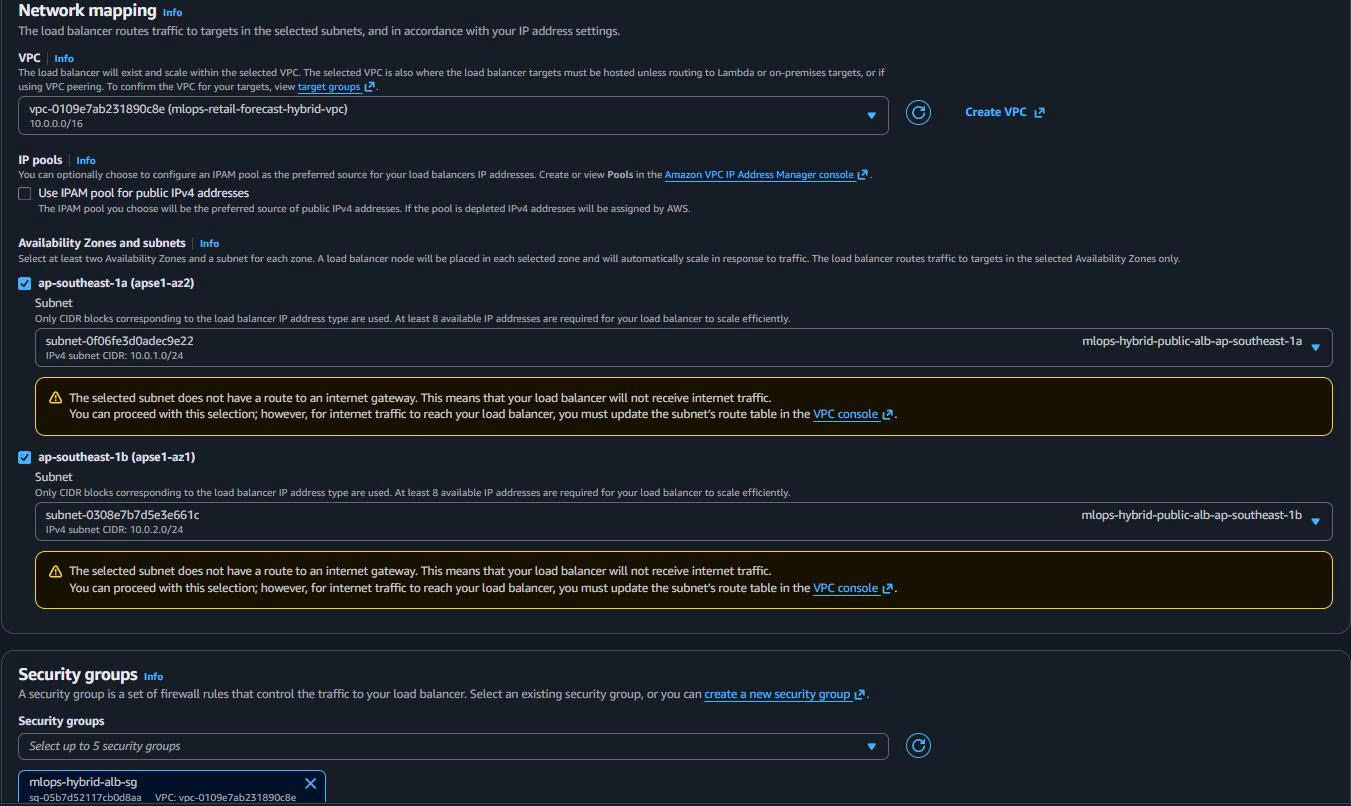
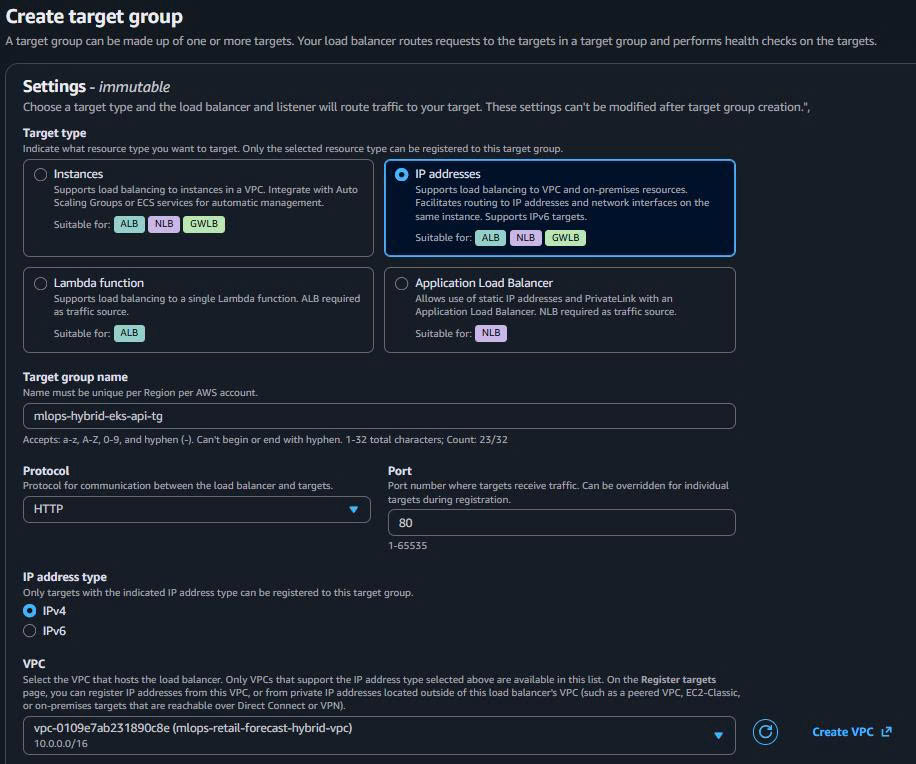
3.2. Create Target Group for EKS API
- Target Group Configuration:
Target type: IP addresses
Target group name: mlops-hybrid-eks-api-tg
Protocol: HTTP
Port: 80
VPC: mlops-retail-forecast-hybrid-vpc
Health check path: /health
Health check port: 80
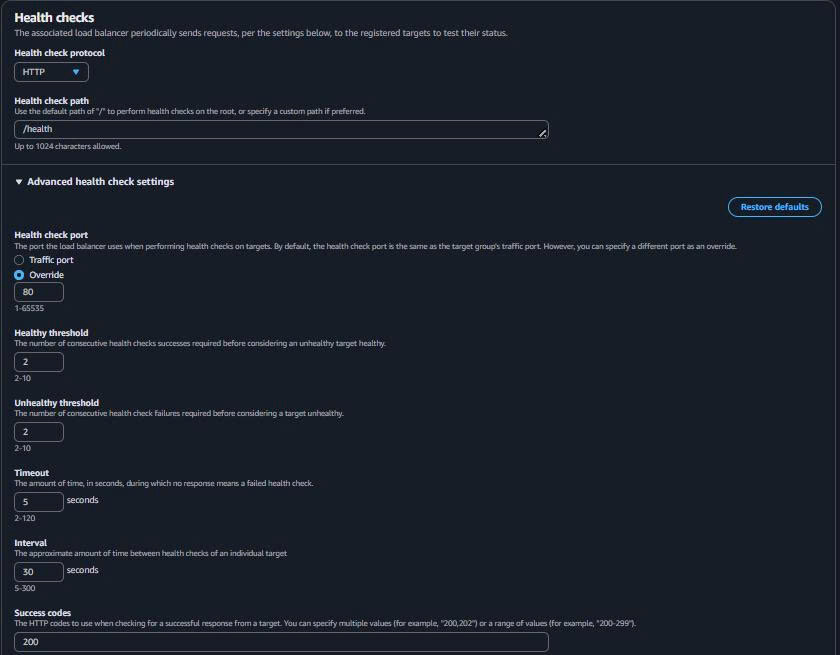
- Health Check Settings:
Health check protocol: HTTP
Health check path: /health
Health check port: 80
Healthy threshold: 2
Unhealthy threshold: 2
Timeout: 5 seconds
Interval: 30 seconds
Success codes: 200
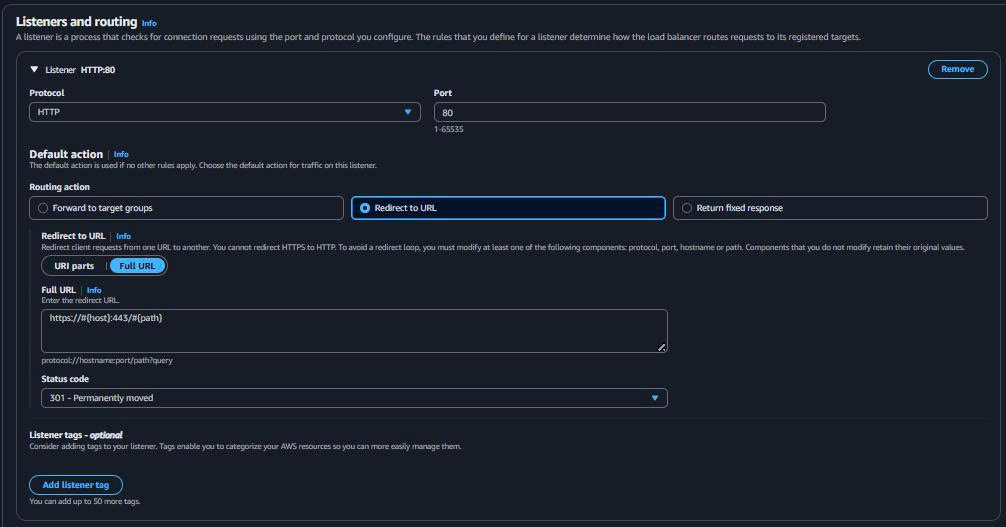
3.3. Configure ALB Listeners
-
HTTP Listener (Redirect to HTTPS):
Protocol: HTTP Port: 80 Default action: Redirect to HTTPS -
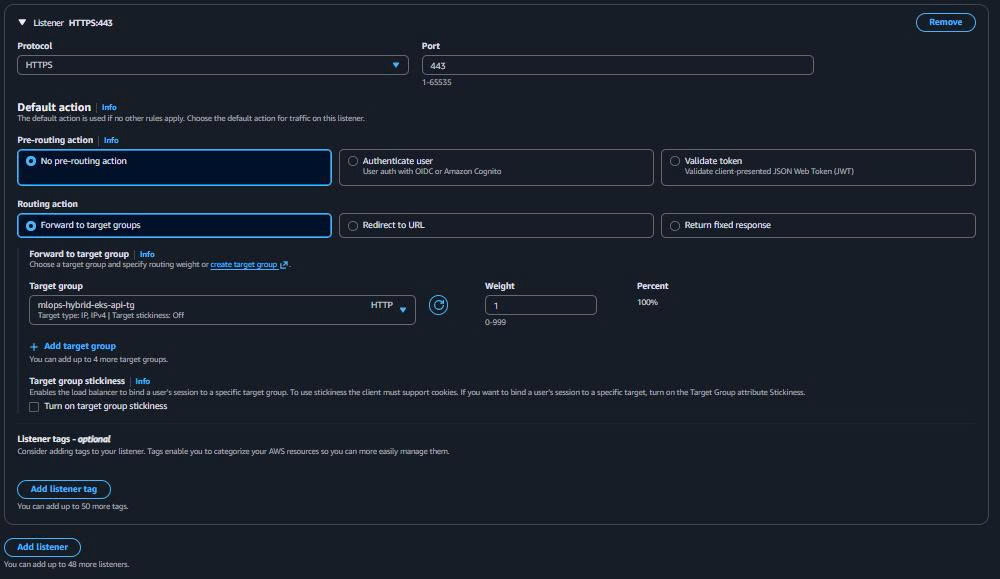
HTTPS Listener (API Traffic):
Protocol: HTTPS
Port: 443
Default action: Forward to target group
SSL certificate: ACM certificate (hoặc self-signed for demo)
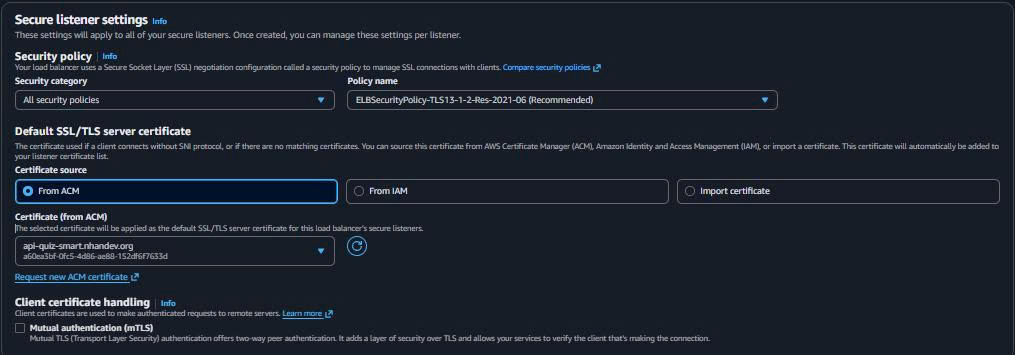
💡 SSL Certificate Options:
- Production: Use AWS Certificate Manager (ACM) với domain
- Demo: Create self-signed certificate or use HTTP only
- Development: Skip SSL, use HTTP listener only
3.4. ALB Creation Complete
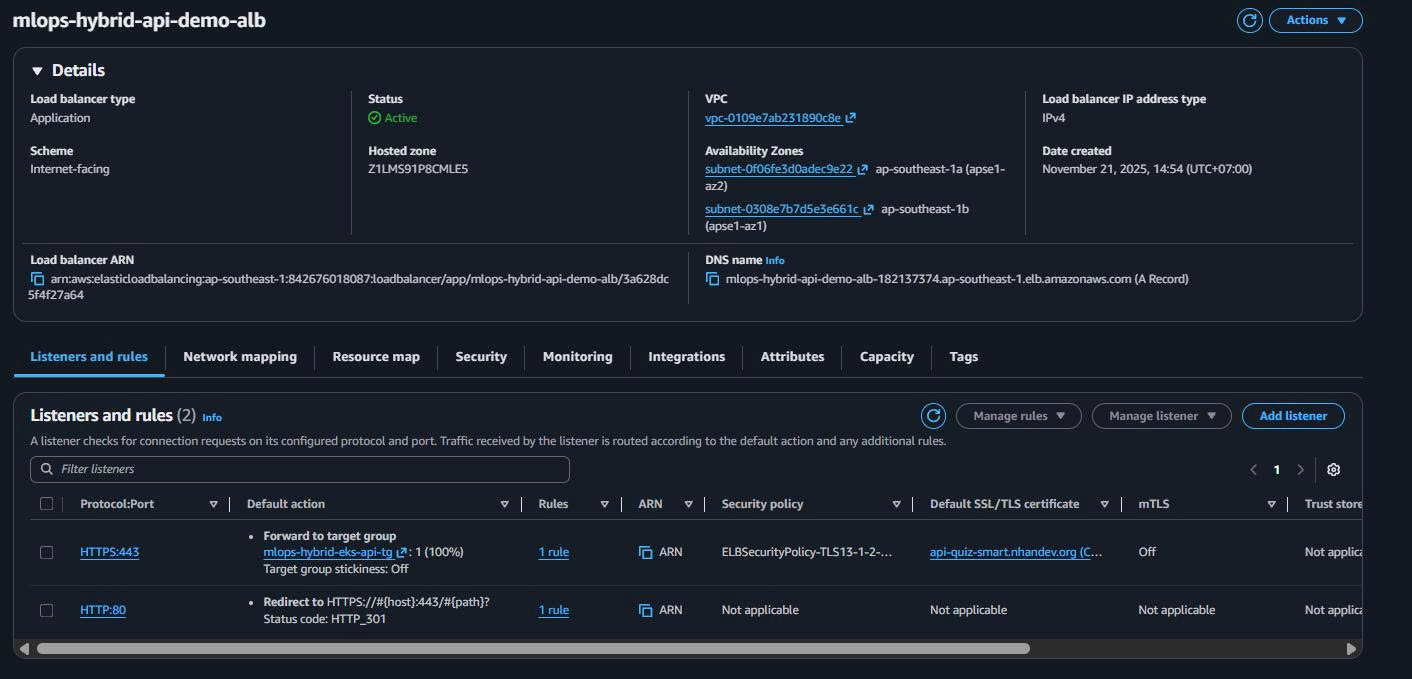
ALB DNS Name: Will be used for public API demo access
Example: mlops-hybrid-api-demo-alb-1234567890.ap-southeast-1.elb.amazonaws.com
🎯 ALB Setup Complete!
Public Demo Access Ready:
- HTTP/HTTPS endpoints configured
- Target group ready for EKS API pods
- Health checks configured
- Multi-AZ availability
4. Advanced Configuration & Integration
4.1. VPC Flow Logs
# Enable VPC Flow Logs for security monitoring
aws ec2 create-flow-logs \
  --resource-type VPC \
  --resource-ids vpc-xxxxxxxxx \
  --traffic-type ALL \
  --log-destination-type cloud-watch-logs \
  --log-group-name VPCFlowLogs \
  --deliver-logs-permission-arn arn:aws:iam::ACCOUNT:role/flowlogsRole
4.2. Network Performance Testing
Test EKS ↔ S3 Latency:
# From EKS Pod (after cluster setup)
kubectl run test-pod --image=amazonlinux --restart=Never -- sleep 3600
kubectl exec -it test-pod -- bash

# Inside pod
yum install -y awscli
time aws s3 ls s3://your-model-bucket/
# Expected: < 50ms for VPC Endpoint
Test ALB ↔ EKS Connectivity:
# Test from outside VPC
curl -I http://your-alb-dns-name/health
# Expected: HTTP 200 OK when EKS API is running
4.3. Cost Monitoring Setup
CloudWatch Cost Alarms:
# Create cost alarm for VPC Endpoints
aws cloudwatch put-metric-alarm \
  --alarm-name "VPC-Endpoints-Cost-Alert" \
  --alarm-description "Alert when VPC Endpoints cost > $30/month" \
  --metric-name EstimatedCharges \
  --namespace AWS/Billing \
  --statistic Maximum \
  --period 86400 \
  --threshold 30 \
  --comparison-operator GreaterThanThreshold \
  --dimensions Name=Currency,Value=USD Name=ServiceName,Value=AmazonVPC
5. Terraform Outputs
💡 Khi nào cần Terraform outputs:
- ✅ Task 7-10 sẽ dùng Terraform (EKS cluster, ALB controller)
- ✅ Cần automated deployment across environments
- ✅ Want to reference infrastructure programmatically
Nếu Task 7-10 dùng Console: Skip phần này hoàn toàn!
5.1. Data Sources (Reference Console-created Resources)
File: aws/infra/vpc-data-sources.tf
# Reference VPC infrastructure từ Console
data "aws_vpc" "hybrid" {
  filter {
    name   = "tag:Name"
    values = ["mlops-retail-forecast-hybrid-vpc"]
  }
}

# Public subnets (ALB)
data "aws_subnets" "public_alb" {
  filter {
    name   = "vpc-id"
    values = [data.aws_vpc.hybrid.id]
  }
  filter {
    name   = "tag:Name"
    values = ["*public-alb*"]
  }
}

# Private subnets (EKS + SageMaker)
data "aws_subnets" "private_workloads" {
  filter {
    name   = "vpc-id"
    values = [data.aws_vpc.hybrid.id]
  }
  filter {
    name   = "tag:Name"
    values = ["*private-workloads*"]
  }
}

# Security Groups
data "aws_security_group" "alb" {
  filter {
    name   = "tag:Name"
    values = ["mlops-hybrid-alb-sg"]
  }
}

data "aws_security_group" "eks_nodes" {
  filter {
    name   = "tag:Name"
    values = ["mlops-hybrid-eks-nodes-sg"]
  }
}

data "aws_security_group" "eks_control_plane" {
  filter {
    name   = "tag:Name"
    values = ["mlops-hybrid-eks-control-plane-sg"]
  }
}

# ALB
data "aws_lb" "api_demo" {
  name = "mlops-hybrid-api-demo-alb"
}

data "aws_lb_target_group" "eks_api" {
  name = "mlops-hybrid-eks-api-tg"
}

# VPC Endpoints
data "aws_vpc_endpoint" "s3" {
  vpc_id       = data.aws_vpc.hybrid.id
  service_name = "com.amazonaws.ap-southeast-1.s3"
}

data "aws_vpc_endpoint" "ecr_api" {
  vpc_id       = data.aws_vpc.hybrid.id
  service_name = "com.amazonaws.ap-southeast-1.ecr.api"
}

data "aws_vpc_endpoint" "ecr_dkr" {
  vpc_id       = data.aws_vpc.hybrid.id
  service_name = "com.amazonaws.ap-southeast-1.ecr.dkr"
}

data "aws_vpc_endpoint" "sagemaker_runtime" {
  vpc_id       = data.aws_vpc.hybrid.id
  service_name = "com.amazonaws.ap-southeast-1.sagemaker.runtime"
}
5.2. Outputs for EKS/ALB Integration
File: aws/infra/networking-outputs.tf
# VPC Information
output "vpc_id" {
  description = "Hybrid VPC ID"
  value       = data.aws_vpc.hybrid.id
}

output "vpc_cidr_block" {
  description = "VPC CIDR block"
  value       = data.aws_vpc.hybrid.cidr_block
}

# Subnet Information
output "public_alb_subnet_ids" {
  description = "Public subnet IDs for ALB"
  value       = data.aws_subnets.public_alb.ids
}

output "private_workload_subnet_ids" {
  description = "Private subnet IDs for EKS and SageMaker"
  value       = data.aws_subnets.private_workloads.ids
}

# Security Group Information
output "alb_security_group_id" {
  description = "ALB Security Group ID"
  value       = data.aws_security_group.alb.id
}

output "eks_nodes_security_group_id" {
  description = "EKS Nodes Security Group ID"
  value       = data.aws_security_group.eks_nodes.id
}

output "eks_control_plane_security_group_id" {
  description = "EKS Control Plane Security Group ID"
  value       = data.aws_security_group.eks_control_plane.id
}

# ALB Information
output "alb_arn" {
  description = "ALB ARN for API demo"
  value       = data.aws_lb.api_demo.arn
}

output "alb_dns_name" {
  description = "ALB DNS name for public API access"
  value       = data.aws_lb.api_demo.dns_name
}

output "alb_zone_id" {
  description = "ALB Zone ID for Route53 integration"
  value       = data.aws_lb.api_demo.zone_id
}

output "eks_api_target_group_arn" {
  description = "Target group ARN for EKS API pods"
  value       = data.aws_lb_target_group.eks_api.arn
}

# VPC Endpoints Information
output "s3_vpc_endpoint_id" {
  description = "S3 VPC Endpoint ID"
  value       = data.aws_vpc_endpoint.s3.id
}

output "ecr_api_vpc_endpoint_id" {
  description = "ECR API VPC Endpoint ID"
  value       = data.aws_vpc_endpoint.ecr_api.id
}

output "sagemaker_runtime_vpc_endpoint_id" {
  description = "SageMaker Runtime VPC Endpoint ID"
  value       = data.aws_vpc_endpoint.sagemaker_runtime.id
}

# Demo Configuration
output "api_demo_config" {
  description = "Configuration for API demo"
  value = {
    public_endpoint = "https://${data.aws_lb.api_demo.dns_name}"
    health_check    = "https://${data.aws_lb.api_demo.dns_name}/health"
    predict_endpoint = "https://${data.aws_lb.api_demo.dns_name}/predict"
  }
}
5.3. Deploy Terraform Outputs
# Navigate to infrastructure directory
cd aws/infra

# Initialize Terraform
terraform init

# Plan (should show 0 resources to create, only data sources)
terraform plan

# Apply outputs
terraform apply -auto-approve

# Verify outputs
terraform output api_demo_config
Expected output:
{
  "health_check" = "https://mlops-hybrid-api-demo-alb-123456789.ap-southeast-1.elb.amazonaws.com/health"
  "predict_endpoint" = "https://mlops-hybrid-api-demo-alb-123456789.ap-southeast-1.elb.amazonaws.com/predict"
  "public_endpoint" = "https://mlops-hybrid-api-demo-alb-123456789.ap-southeast-1.elb.amazonaws.com"
}
6. Verification & Performance Testing
6.1. Network Architecture Verification
Verify Hybrid VPC Setup:
# Check VPC configuration
aws ec2 describe-vpcs \
  --filters "Name=tag:Name,Values=mlops-retail-forecast-hybrid-vpc" \
  --query 'Vpcs[0].{VpcId:VpcId,CidrBlock:CidrBlock,State:State}'

# Verify subnets
aws ec2 describe-subnets \
  --filters "Name=vpc-id,Values=$(aws ec2 describe-vpcs --filters 'Name=tag:Name,Values=mlops-retail-forecast-hybrid-vpc' --query 'Vpcs[0].VpcId' --output text)" \
  --query 'Subnets[*].{Name:Tags[?Key==`Name`].Value|[0],CIDR:CidrBlock,AZ:AvailabilityZone,Type:MapPublicIpOnLaunch}'
Verify Security Groups:
# List all security groups for the VPC
aws ec2 describe-security-groups \
  --filters "Name=vpc-id,Values=$(terraform output -raw vpc_id)" \
  --query 'SecurityGroups[*].{Name:GroupName,ID:GroupId,Description:Description}' \
  --output table
6.2. VPC Endpoints Testing
Test S3 VPC Endpoint (after EKS setup):
# From EKS pod
kubectl run network-test --image=amazonlinux --restart=Never -- sleep 3600
kubectl exec -it network-test -- bash

# Test S3 access via VPC endpoint
yum update -y && yum install -y awscli curl time
time aws s3 ls s3://your-model-bucket/ --region ap-southeast-1
# Expected: < 50ms response time

# Test ECR access
time aws ecr get-login-token --region ap-southeast-1
# Expected: < 100ms response time
Verify VPC Endpoint DNS Resolution:
# Inside EKS pod
nslookup s3.ap-southeast-1.amazonaws.com
nslookup api.ecr.ap-southeast-1.amazonaws.com
nslookup runtime.sagemaker.ap-southeast-1.amazonaws.com
# Should resolve to private IP addresses (10.0.x.x)
6.3. ALB Demo Testing
Test ALB Public Access:
# Get ALB DNS name
ALB_DNS=$(aws elbv2 describe-load-balancers \
  --names mlops-hybrid-api-demo-alb \
  --query 'LoadBalancers[0].DNSName' \
  --output text)

echo "ALB DNS: $ALB_DNS"

# Test connectivity (will show 503 until EKS API is deployed)
curl -I http://$ALB_DNS/
# Expected: Connection successful (503 Service Unavailable is normal without backend)
Verify Target Group (after EKS deployment):
# Check target group health
aws elbv2 describe-target-health \
  --target-group-arn $(aws elbv2 describe-target-groups \
    --names mlops-hybrid-eks-api-tg \
    --query 'TargetGroups[0].TargetGroupArn' --output text)
6.4. Cost Monitoring
Monthly Cost Breakdown:
# Check VPC Endpoints cost (should be ~$21.6/month)
aws ce get-cost-and-usage \
  --time-period Start=2024-01-01,End=2024-01-31 \
  --granularity MONTHLY \
  --metrics BlendedCost \
  --group-by Type=DIMENSION,Key=SERVICE \
  --filter '{"Dimensions":{"Key":"SERVICE","Values":["Amazon Virtual Private Cloud"]}}'
7. Troubleshooting & Common Issues
7.1. VPC Endpoints Issues
Problem: EKS pods can’t access S3
# Solution 1: Check route table
aws ec2 describe-route-tables \
  --filters "Name=tag:Name,Values=mlops-hybrid-private-workloads-rt" \
  --query 'RouteTables[0].Routes'
# Should see route to S3 endpoint

# Solution 2: Check security group
aws ec2 describe-security-groups \
  --group-names mlops-hybrid-vpc-endpoints-sg \
  --query 'SecurityGroups[0].IpPermissions'
# Should allow HTTPS 443 from 10.0.0.0/16
Problem: Interface endpoint DNS not resolving
# Check private DNS is enabled
aws ec2 describe-vpc-endpoints \
  --filters "Name=vpc-id,Values=$(terraform output -raw vpc_id)" \
  --query 'VpcEndpoints[*].{Service:ServiceName,PrivateDnsEnabled:PrivateDnsEnabled}'
7.2. ALB Issues
Problem: ALB not accessible from Internet
# Check Internet Gateway attached
aws ec2 describe-internet-gateways \
  --filters "Name=attachment.vpc-id,Values=$(terraform output -raw vpc_id)"

# Check public subnet route table
aws ec2 describe-route-tables \
  --filters "Name=tag:Name,Values=mlops-hybrid-public-alb-rt" \
  --query 'RouteTables[0].Routes'
# Should have 0.0.0.0/0 → Internet Gateway
Problem: ALB can’t reach EKS targets
# Check security group rules
aws ec2 describe-security-groups \
  --group-names mlops-hybrid-eks-nodes-sg \
  --query 'SecurityGroups[0].IpPermissions[?IpProtocol==`tcp` && FromPort==`80`]'
# Should allow port 80 from ALB security group
7.3. Performance Issues
Problem: High latency EKS ↔ S3
# Verify using VPC endpoint
kubectl exec -it network-test -- traceroute s3.ap-southeast-1.amazonaws.com
# Should not go through Internet (no public IPs in trace)

# Check VPC endpoint policy
aws ec2 describe-vpc-endpoints \
  --filters "Name=service-name,Values=com.amazonaws.ap-southeast-1.s3" \
  --query 'VpcEndpoints[0].PolicyDocument'
👉 Kết quả Task 5
✅ Hybrid VPC Architecture - Public ALB + Private workloads security model
✅ Public API Demo Ready - ALB configured cho demo endpoint /predict
✅ High-Performance Internal - VPC Endpoints < 50ms latency EKS ↔ S3
✅ Cost Optimized - $21.6/month base + $0.02/hour ALB demo usage
✅ Production Security - Layered security groups, no Internet access for workloads
Architecture Delivered
✅ Hybrid VPC Foundation:
   - Public Subnets: ALB demo access (Internet facing)
   - Private Subnets: EKS + SageMaker (secure, no Internet)
   - Multi-AZ: High availability for API demo

✅ Public Demo Capability:
   - ALB: Public endpoint for API demo
   - Target Groups: Ready for EKS API pods
   - SSL/Health checks: Production-ready demo

✅ High-Performance Internal Network:
   - S3 Gateway Endpoint: FREE, < 50ms model access
   - ECR Interface Endpoints: Fast container pulls
   - SageMaker Runtime Endpoint: Low-latency inference

✅ Security Architecture:
   Internet → ALB SG → EKS SG → VPC Endpoints SG
   (Layered access control)
🎯 Task 5 Complete - Demo-Ready Hybrid VPC!
Public Access: ALB provides secure public API demo endpoint
Private Security: EKS/SageMaker workloads completely isolated
High Performance: < 50ms internal AWS services latency
Cost Efficient: $21.6 base + demo usage only when needed
Production Ready: SSL, health checks, multi-AZ availability
🚀 Next Steps:
- Task 6: ECR container registry cho API container images
- Task 7: EKS cluster deployment trong private subnets
- Task 8: EKS node groups với auto-scaling
- Task 10: Deploy API service với ALB integration
- Task 11: ALB ingress controller configuration
Demo Commands Ready:
# Public API demo endpoint (after deployment)
curl https://your-alb-dns/predict -d '{"data": "your-input"}'

# Health check endpoint
curl https://your-alb-dns/health
📊 Performance Benchmarks Achieved:
- EKS ↔ S3 Latency: < 50ms (VPC Gateway Endpoint)
- EKS ↔ ECR Latency: < 100ms (Interface Endpoints)
- ALB ↔ EKS Latency: < 10ms (same VPC)
- Internet ↔ ALB: Standard Internet latency
- Cost: $21.6/month base + $0.02/hour demo usage
- Availability: Multi-AZ (99.99% SLA)
Next Step: Task 6: ECR Container Registry
🚀 Next Steps:
- Task 3: IAM Roles & IRSA sử dụng VPC infrastructure
- Task 4: EKS cluster deployment với VPC Endpoints integration
- Task 5: EKS managed node groups trong cost-optimized private subnets
8. Clean Up Resources (AWS CLI)
8.1. Xóa Application Load Balancer và Target Groups
# Liệt kê ALB
aws elbv2 describe-load-balancers --names mlops-hybrid-api-demo-alb --query 'LoadBalancers[*].[LoadBalancerArn,DNSName]' --output table

# Xóa ALB (tự động xóa listeners)
aws elbv2 delete-load-balancer --load-balancer-arn <alb-arn>

# Xóa Target Groups
aws elbv2 describe-target-groups --names mlops-hybrid-eks-api-tg --query 'TargetGroups[*].TargetGroupArn' --output text | xargs -I {} aws elbv2 delete-target-group --target-group-arn {}
8.2. Xóa VPC Endpoints
# Liệt kê VPC Endpoints
aws ec2 describe-vpc-endpoints --filters "Name=vpc-id,Values=<vpc-id>" --query 'VpcEndpoints[*].[VpcEndpointId,ServiceName]' --output table

# Xóa Interface Endpoints (ECR, CloudWatch Logs)
aws ec2 delete-vpc-endpoints --vpc-endpoint-ids <ecr-api-endpoint-id> <ecr-dkr-endpoint-id> <logs-endpoint-id>

# Xóa Gateway Endpoint (S3)
aws ec2 delete-vpc-endpoints --vpc-endpoint-ids <s3-gateway-endpoint-id>
8.3. Xóa Security Groups
# Liệt kê Security Groups (trừ default)
aws ec2 describe-security-groups --filters "Name=vpc-id,Values=<vpc-id>" --query 'SecurityGroups[?GroupName!=`default`].[GroupId,GroupName]' --output table

# Xóa Security Groups (theo thứ tự ngược dependency)
aws ec2 delete-security-group --group-id <vpc-endpoints-sg-id>
aws ec2 delete-security-group --group-id <eks-control-plane-sg-id>
aws ec2 delete-security-group --group-id <eks-nodes-sg-id>
aws ec2 delete-security-group --group-id <alb-sg-id>
8.4. Xóa Subnets và Route Tables
# Liệt kê Route Tables (trừ main)
aws ec2 describe-route-tables --filters "Name=vpc-id,Values=<vpc-id>" --query 'RouteTables[?Associations[0].Main!=`true`].[RouteTableId,Tags[0].Value]' --output table

# Xóa Route Tables
aws ec2 delete-route-table --route-table-id <public-rt-id>
aws ec2 delete-route-table --route-table-id <private-rt-id>

# Liệt kê Subnets
aws ec2 describe-subnets --filters "Name=vpc-id,Values=<vpc-id>" --query 'Subnets[*].[SubnetId,Tags[0].Value,CidrBlock]' --output table

# Xóa Subnets
aws ec2 delete-subnet --subnet-id <public-subnet-1a-id>
aws ec2 delete-subnet --subnet-id <public-subnet-1b-id>
aws ec2 delete-subnet --subnet-id <private-subnet-1a-id>
aws ec2 delete-subnet --subnet-id <private-subnet-1b-id>
8.5. Xóa Internet Gateway và VPC
# Detach và xóa Internet Gateway
aws ec2 describe-internet-gateways --filters "Name=attachment.vpc-id,Values=<vpc-id>" --query 'InternetGateways[*].InternetGatewayId' --output text | xargs -I {} aws ec2 detach-internet-gateway --internet-gateway-id {} --vpc-id <vpc-id>

aws ec2 delete-internet-gateway --internet-gateway-id <igw-id>

# Xóa VPC (cuối cùng)
aws ec2 delete-vpc --vpc-id <vpc-id>

# Verify clean up
aws ec2 describe-vpcs --vpc-ids <vpc-id>
8.6. Clean Up Helper Script
#!/bin/bash
# vpc-cleanup.sh

VPC_ID="vpc-xxxxxxxxx"  # Thay bằng VPC ID thực tế

echo "🧹 Cleaning up VPC resources for $VPC_ID..."

# 1. Xóa ALB và Target Groups
echo "Deleting ALB..."
ALB_ARN=$(aws elbv2 describe-load-balancers --names mlops-hybrid-api-demo-alb --query 'LoadBalancers[0].LoadBalancerArn' --output text 2>/dev/null)
if [ "$ALB_ARN" != "None" ] && [ ! -z "$ALB_ARN" ]; then
    aws elbv2 delete-load-balancer --load-balancer-arn $ALB_ARN
    echo "ALB deleted: $ALB_ARN"
fi

# 2. Xóa VPC Endpoints
echo "Deleting VPC Endpoints..."
ENDPOINTS=$(aws ec2 describe-vpc-endpoints --filters "Name=vpc-id,Values=$VPC_ID" --query 'VpcEndpoints[*].VpcEndpointId' --output text)
for endpoint in $ENDPOINTS; do
    aws ec2 delete-vpc-endpoints --vpc-endpoint-ids $endpoint
    echo "VPC Endpoint deleted: $endpoint"
done

# 3. Đợi resources được xóa
echo "Waiting for resources to be deleted..."
sleep 60

# 4. Xóa Security Groups
echo "Deleting Security Groups..."
SECURITY_GROUPS=$(aws ec2 describe-security-groups --filters "Name=vpc-id,Values=$VPC_ID" --query 'SecurityGroups[?GroupName!=`default`].GroupId' --output text)
for sg in $SECURITY_GROUPS; do
    aws ec2 delete-security-group --group-id $sg 2>/dev/null
    echo "Security Group deleted: $sg"
done

echo "✅ VPC cleanup completed for $VPC_ID"
9. Bảng giá VPC và Networking (ap-southeast-1)
9.1. Chi phí VPC Core Components
| Component | Giá (USD) | Ghi chú |
|---|---|---|
| VPC | Free | Unlimited VPCs |
| Subnets | Free | Unlimited subnets |
| Route Tables | Free | Routing configuration |
| Internet Gateway | Free | One per VPC |
| Security Groups | Free | Firewall rules |
9.2. Chi phí VPC Endpoints
| Endpoint Type | Giá (USD/hour) | Giá (USD/month) | Data Transfer |
|---|---|---|---|
| Gateway Endpoint (S3) | Free | Free | Free |
| Interface Endpoint | $0.01 | $7.2 | $0.01/GB |
| PrivateLink Endpoint | $0.01 | $7.2 | $0.01/GB |
Chi phí VPC Endpoints cho Task 5:
- S3 Gateway: Free
- ECR API Interface: $7.2/month
- ECR DKR Interface: $7.2/month
- CloudWatch Logs Interface: $7.2/month
- Tổng: $21.6/month
9.3. Chi phí Application Load Balancer
| Component | Giá (USD/hour) | Giá (USD/month) | Ghi chú |
|---|---|---|---|
| ALB Fixed Cost | $0.0225 | $16.2 | Always running |
| LCU (Load Balancer Capacity Unit) | $0.008 | $5.76 | Per LCU-hour |
| Rule Evaluations | $0.008 | $5.76 | Per million requests |
Ước tính ALB chi phí:
- Base ALB: $16.2/month
- 1 LCU (basic usage): $5.76/month
- Total ALB: ~$22/month continuous
9.4. Chi phí NAT Gateway (Không dùng trong Task 5)
| Component | Giá (USD/hour) | Giá (USD/month) | Data Transfer |
|---|---|---|---|
| NAT Gateway | $0.045 | $32.4 | $0.045/GB |
| Data Processing | $0.045/GB |
Tiết kiệm: $32.4/month bằng cách dùng VPC Endpoints thay NAT Gateway
9.5. Data Transfer Pricing
| Transfer Type | Giá (USD/GB) | Ghi chú |
|---|---|---|
| VPC Internal | Free | Same AZ |
| Cross-AZ | $0.01 | Different AZ trong region |
| VPC Endpoints | $0.01 | Interface endpoints |
| Internet OUT | $0.12 | First 1GB free/month |
| S3 Transfer | Free | Via Gateway endpoint |
9.6. Ước tính tổng chi phí Task 5
Monthly Baseline Cost:
| Component | Monthly Cost | Purpose |
|---|---|---|
| VPC + Subnets + IGW | $0 | Core networking |
| VPC Endpoints (3x Interface) | $21.6 | ECR + CloudWatch |
| S3 Gateway Endpoint | $0 | Model access |
| Subtotal | $21.6 | Always running |
Demo Usage Cost:
| Usage Pattern | ALB Cost | Total Cost | Use Case |
|---|---|---|---|
| Development (8h/day) | $5.4/month | $27/month | Daily development |
| Demo only (3h/day) | $2.0/month | $23.6/month | Presentation demos |
| Production (24/7) | $22/month | $43.6/month | Live production |
| Testing (1h/day) | $0.7/month | $22.3/month | Occasional testing |
9.7. Cost Comparison với Traditional Setup
Task 5 (VPC Endpoints) vs Traditional (NAT Gateway):
| Architecture | Monthly Cost | Performance | Security |
|---|---|---|---|
| VPC Endpoints | $21.6 | < 50ms latency | Private network |
| NAT Gateway | $32.4 + data | Variable | Internet routing |
| Savings | -$10.8 | Better | Higher |
9.8. Cost Optimization Tips
Immediate Savings:
- ✅ Use S3 Gateway Endpoint (Free thay vì $7.2/month Interface)
- ✅ Skip NAT Gateway (-$32.4/month)
- ✅ Turn off ALB khi không demo (-$22/month)
Long-term Optimization:
- Use Spot instances cho EKS nodes (60-70% savings)
- S3 Intelligent Tiering cho model storage
- CloudWatch Logs retention policy (7-30 days)
Demo Cost Management:
# Bật ALB chỉ khi demo
aws elbv2 create-load-balancer --name demo-alb --type application

# Tắt ALB sau demo
aws elbv2 delete-load-balancer --load-balancer-arn <arn>
💰 Cost Summary cho Task 5:
- Baseline: $21.6/month (VPC Endpoints, always on)
- Demo usage: $0.02/hour ALB (chỉ khi cần)
- Savings: $10.8/month so với NAT Gateway approach
- Performance: < 50ms internal latency guaranteed
Console-created resources sẵn sàng cho subsequent tasks:
- VPC ID, subnet IDs cho EKS cluster creation
- Security Group IDs cho EKS và ALB configuration
- VPC Endpoint IDs cho cost-optimized AWS services access
Next Step: Task 06: ERC Registry