ECR Container Registry
🎯 Mục tiêu Task 6: Thiết lập Amazon Elastic Container Registry (ECR) cho MLOps pipeline:
- Tạo ECR Repository: Repository cho API container
- Cấu hình Security: Image scanning, IAM policy, lifecycle rules
- Build & Push Image: Upload FastAPI container lên ECR
- Manual Build & Push: Hướng dẫn build/push bằng script (CLI / PowerShell)
📥 Input từ các Task trước:
- Task 2 (IAM Roles & Audit): IAM roles, policies và permissions cho ECR/EKS/S3 access
- Task 5 (Production VPC): VPC endpoints, networking và security groups để cho phép EKS pull images từ ECR
📦 Output:
- Inference Container:
server/code → FastAPI API serving predictions trong EKS
Tổng quan
Amazon ECR (Elastic Container Registry) là dịch vụ Docker container registry được quản lý hoàn toàn bởi AWS, tích hợp sâu với EKS và CI/CD pipeline. ECR cung cấp khả năng lưu trữ, quản lý và triển khai container images một cách an toàn cho MLOps workflow.
1. ECR Repositories Setup
1.1. Create ECR Repositories
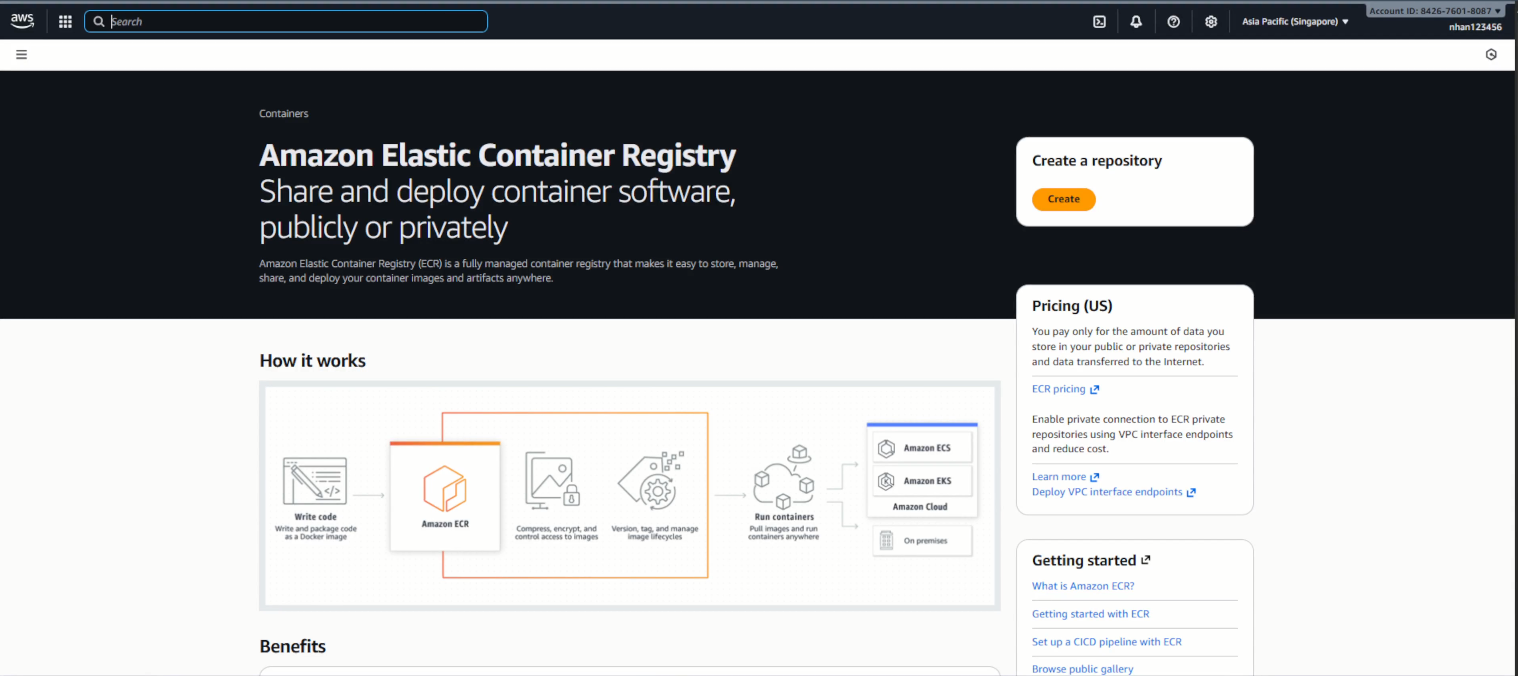
- Navigate to ECR Console:
- Đăng nhập AWS Console
- Navigate to Amazon ECR service
- Region: ap-southeast-1
- Chọn “Create repository”
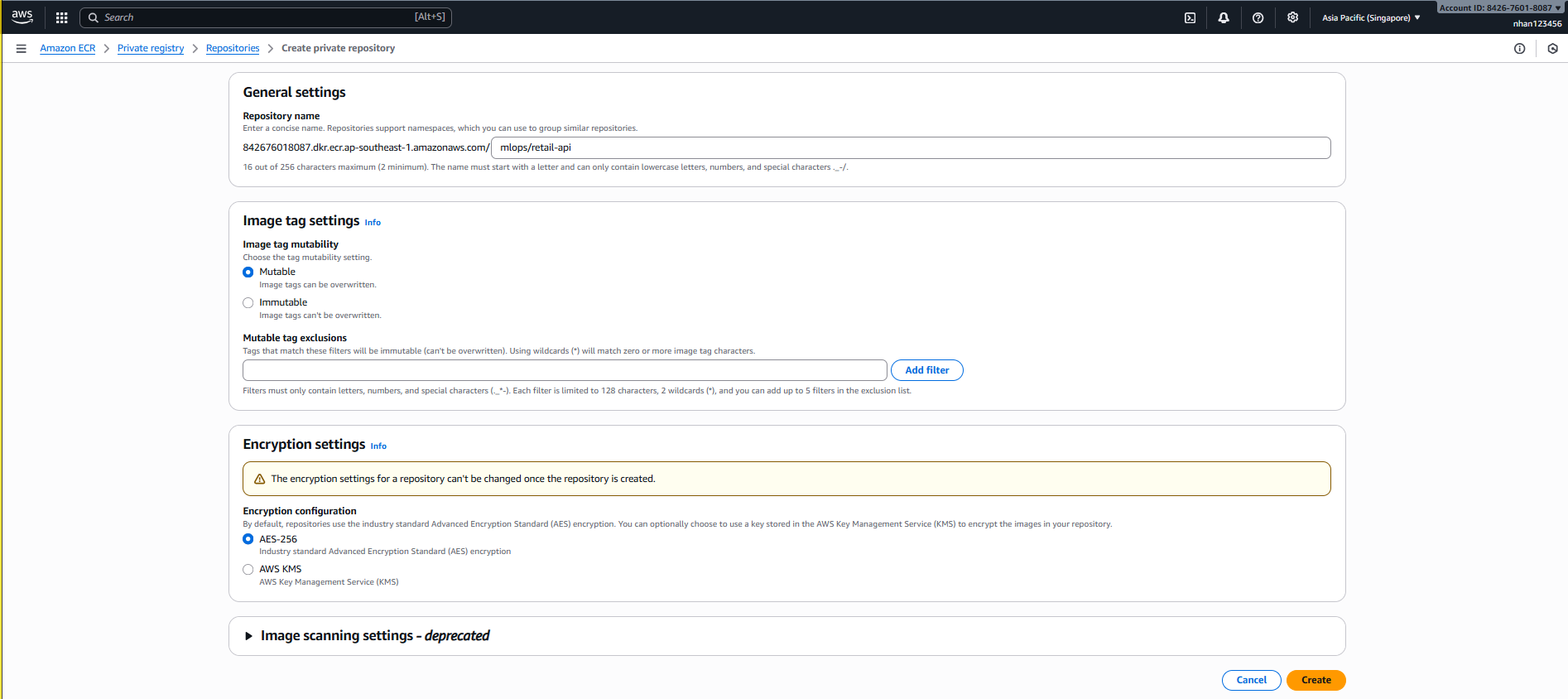
- API Repository Configuration:
-
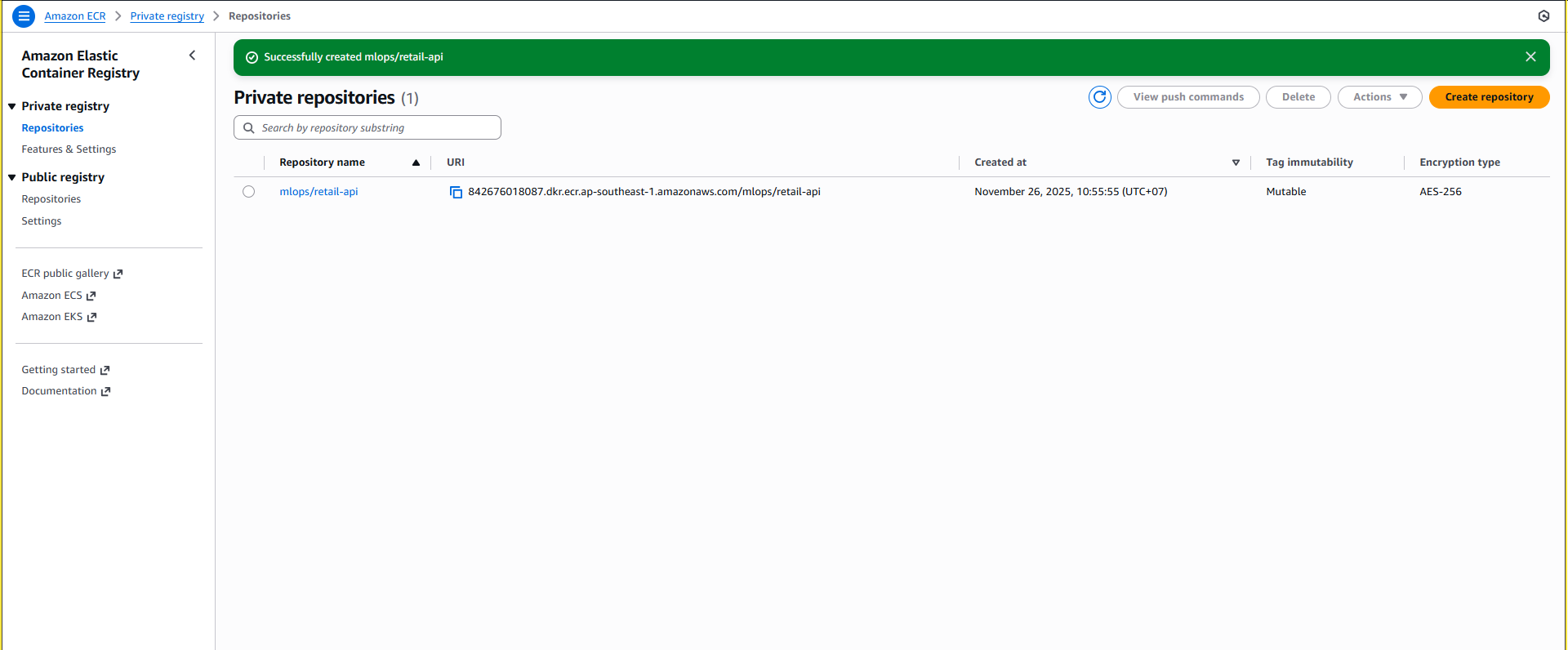
Repository Created Successfully:
Sau khi tạo repository, bạn sẽ thấy giao diện như hình dưới với thông tin:
- Repository name:
mlops/retail-api - Repository URI:
<account-id>.dkr.ecr.ap-southeast-1.amazonaws.com/mlops/retail-api - Status: “No active images” (chưa có image nào được push)
- Các tab: Summary, Images, Permissions, Lifecycle policy, Repository tags
- Repository name:
-
Repository Setup Complete:
API repository đã sẵn sàng cho containerized FastAPI application.
-
Repository Management Interface:
Trong giao diện quản lý repository, bạn có thể:
- Images tab: Xem danh sách images, filter theo tags
- View push commands: Lệnh để push image lên repository
- Copy URI: Copy repository URI để sử dụng
- Scan: Quét vulnerability cho images
- Delete: Xóa repository khi không cần

1.2. Lifecycle Policy Setup
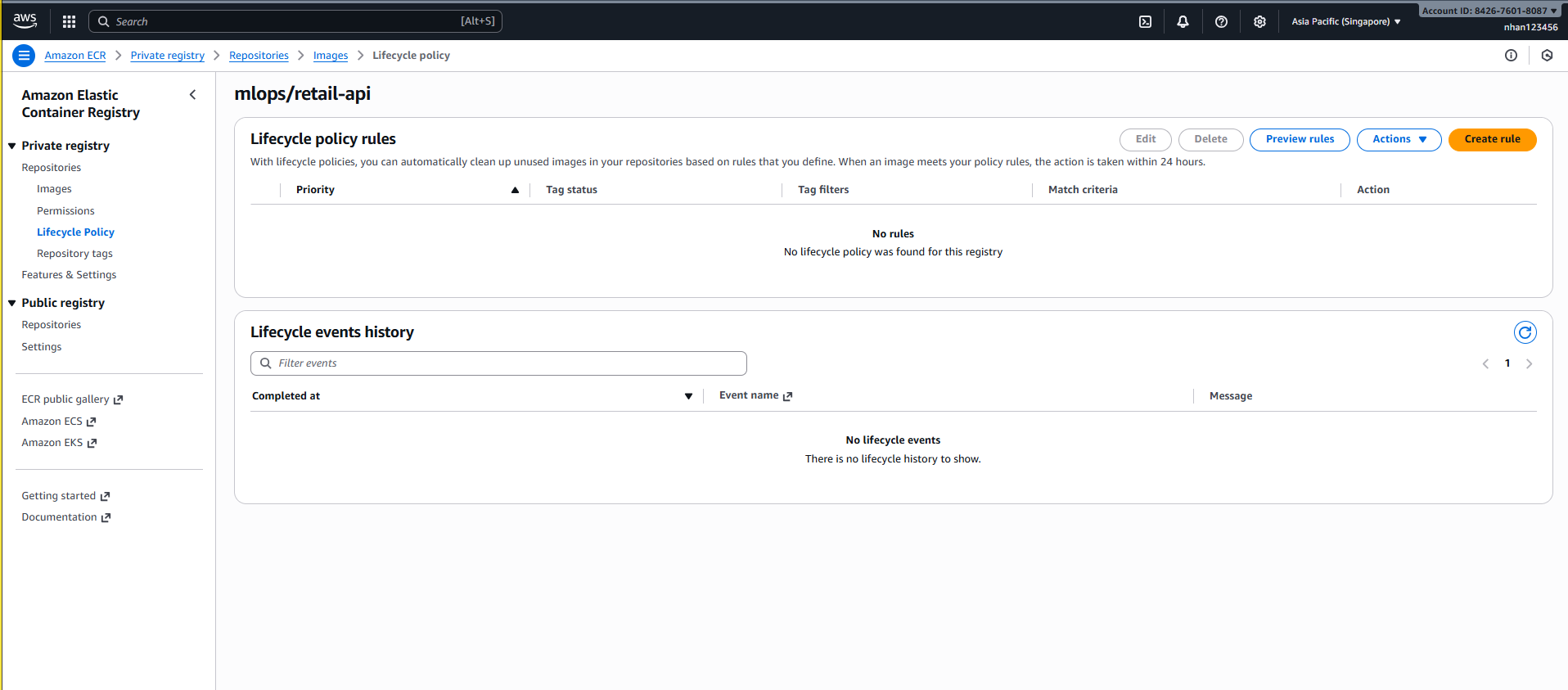
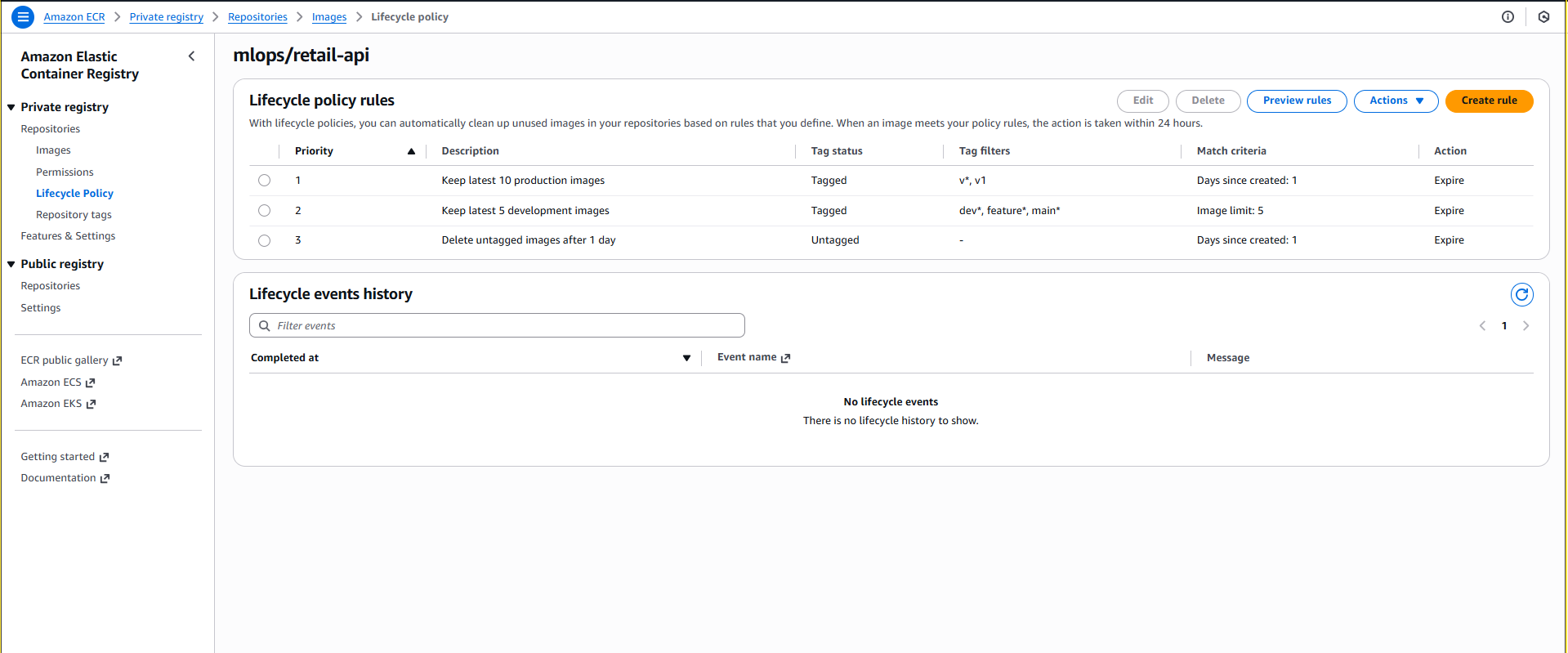
- API Repository Lifecycle Policy:
- Chọn repository
mlops/retail-api - Click tab “Lifecycle policy”
- Click “Create rule” để tạo lifecycle policy
- Chọn repository
-
Configure API Lifecycle Rules:
Rule 1 - Keep Latest Production Images:
Rule priority: 1
Description: Keep latest 10 production images
Image status: Tagged (wildcard matching)
Image tag filters: v*

Match criteria:
- Count type: imageCountMoreThan
- Count number: 10

Action: expire
Rule 2 - Keep Latest Development Images:
Rule priority: 2
Description: Keep latest 5 development images
Image status: Tagged (wildcard matching)
Image tag filters: dev*, feature*, main*

Match criteria:
- Count type: imageCountMoreThan
- Count number: 5

Action: expire
Rule 3 - Remove Old Untagged Images:
Rule priority: 3 Description: Delete untagged images after 1 day Image status: Untagged Match criteria: - Days since image created: 1 Action: expire -
Training Repository Lifecycle Policy:
1.3. Image Scanning & Push Commands
-
Check Scan Settings:
- Chọn repository từ danh sách
- Kiểm tra “Scan on push” đã được enabled
- Review enhanced scanning options nếu cần
-
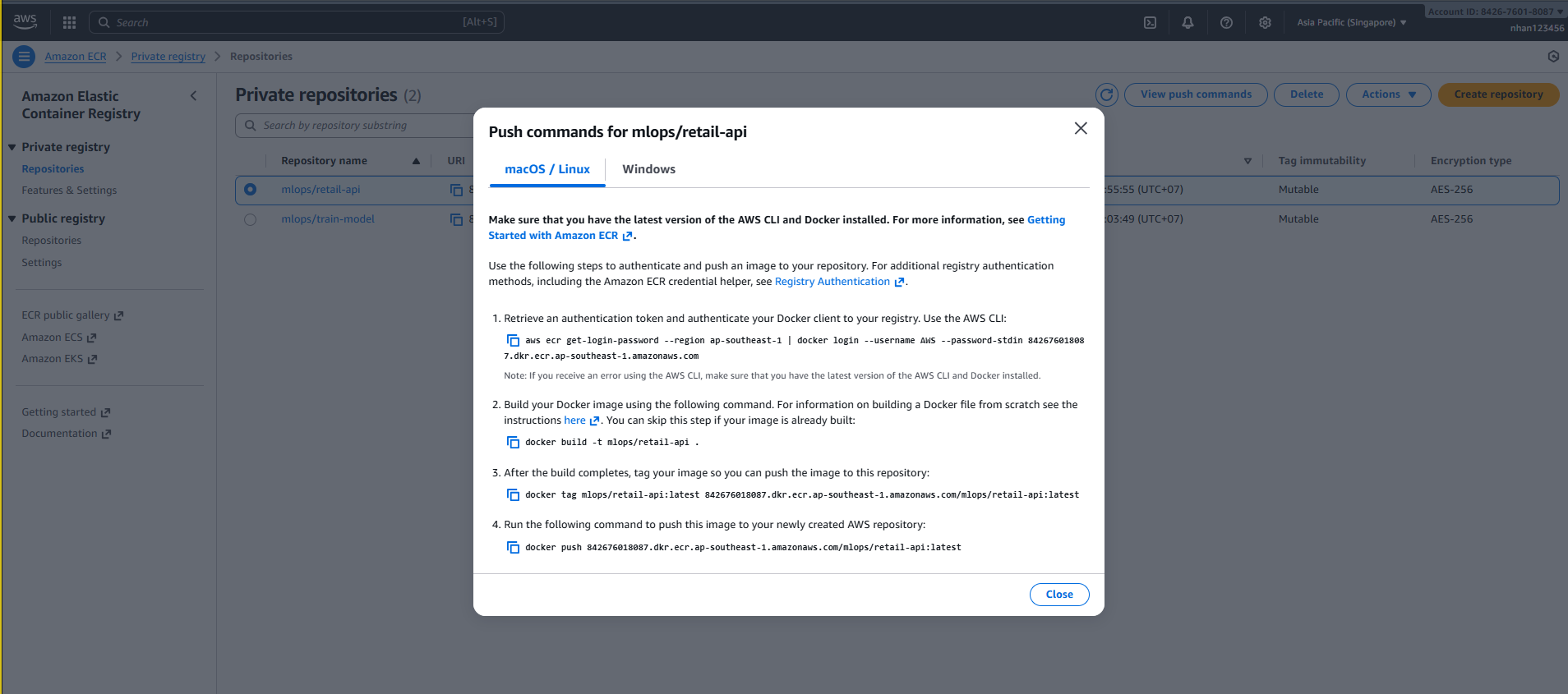
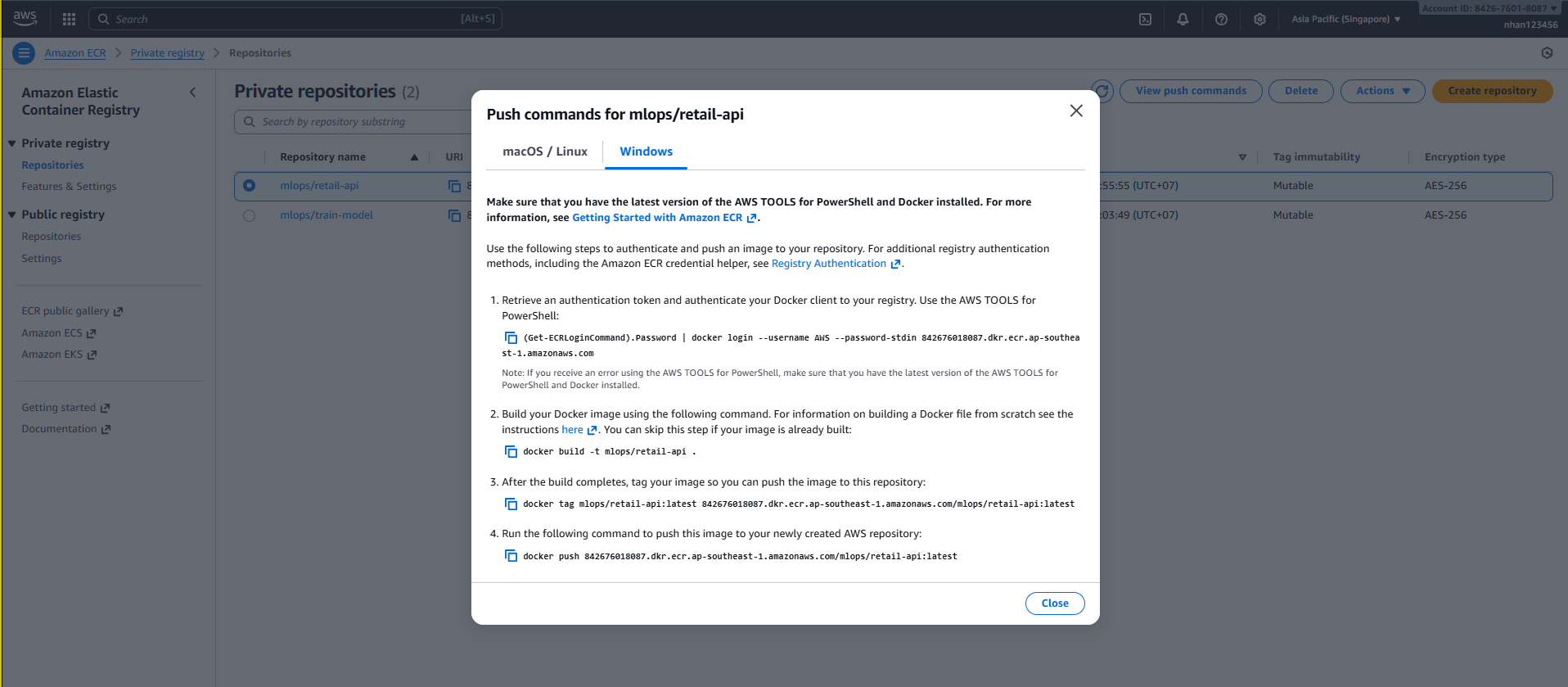
View Push Commands:
- Click nút “View push commands” trong giao diện repository
- AWS sẽ hiển thị các lệnh để authenticate và push image
- Copy các lệnh này để sử dụng từ local machine hoặc CI/CD pipeline
🎯 ECR Repositories Setup Complete!
Created Repository:
- ✅
mlops/retail-api: FastAPI prediction service container - ✅ Repository URI:
<account-id>.dkr.ecr.ap-southeast-1.amazonaws.com/mlops/retail-api - ✅ Private repository với tag immutability enabled
- ✅ Image scanning enabled on push
- ✅ Lifecycle policies configured for cost optimization
- ✅ Push commands available trong console
- ✅ IAM access policies for EKS integration
2. API Containerization Workflow
2.1. Dockerfile Configuration
Tạo server/Dockerfile - Multi-stage build:
# Multi-stage build
FROM python:3.9-slim as builder
WORKDIR /app
COPY requirements.txt .
RUN pip install --user -r requirements.txt

# Production stage
FROM python:3.9-slim as production
WORKDIR /app

# Copy dependencies
COPY --from=builder /root/.local /root/.local

# Create non-root user
RUN useradd --create-home --shell /bin/bash apiuser
USER apiuser

# Copy application
COPY . .

# Expose port
EXPOSE 8000

# Health check
HEALTHCHECK --interval=30s --timeout=5s --start-period=10s --retries=3 \
    CMD curl -f http://localhost:8000/health || exit 1

# Start application
CMD ["uvicorn", "main:app", "--host", "0.0.0.0", "--port", "8000"]
Tạo server/.dockerignore:
# Development files
.git
.gitignore
__pycache__/
*.pyc
.env
*.log

# Editor files
.idea/
.vscode/

# Large files (downloaded at runtime)
*.joblib
*.pkl
model/
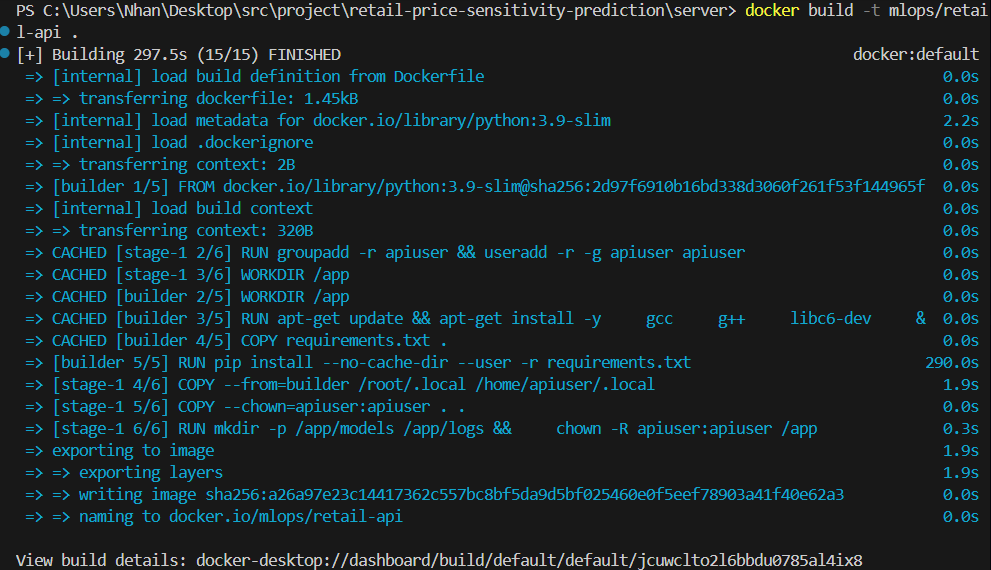
2.2. Local Build & Test
# Navigate to server directory
cd retail-price-sensitivity-prediction/server

# Build Docker image
docker build -t mlops/retail-api:latest .

# Test locally
docker run -d --name test -p 8000:8000 mlops/retail-api:latest
curl http://localhost:8000/health
docker stop test && docker rm test
2.3. View Push Commands từ AWS Console
-
Trong ECR Console:
- Chọn repository
mlops/retail-api - Click nút “View push commands”
- AWS sẽ hiển thị các lệnh để build và push
- Chọn repository
-
Các lệnh push commands sẽ như (Windows PowerShell):
# 1. Retrieve an authentication token and authenticate Docker client
(Get-ECRLoginCommand).Password | docker login --username AWS --password-stdin 842676018087.dkr.ecr.ap-southeast-1.amazonaws.com

# 2. Build your Docker image
docker build -t mlops/retail-api .

# 3. Tag your image
docker tag mlops/retail-api:latest 842676018087.dkr.ecr.ap-southeast-1.amazonaws.com/mlops/retail-api:latest

# 4. Push image to ECR
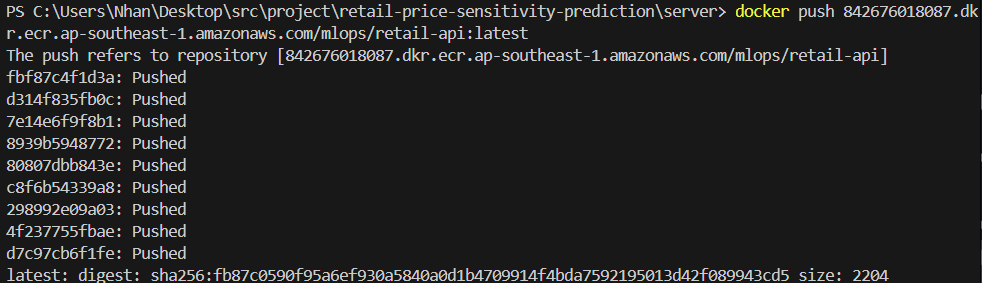
docker push 842676018087.dkr.ecr.ap-southeast-1.amazonaws.com/mlops/retail-api:latest
Hoặc sử dụng AWS CLI:
# 1. Retrieve an authentication token and authenticate Docker client
aws ecr get-login-password --region ap-southeast-1 | docker login --username AWS --password-stdin 842676018087.dkr.ecr.ap-southeast-1.amazonaws.com

# 2. Build your Docker image
docker build -t mlops/retail-api .

# 3. Tag your image
docker tag mlops/retail-api:latest 842676018087.dkr.ecr.ap-southeast-1.amazonaws.com/mlops/retail-api:latest

# 4. Push image to ECR
docker push 842676018087.dkr.ecr.ap-southeast-1.amazonaws.com/mlops/retail-api:latest
2.2. Verify ECR Push Success
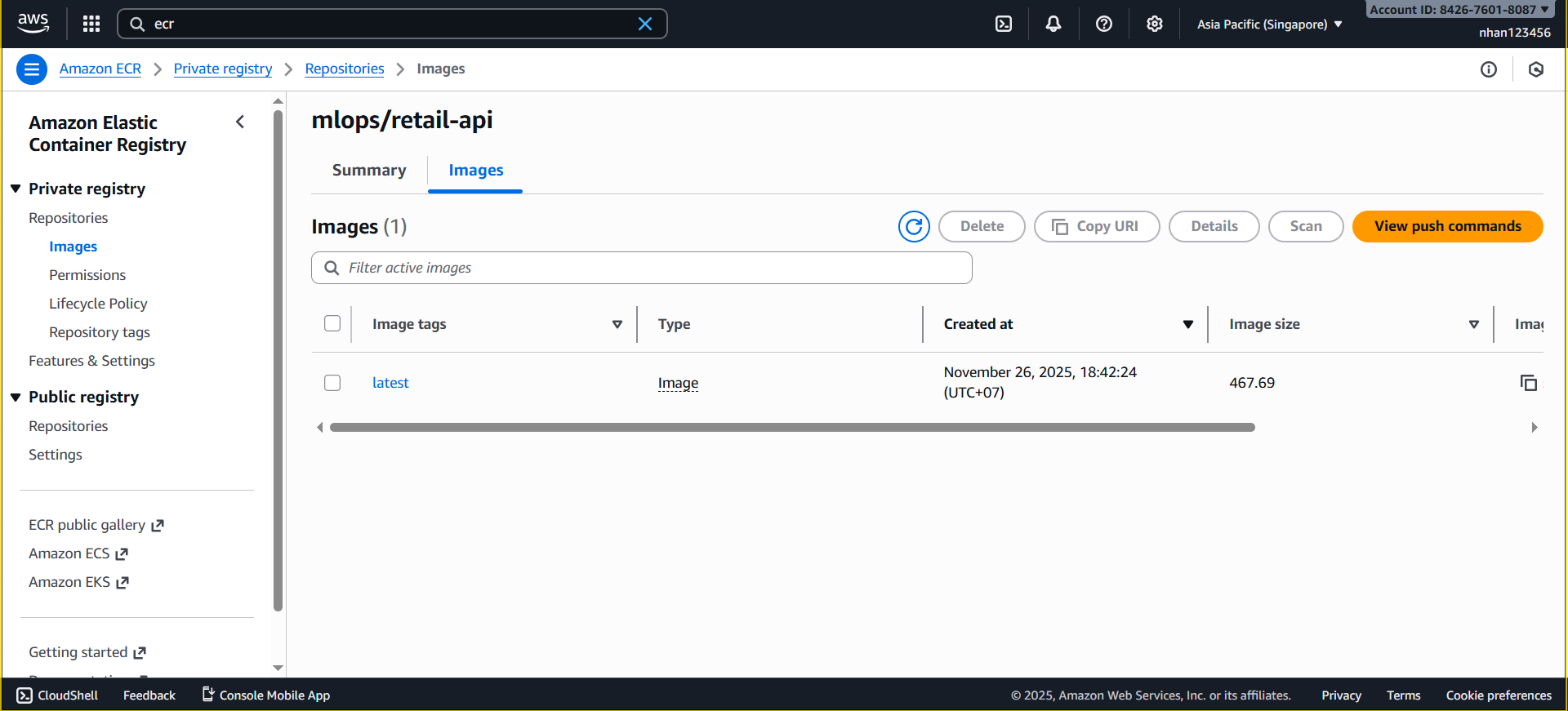
Kiểm tra trong AWS Console:
-
Navigate to ECR Console:
- Vào AWS Console → ECR service
- Chọn repository
mlops/retail-api - Check tab “Images” để xem image đã được push
-
Expected Result:
- Image với tag
latestxuất hiện trong danh sách - Image size hiển thị (~927MB)
- Vulnerability scan status (if enabled)
- Push timestamp
- Image với tag
Kiểm tra bằng CLI:

Kiểm tra bằng console:
2.5. Container Environment & Testing
Environment Variables:
# Basic configuration
AWS_DEFAULT_REGION=ap-southeast-1
MODEL_BUCKET=mlops-retail-forecast-models
LOG_LEVEL=INFO
PORT=8000
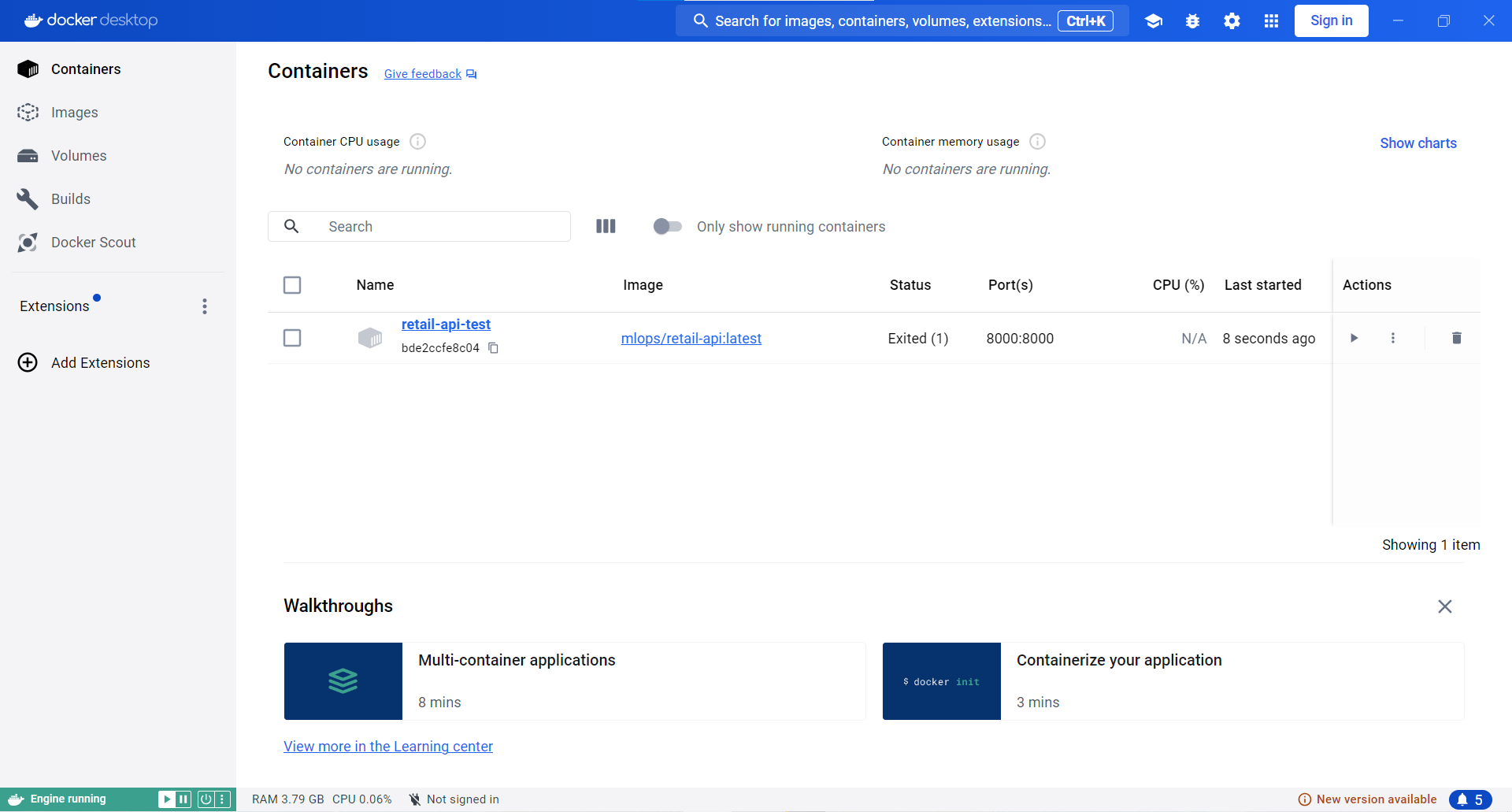
Test Docker Image Locally:
# Test API container locally
docker run -d \
    --name retail-api-test \
    -p 8000:8000 \
    -e AWS_DEFAULT_REGION=ap-southeast-1 \
    -e MODEL_BUCKET=mlops-retail-prediction-dev-842676018087 \
    842676018087.dkr.ecr.ap-southeast-1.amazonaws.com/mlops/retail-api:latest

# Test health endpoint
curl http://localhost:8000/health

# Test API documentation
open http://localhost:8000/docs

# Clean up
docker stop retail-api-test && docker rm retail-api-test
- Local container test for retail-api :
Hoàn thành! 🎉
ECR registry đã được thiết lập và tích hợp với EKS cluster mlops-retail-cluster. Docker image của retail API đã sẵn sàng để deploy trên Kubernetes trong Task 10.
Kết quả Task 6
✅ ECR Repository - mlops/retail-api repository
✅ Container Image - FastAPI prediction service
✅ Cost Optimization - Lifecycle policies, multi-stage builds, ~$0.15/month
🎯 Task 6 Complete - ECR Registry + API Containerization!
✅ ECR Setup: Repository với lifecycle policies & image scanning
✅ Dockerfile: Multi-stage build, non-root user, health checks
✅ Build & Push: Local build → ECR push workflow
✅ Testing: Container verification & API validation
✅ Ready: Sẵn sàng cho EKS deployment trong Task 7
🚀 Next Steps:
- Task 7: EKS cluster deployment với ECR integration
- Task 8: Deploy API container lên EKS với ALB
- Task 9: Load balancing và scaling configuration
� Production Benchmarks Achieved:
- Image Size: FastAPI ~500MB (optimized multi-stage)
- Build Time: ~3-5 minutes (with caching)
- Storage Cost: ~$0.15/month (1.5GB total)
- Security: Non-root, vulnerability scanned
- Availability: Multi-tag strategy (latest, commit, branch)
- CI/CD: Automated on every commit
3. Clean Up Resources (AWS CLI)
3.1. Xóa Images từ ECR Repository
# Liệt kê images trong repository
aws ecr describe-images --repository-name mlops/retail-api --region ap-southeast-1 --query 'imageDetails[*].[imageDigest,imageTags[0],imagePushedAt]' --output table

# Xóa specific image tag
aws ecr batch-delete-image \
  --repository-name mlops/retail-api \
  --image-ids imageTag=latest \
  --region ap-southeast-1

# Xóa tất cả images trong repository
aws ecr batch-delete-image \
  --repository-name mlops/retail-api \
  --image-ids "$(aws ecr describe-images --repository-name mlops/retail-api --region ap-southeast-1 --query 'imageDetails[*].{imageDigest:imageDigest}' --output json)" \
  --region ap-southeast-1
3.2. Xóa ECR Repositories
# Xóa repository (phải trống trước)
aws ecr delete-repository --repository-name mlops/retail-api --region ap-southeast-1 --force

# Verify repository đã bị xóa
aws ecr describe-repositories --region ap-southeast-1 --query 'repositories[?repositoryName==`mlops/retail-api`]'
3.3. Xóa Lifecycle Policies
# Xóa lifecycle policy (tự động xóa khi xóa repository)
aws ecr delete-lifecycle-policy --repository-name mlops/retail-api --region ap-southeast-1

# List remaining repositories
aws ecr describe-repositories --region ap-southeast-1 --query 'repositories[*].[repositoryName,repositoryUri]' --output table
3.4. Clean Up Local Docker Images
# Remove local Docker images
docker rmi mlops/retail-api:latest
docker rmi 842676018087.dkr.ecr.ap-southeast-1.amazonaws.com/mlops/retail-api:latest

# Clean up Docker build cache
docker system prune -f

# Remove unused images
docker image prune -a -f
3.5. ECR Cleanup Helper Script
#!/bin/bash
# ecr-cleanup.sh

REPOSITORY_NAME="mlops/retail-api"
REGION="ap-southeast-1"

echo "🧹 Cleaning up ECR repository: $REPOSITORY_NAME..."

# 1. Delete all images
echo "Deleting all images..."
IMAGE_IDS=$(aws ecr describe-images --repository-name $REPOSITORY_NAME --region $REGION --query 'imageDetails[*].{imageDigest:imageDigest}' --output json)

if [ "$IMAGE_IDS" != "[]" ]; then
    aws ecr batch-delete-image \
        --repository-name $REPOSITORY_NAME \
        --image-ids "$IMAGE_IDS" \
        --region $REGION
    echo "Images deleted"
else
    echo "No images to delete"
fi

# 2. Delete repository
echo "Deleting repository..."
aws ecr delete-repository \
    --repository-name $REPOSITORY_NAME \
    --region $REGION \
    --force

# 3. Clean up local Docker
echo "Cleaning up local Docker images..."
docker rmi mlops/retail-api:latest 2>/dev/null || true
docker rmi 842676018087.dkr.ecr.ap-southeast-1.amazonaws.com/$REPOSITORY_NAME:latest 2>/dev/null || true

echo "✅ ECR cleanup completed"
4. Bảng giá ECR (ap-southeast-1)
4.1. Chi phí ECR Storage
| Storage Type | Giá (USD/GB/tháng) | Ghi chú |
|---|---|---|
| ECR Storage | $0.10 | Compressed image size |
| Free Tier | 500MB free | First 12 months |
| Data Transfer IN | Free | Push images to ECR |
| Data Transfer OUT | $0.12/GB | Pull từ Internet |
| Data Transfer VPC | Free | Pull qua VPC Endpoints |
4.2. Chi phí Image Scanning
| Scan Type | Giá (USD) | Ghi chú |
|---|---|---|
| Basic Scanning | Free | CVE database scanning |
| Enhanced Scanning | $0.09/image/month | Inspector integration |
| OS Package Scanning | Free | Basic vulnerability detection |
| Language Package Scanning | $0.09/image/month | Enhanced scanning only |
4.3. Ước tính chi phí cho Task 6
Container Images:
- FastAPI image: ~500MB (compressed)
- Total storage: ~0.5GB
Monthly Costs:
| Component | Size | Price | Monthly Cost |
|---|---|---|---|
| ECR Storage | 0.5GB | $0.10/GB | $0.05 |
| Basic Scanning | 1 image | Free | $0.00 |
| VPC Endpoint Transfer | ~1GB/month | Free | $0.00 |
| Total | $0.05 |
4.4. Cost Comparison với Alternatives
ECR vs Docker Hub:
| Feature | ECR | Docker Hub | Winner |
|---|---|---|---|
| Storage (500MB) | $0.05/month | Free (public) | Docker Hub |
| Private repos | ✅ Native | $5/month | ECR |
| AWS Integration | ✅ Native | Manual setup | ECR |
| VPC Endpoints | ✅ Free transfer | ❌ Internet only | ECR |
| IAM Integration | ✅ Native | ❌ Token-based | ECR |
| Vulnerability Scanning | ✅ Built-in | ❌ Extra cost | ECR |
4.5. Data Transfer Costs
ECR Pull Scenarios:
| Pull Location | Cost | Use Case |
|---|---|---|
| Same Region (VPC) | Free | EKS production |
| Same Region (Internet) | $0.12/GB | CI/CD outside AWS |
| Cross Region | $0.12/GB + transfer | Multi-region deployment |
| Internet (outside AWS) | $0.12/GB | Local development |
4.6. Lifecycle Policy Cost Savings
Without Lifecycle Policies:
- 50 images × 500MB = 25GB storage
- Cost: 25GB × $0.10 = $2.50/month
With Lifecycle Policies (Task 6):
- Keep 10 production images = 5GB
- Keep 5 development images = 2.5GB
- Total: 7.5GB × $0.10 = $0.75/month
- Savings: $1.75/month (70%)
4.7. Cost Optimization Tips
Storage Optimization:
# Multi-stage builds giảm image size
FROM node:16 as builder
# ... build steps
FROM node:16-alpine as production  # Smaller base image
COPY --from=builder /app/dist ./dist
Registry Management:
# Automated cleanup with lifecycle policies
aws ecr put-lifecycle-policy \
  --repository-name mlops/retail-api \
  --lifecycle-policy-text file://lifecycle-policy.json
Free Tier Usage:
- Sử dụng 500MB free tier cho development
- Production images trong repositories riêng biệt
- VPC Endpoints để tránh data transfer charges
💰 Cost Summary cho Task 6:
- Storage: $0.05/month (500MB images)
- Scanning: Free (basic vulnerability detection)
- Data Transfer: Free (VPC Endpoints to EKS)
- Total: $0.05/month (vs $5/month Docker Hub private)
- Savings: $4.95/month với ECR + lifecycle policies
Next Step: Task 7: EKS Cluster Setup