API Deployment on EKS
🎯 Mục tiêu Task 9:
→ Đảm bảo dịch vụ chạy ổn định, tự động scale, bảo mật, và có thể demo API thật.
📥 Input từ các Task trước:
- Task 5 (Production VPC): VPC design, subnets, VPC Endpoints and ALB networking required for cluster and load balancer
- Task 6 (ECR Container Registry): Container images and repository URIs to deploy
- Task 2 (IAM Roles & Audit): IRSA roles and policies for Pods to access S3 and other AWS services
- Task 7 (EKS Cluster): EKS cluster and node groups where manifests will be applied
1. Tổng quan
API Deployment là bước triển khai service dự đoán đã được container hóa lên Kubernetes (EKS). Bước này đảm bảo ứng dụng được triển khai theo kiến trúc microservice, tự động scale và có tính sẵn sàng cao.
Kiến trúc triển khai
EKS Deployment Architecture:
Client → ALB → EKS Service → API Pods → S3 Models
                    ↓
            Auto-scaling (HPA)
Components:
- Namespace:
mlops - ServiceAccount: IRSA cho SageMaker access
- Deployment: API pods với ECR Singapore image
- Service: LoadBalancer service
- HPA: Auto-scaling dựa trên CPU
2. Kubernetes Manifests
Cần tạo 5 file chính:
namespace.yaml- Tạo namespace mlopsserviceaccount.yaml- IRSA service accountdeployment.yaml- API application với SageMaker Registryservice.yaml- LoadBalancer servicehpa.yaml- Auto-scaling
2.1 Namespace Configuration
# namespace.yaml
apiVersion: v1
kind: Namespace
metadata:
  name: mlops
  labels:
    app.kubernetes.io/name: retail-api
---
2.2 ServiceAccount với IRSA
# serviceaccount.yaml
apiVersion: v1
kind: ServiceAccount
metadata:
  name: retail-api-sa
  namespace: mlops
  annotations:
    eks.amazonaws.com/role-arn: arn:aws:iam::842676018087:role/eks-sagemaker-access-role
---
2.3 Deployment Configuration
# deployment.yaml
apiVersion: apps/v1
kind: Deployment
metadata:
  name: retail-api
  namespace: mlops
  labels:
    app: retail-api
spec:
  replicas: 2
  selector:
    matchLabels:
      app: retail-api
  template:
    metadata:
      labels:
        app: retail-api
    spec:
      serviceAccountName: retail-api-sa
      containers:
      - name: retail-api
        image: 842676018087.dkr.ecr.ap-southeast-1.amazonaws.com/mlops/retail-api:latest
        ports:
        - containerPort: 8000
        env:
        - name: PORT
          value: "8000"
        - name: AWS_DEFAULT_REGION
          value: "ap-southeast-1"
        - name: MODEL_PACKAGE_GROUP
          value: "retail-price-sensitivity-models"
        resources:
          requests:
            memory: "512Mi"
            cpu: "250m"
          limits:
            memory: "1Gi"
            cpu: "500m"
        livenessProbe:
          httpGet:
            path: /health
            port: 8000
          initialDelaySeconds: 30
          periodSeconds: 10
        readinessProbe:
          httpGet:
            path: /health
            port: 8000
          initialDelaySeconds: 10
          periodSeconds: 5
---
3. Service (Load Balancer)
# service.yaml
apiVersion: v1
kind: Service
metadata:
  name: retail-api-service
  namespace: mlops
  labels:
    app: retail-api
spec:
  selector:
    app: retail-api
  ports:
  - name: http
    port: 80
    targetPort: 8000
  type: LoadBalancer
4. Auto-scaling (HPA)
# hpa.yaml
apiVersion: autoscaling/v2
kind: HorizontalPodAutoscaler
metadata:
  name: retail-api-hpa
  namespace: mlops
spec:
  scaleTargetRef:
    apiVersion: apps/v1
    kind: Deployment
    name: retail-api
  minReplicas: 2
  maxReplicas: 5
  metrics:
  - type: Resource
    resource:
      name: cpu
      target:
        type: Utilization
        averageUtilization: 60
5. Deploy to EKS
5.1 Apply Manifests
# Deploy all manifests in order
kubectl apply -f namespace.yaml
kubectl apply -f serviceaccount.yaml
kubectl apply -f deployment.yaml
kubectl apply -f service.yaml
kubectl apply -f hpa.yaml
5.2 Kiểm tra Trạng thái Deployment
# Kiểm tra trạng thái pods
kubectl get pods -n mlops

# Kiểm tra service và load balancer
kubectl get svc -n mlops

# Kiểm tra horizontal pod autoscaler
kubectl get hpa -n mlops

# Kiểm tra logs của pod
kubectl logs -l app=retail-api -n mlops --tail=50
5.3 Lấy LoadBalancer URL và Test API
# Lấy URL của LoadBalancer
kubectl get svc retail-api-service -n mlops -o jsonpath='{.status.loadBalancer.ingress[0].hostname}'

# Test health check endpoint
curl http://[LOAD_BALANCER_URL]/health

# Test API documentation
curl http://[LOAD_BALANCER_URL]/docs

# Test prediction endpoint với data format thật
curl -X POST http://[LOAD_BALANCER_URL]/predict \
  -H "Content-Type: application/json" \
  -d '{
    "BASKET_SIZE": "M",
    "BASKET_TYPE": "MIXED",
    "STORE_REGION": "LONDON",
    "STORE_FORMAT": "LS",
    "SPEND": 125.50,
    "QUANTITY": 3,
    "PROD_CODE_20": "FOOD",
    "PROD_CODE_30": "FRESH"
  }'
6. Kiểm tra qua AWS Console
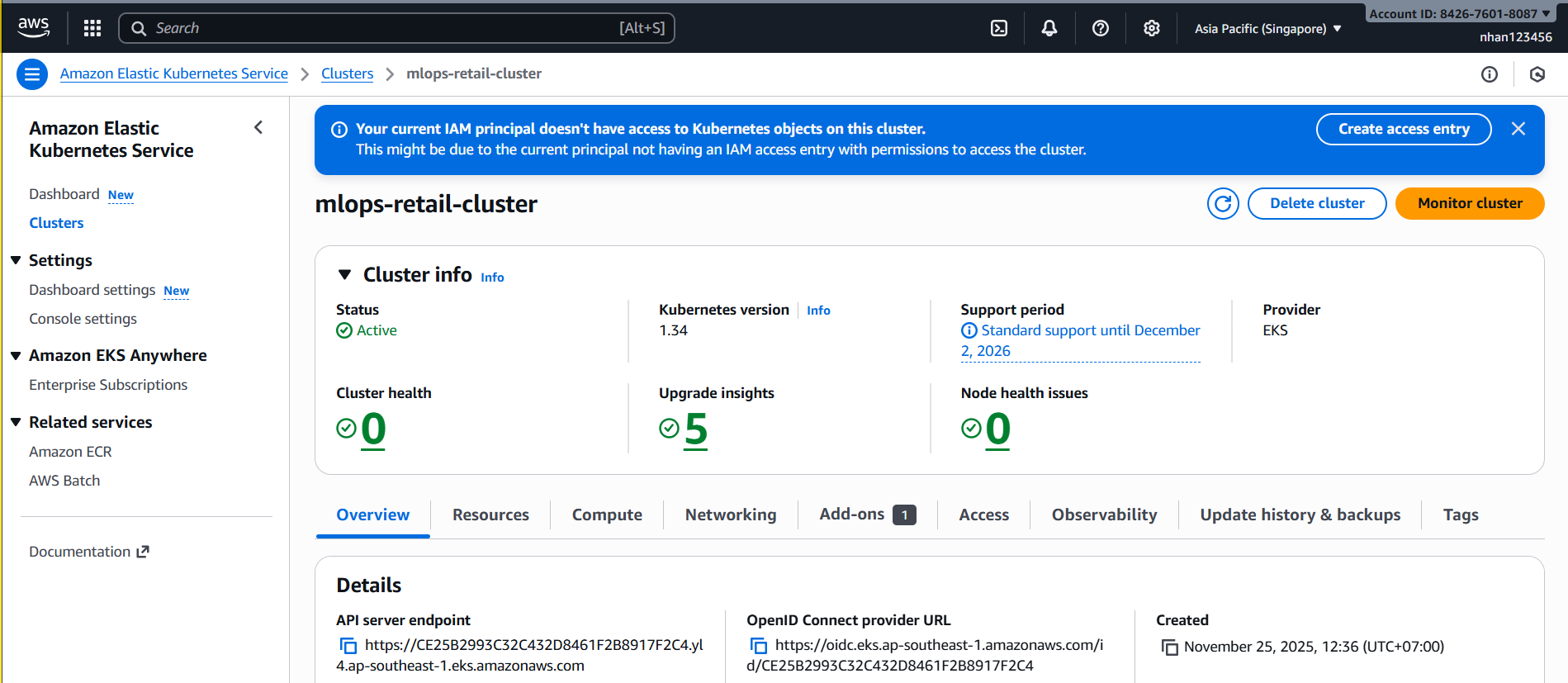
6.1 EKS Console - Kiểm tra Cluster Status
- Truy cập EKS Console:
AWS Console → EKS → Clusters → mlops-retail-cluster
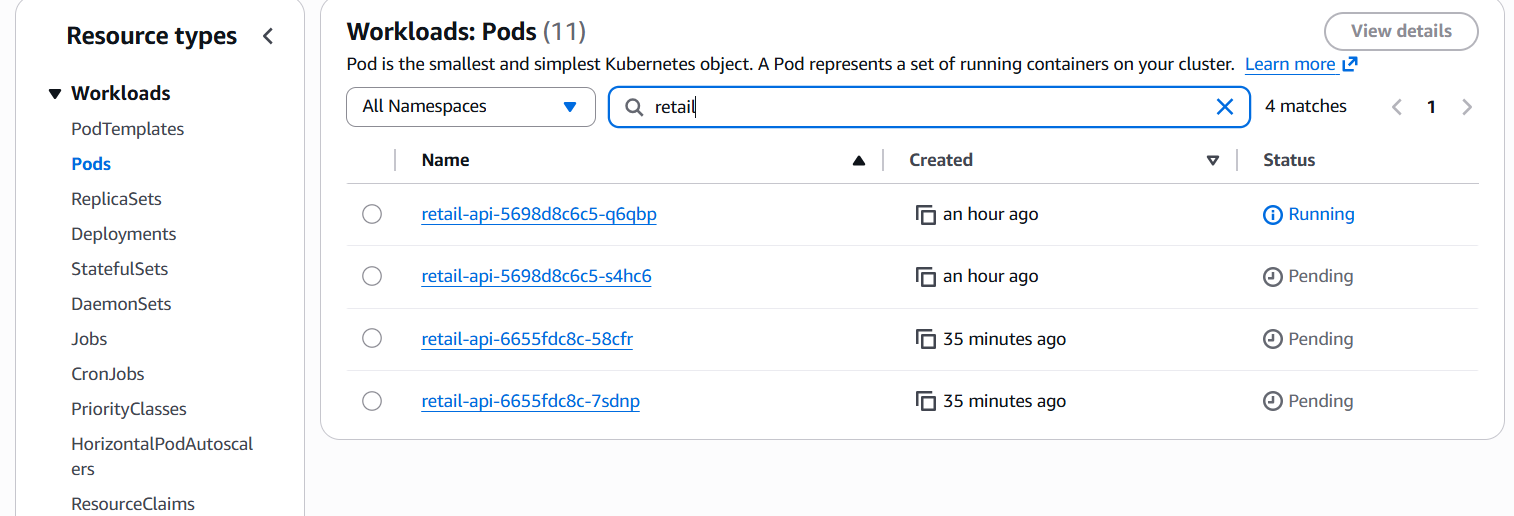
- Kiểm tra Resources Tab:
mlops-retail-cluster → Resources → All namespaces → Filter: mlops
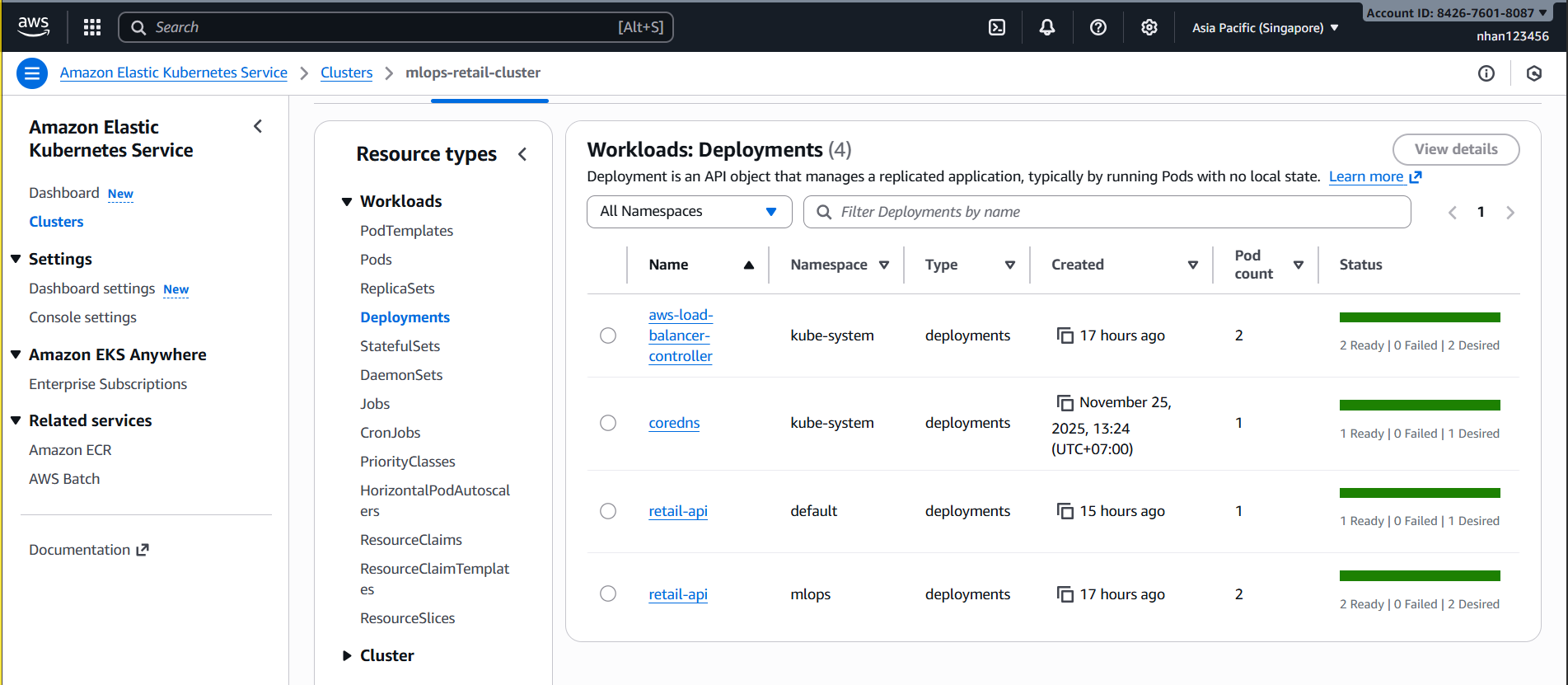
6.2 EKS Workloads - Chi tiết Deployment
- Kiểm tra Deployment:
Resources → Deployments → retail-api
- Kiểm tra Pods:
- Click vào Deployment → Pods tab
- Pod status: Running (nếu Pending thì có vấn đề về resources)
- Restart count: 0 (nếu > 0 thì có crash)

6.3 Debug khi Pods Pending
-
Nếu Pods ở trạng thái Pending:
- Check Events section để xem lỗi:
- Insufficient CPU/Memory: Cần scale nodes
- Image pull error: ECR permissions issue
- PodSecurityPolicy: IAM role issue
- Check Events section để xem lỗi:
-
Nếu LoadBalancer timeout/connection refused:
- Target Groups unhealthy: Pods chưa pass health check (/health endpoint)
- Security Groups: EKS worker nodes phải allow inbound từ Load Balancer
- Subnets: Load Balancer cần ít nhất 2 public subnets
-
Kiểm tra Events trong EKS Console:
Resources → Events → Filter namespace: mlops- Tìm Warning/Error events liên quan đến deployment
7. Testing và Load Testing
7.1 Local Testing với Port Forward
# Port forward service đến localhost (nếu LoadBalancer chưa ready)
kubectl port-forward service/retail-api-service 8080:80 -n mlops

# Test qua port forward
curl http://localhost:8080/health
7.2 Test SageMaker Model Registry Integration
# Kiểm tra model info endpoint
curl http://[LOAD_BALANCER_URL]/model/info

# Kiểm tra model metrics từ SageMaker Registry
curl http://[LOAD_BALANCER_URL]/model/metrics

# Expected response: Accuracy 84.7%, F1-Score 83.2% từ Registry
7.3 Load Testing để Test Auto-scaling
# Load test với data format đúng
for i in {1..100}; do
  curl -X POST http://[LOAD_BALANCER_URL]/predict \
    -H "Content-Type: application/json" \
    -d '{"BASKET_SIZE":"M","BASKET_TYPE":"MIXED","STORE_REGION":"LONDON","STORE_FORMAT":"LS","SPEND":125.50,"QUANTITY":3,"PROD_CODE_20":"FOOD","PROD_CODE_30":"FRESH"}' &
done

# Theo dõi HPA scaling
kubectl get hpa retail-api-hpa -n mlops -w

# Theo dõi pods được scale up (từ 2 → max 5)
kubectl get pods -n mlops -w
8. Chi phí ước tính
| Thành phần | Ước tính | Ghi chú |
|---|---|---|
| EKS Pod (2 replica Spot node) | ~0.012 USD/h | Chi phí compute |
| ALB/NLB (public) | ~0.02 USD/h | Chỉ bật khi demo |
| Tổng (1h demo) | ≈ 0.03–0.04 USD | Cực thấp nếu tắt ngay sau demo |
Chi phí tính toán dựa trên Spot instances t3.medium và NLB tại region ap-southeast-1. Chi phí thực tế có thể thay đổi tùy theo cấu hình và thời gian sử dụng.
🎯 Task 9 Complete - API Deployment on EKS
- Kubernetes manifests ready
- EKS deployment configured với IRSA
- Load Balancer service cho external access
- Auto-scaling với HPA
9. Clean Up Resources
9.1 Xóa Deployment và Resources
# Xóa tất cả resources trong namespace mlops
kubectl delete namespace mlops

# Hoặc xóa từng resource riêng lẻ
kubectl delete deployment retail-api -n mlops
kubectl delete service retail-api-service -n mlops
kubectl delete hpa retail-api-hpa -n mlops
kubectl delete serviceaccount retail-api-sa -n mlops

# Kiểm tra LoadBalancer đã bị xóa
aws elbv2 describe-load-balancers --query 'LoadBalancers[?contains(LoadBalancerName, `k8s-mlops`)].LoadBalancerArn'
9.2 Xóa ECR Images (Optional)
# List images trong repository
aws ecr describe-images --repository-name mlops/retail-api --region ap-southeast-1

# Xóa specific image tag
aws ecr batch-delete-image \
  --repository-name mlops/retail-api \
  --image-ids imageTag=v3 \
  --region ap-southeast-1

# Xóa tất cả images
aws ecr batch-delete-image \
  --repository-name mlops/retail-api \
  --image-ids "$(aws ecr describe-images --repository-name mlops/retail-api --region ap-southeast-1 --query 'imageDetails[].imageDigest' --output text | tr '\t' '\n' | sed 's/.*/imageDigest=&/')" \
  --region ap-southeast-1
9.3 Kiểm tra Clean Up
# Kiểm tra không còn pods nào
kubectl get pods -n mlops

# Kiểm tra không còn services nào
kubectl get svc -n mlops

# Kiểm tra LoadBalancer đã bị terminate
aws elbv2 describe-load-balancers --query 'LoadBalancers[?contains(LoadBalancerName, `k8s-mlops`)]'
10. Bảng giá Kubernetes Deployment (ap-southeast-1)
10.1. Chi phí Pod Resources
| Resource Type | Request | Limit | Cost Impact |
|---|---|---|---|
| CPU | 250m | 500m | ~25% of node CPU |
| Memory | 512Mi | 1Gi | ~25% of node memory |
| Storage (EBS) | - | - | From EBS pricing |
Với t2.micro node (1 vCPU, 1GB RAM):
- 1 API pod sử dụng ~50% resources
- Có thể chạy 2 pods với resource requests
- Scaling bị giới hạn bởi node capacity
10.2. Chi phí Load Balancer
| Load Balancer Type | Giá (USD/hour) | Giá (USD/month) | Data Processing |
|---|---|---|---|
| Classic LB | $0.025 | $18.25 | $0.008/GB |
| Application LB | $0.0225 | $16.43 | $0.008/LCU-hour |
| Network LB | $0.0225 | $16.43 | $0.006/NLCU-hour |
10.3. Chi phí Service Types
| Service Type | AWS Resource | Monthly Cost | Use Case |
|---|---|---|---|
| ClusterIP | None | $0 | Internal communication |
| NodePort | EC2 Security Groups | $0 | Development testing |
| LoadBalancer | ELB/ALB/NLB | $16.43+ | Production external access |
| ExternalName | None | $0 | External service mapping |
10.4. Auto-scaling Costs
Horizontal Pod Autoscaler (HPA):
- HPA controller: Free (part of EKS)
- Additional pods: EC2 instance costs
- Scaling triggers: CPU/Memory metrics (free)
Cluster Autoscaler:
- Controller: Free
- New nodes: Full EC2 instance pricing
- Scale-down: Automatic cost reduction
10.5. Ước tính chi phí Task 8
Basic Deployment (2 replicas):
| Component | Quantity | Resource Usage | Monthly Cost |
|---|---|---|---|
| API Pods | 2 replicas | 500m CPU, 1Gi RAM | Included in node cost |
| LoadBalancer Service | 1 ALB | Base + LCU usage | $16.43 + usage |
| HPA | 1 autoscaler | Controller only | $0 |
| Ingress | Optional | Same ALB | $0 additional |
| Total | ~$16.43 + LCU |
With Auto-scaling (2-5 replicas):
| Scenario | Pods | Node Requirements | Additional Cost |
|---|---|---|---|
| Low load | 2 pods | 2x t2.micro (free) | $0 |
| Medium load | 3-4 pods | 1x t3.small | $15.18 |
| High load | 5 pods | 1x t3.medium | $30.37 |
10.6. Data Transfer Costs
| Transfer Type | Cost | Use Case |
|---|---|---|
| Pod-to-Pod (same AZ) | Free | Internal communication |
| Pod-to-Pod (cross-AZ) | $0.01/GB | Multi-AZ deployment |
| LoadBalancer to Internet | $0.12/GB | API responses to clients |
| VPC Endpoints | Free | S3/ECR access |
10.7. Storage Costs cho Persistent Volumes
# Example PVC for model storage
apiVersion: v1
kind: PersistentVolumeClaim
metadata:
  name: model-storage
  namespace: mlops
spec:
  accessModes:
    - ReadWriteOnce
  resources:
    requests:
      storage: 10Gi
  storageClassName: gp3
Storage pricing:
- 10GB gp3: $0.80/month
- Snapshots: $0.50/month (10GB)
- IOPS (if > 3000): $0.065/IOPS/month
10.8. Cost Optimization cho Deployments
Resource Right-sizing:
resources:
  requests:
    memory: "256Mi"    # Start smaller
    cpu: "100m"        # Minimal CPU request
  limits:
    memory: "512Mi"    # Reasonable limit
    cpu: "250m"        # Allow bursting
Efficient Pod Scheduling:
# Node affinity for cost optimization
affinity:
  nodeAffinity:
    preferredDuringSchedulingIgnoredDuringExecution:
    - weight: 100
      preference:
        matchExpressions:
        - key: kubernetes.io/instance-type
          operator: In
          values: ["t3.micro", "t3.small"]  # Prefer cheaper instances
LoadBalancer Optimization:
# Use single ALB for multiple services
apiVersion: networking.k8s.io/v1
kind: Ingress
metadata:
  name: shared-alb
  annotations:
    kubernetes.io/ingress.class: alb
spec:
  rules:
  - http:
      paths:
      - path: /api/v1/*
        backend:
          service:
            name: retail-api-service
            port:
              number: 80
      - path: /admin/*
        backend:
          service:
            name: admin-service
            port:
              number: 80
10.9. Monitoring Costs
# Monitor pod resource usage
kubectl top pods -n mlops

# Check actual vs requested resources
kubectl describe pod <pod-name> -n mlops

# Monitor HPA behavior
kubectl get hpa -w -n mlops

# Check LoadBalancer usage
aws elbv2 describe-load-balancers --names <alb-name>
Cost tracking commands:
# ELB costs
aws ce get-cost-and-usage \
  --time-period Start=2024-01-01,End=2024-01-31 \
  --granularity MONTHLY \
  --metrics BlendedCost \
  --group-by Type=DIMENSION,Key=SERVICE \
  --filter '{"Dimensions":{"Key":"SERVICE","Values":["Amazon Elastic Load Balancing"]}}'

# EC2 costs for nodes
aws ce get-cost-and-usage \
  --time-period Start=2024-01-01,End=2024-01-31 \
  --granularity MONTHLY \
  --metrics BlendedCost \
  --group-by Type=DIMENSION,Key=INSTANCE_TYPE
💰 Cost Summary cho Task 8:
- Pods: Included in node cost (no additional charge)
- LoadBalancer: $16.43/month base + usage
- Auto-scaling: $0-30.37/month depending on load
- Storage: $0.80/month per 10GB PVC
- Total: $17-47/month depending on scaling
Next Step: Task 09: Elastic Load Balancing